


GatherRadar
- By

What's new
GatherRadar
Find nearby herbs and ore while you level, quest or explore. GatherRadar works on its own, with no other addons required. It uses the resources revealed by your Find Herbs or Find Minerals tracking ability.
A smoothly turning 3D arrow points toward the nearest detected resource for your selected profession. Below it, a small icon shows what you can gather, and a simple number shows the approximate distance in yards. The icon border shows how useful that resource may be for leveling your profession.
It is easy to forget about gathering while following quests. The arrow makes nearby resources easier to notice, so you can collect them along the way.
Spot the resource in the world
Herbs can blend into the grass, and ore can be hard to spot against rocks. An optional ! above a nearby resource helps you find the actual object when you get close. For the same resource, the sign and icon border use the same color.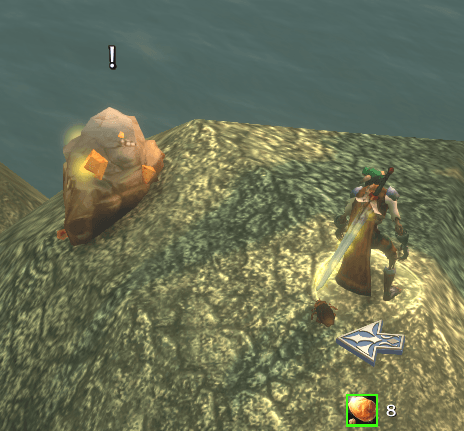
The sign follows one interaction target selected by WoW. You generally need to face the resource, and the sign may disappear when you turn away or move out of range. It also hides during combat. World markers work independently of the arrow, for both herbs and ore.
What the colors mean
- Red: you lack the profession or the skill needed to gather the resource.
- Orange: a high estimated chance to gain a skill point.
- Yellow: a moderate estimated chance to gain a skill point.
- Green: a low estimated chance to gain a skill point.
- White: no skill gain is expected, your current training cap is reached, or the difficulty is unknown.
Skill gain colors use Classic reference thresholds, which may differ on Forever. Gathering restrictions reported by the game take priority.
Tracking and settings
Choose Herbalism or Mining. Turning the arrow on or selecting a profession automatically enables its learned tracking ability outside combat. If you turn tracking off manually, GatherRadar leaves it off until you enable the arrow or select a profession again.
- Left-click the minimap button to turn the arrow on or off.
- Right-click the minimap button or arrow to open settings.
- Drag with the left mouse button to move the arrow or minimap button.
You can adjust arrow size, text size and overall scale, lock or reset the arrow position, and switch world markers on or off separately. Settings are saved per character. All resource icons are included.
Commands and macros
You can type these commands in chat or copy them into a WoW macro:
/gradaropens settings./gradar onturns the arrow on./gradar offturns the arrow off./gradar herbselects Herbalism./gradar miningselects Mining./gradar markers onshows world resource markers./gradar markers offhides world resource markers./gradar locklocks the arrow position./gradar unlockallows you to drag the arrow./gradar resetresets the arrow position./gradar statusprints troubleshooting information in chat.
Herbalism macro:
/gradar herb
/gradar on
Mining macro:
/gradar mining
/gradar on
Turning the arrow off leaves world markers and minimap tracking unchanged.
Compatibility
Made for WoW Forever 1.60.1. The interface is in English, with English and Russian resource names supported. Detection is limited to supported resources visible through minimap tracking. Distances are approximate and do not account for paths around obstacles.
All Relations
- All Relations
- Embedded Library
- Optional Dependency
- Required Dependency
- Tool
- Incompatible
- Include
This mod has no related projects