


GatherLens
- By
A spatial gathering HUD for WoW Forever that remembers resource nodes and places visual markers directly into the game world.
Screenshot 2026-10-08 120851.png
Screenshot 2026-10-08 132927.png
Description
GatherLens
See your herbs and ore in the game world, not just on the minimap.
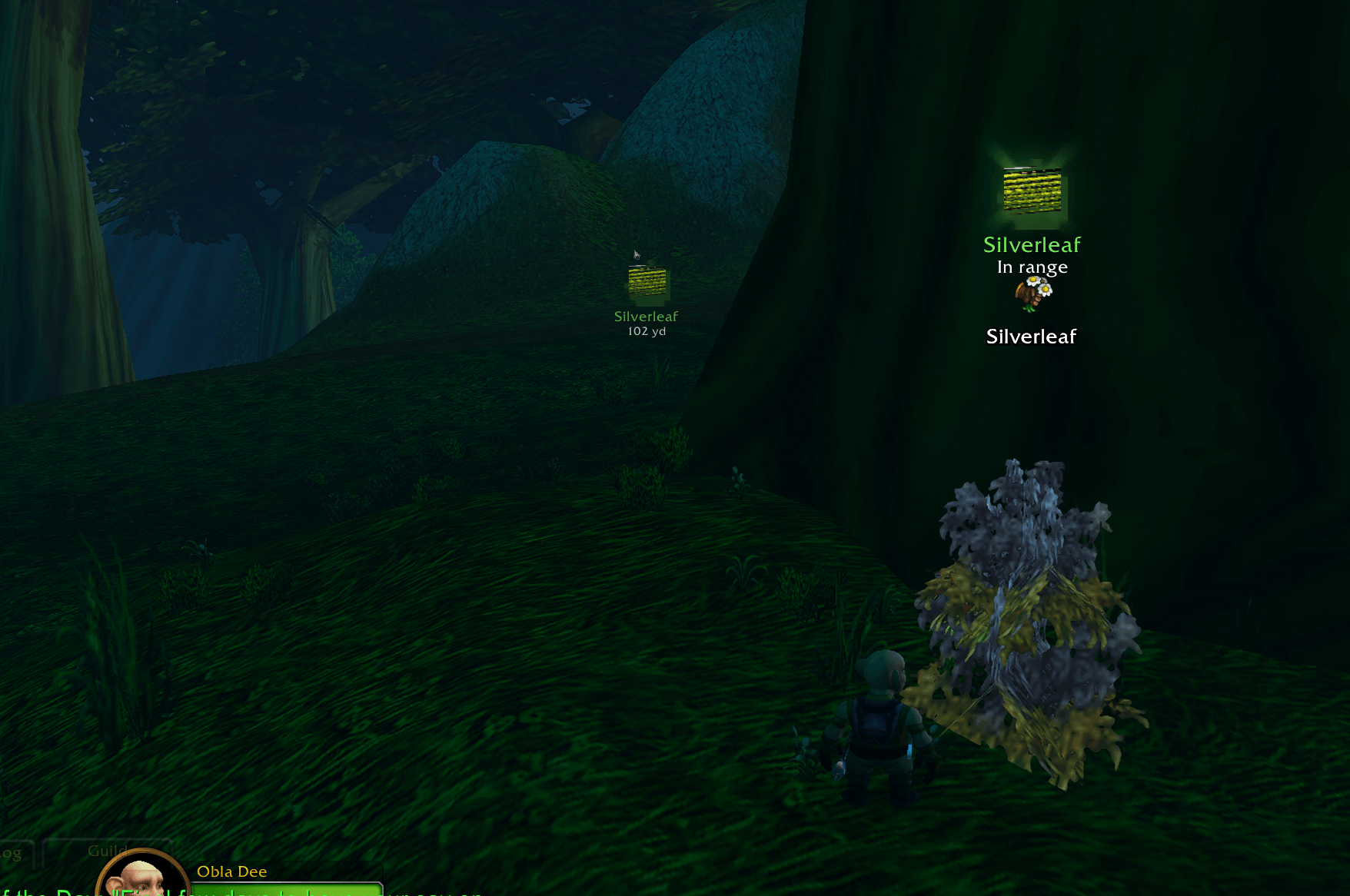
GatherLens is a gathering HUD for WoW Forever. It puts a marker right on the herb, vein or object in front of you. It also points you towards nodes you've gathered before, so you can spend less time squinting at minimap dots and more time gathering.
Features
🌿 3D marker on the node in front of you
- The marker sits on the node itself in the 3D world and stays there as you move the camera.
- It shows the node's real item icon (Silverleaf, Copper Ore and so on), coloured by type: herbs green, ore orange, everything else white.
- It tells you which key gathers it: "Press F to gather".
🧭 Markers for nodes you've gathered before
- Every node you gather is remembered. When you come back, a marker points to it on a ring around your screen, with its distance and a direction arrow.
- Nodes behind you slide to the bottom of the screen and point back at you.
- Closer nodes are bigger and brighter. Once you're close, the far marker hands over to the 3D marker.
- Nodes you've just gathered are hidden while they respawn.
🎒 Learns as you play
- Each herb and ore gets its real item icon after you first loot it.
- It works out whether a node is a herb, ore or something else from what you gather and from the game's own tooltips.
- Optionally, it also remembers herbs and ore you walk past without gathering (marked as estimated).
⚙️ Simple controls
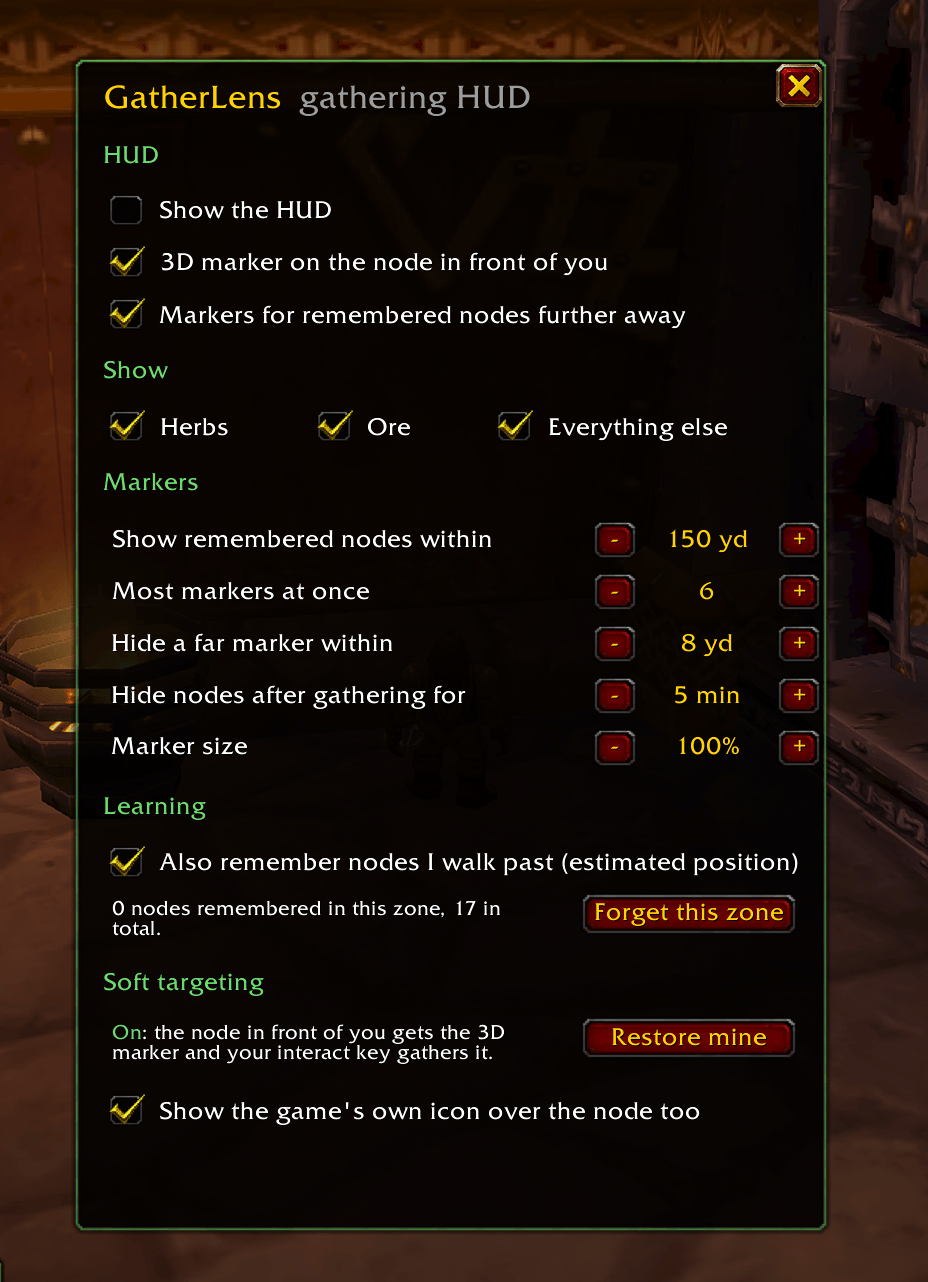
- Minimap button: left-click to turn the HUD on or off, right-click for settings, drag to move it.
- Settings window:
- Show herbs, ore and/or everything else
- Turn the 3D marker and the far markers on or off separately
- How far away to show nodes, and how many at once
- When far markers hide, and how long gathered nodes stay hidden
- Marker size
- Forget a zone's remembered nodes
Getting started
- Install and log in.
- Right-click the GatherLens minimap button → Soft targeting → Turn on. This turns on the game's own "soft targeting" for interactable objects, which the 3D marker needs. GatherLens remembers your previous settings and restores them when you turn it off.
- Go gathering. The 3D marker appears on the node in front of you, and nodes you gather are remembered for next time.
Tip: bind a key to Interact with Target (Key Bindings → Targeting). With soft targeting on, you can then gather the highlighted node with that key instead of clicking it.
Commands
| Command | What it does |
|---|---|
/glens |
HUD on / off |
/glens settings |
Open the settings window |
/glens soft on / off |
Soft targeting on, or restore your previous settings |
/glens forget |
Forget remembered nodes in the current zone |
/glens report |
Diagnostics you can copy and paste when reporting a problem |
Good to know
- GatherLens never plays for you. It doesn't click, gather, move or turn your character. It only shows information.
- Far markers come from your own gathering. The game doesn't tell addons where nodes are, so GatherLens learns positions as you gather. A zone you haven't gathered in starts empty and fills up as you play.
- The 3D marker covers the node the game soft-targets: the closest interactable object in front of you, at gathering range.
- Everything is stored locally in your own saved variables. Nothing is shared or uploaded.
- With "Everything else" on, the 3D marker also appears on chairs, mailboxes and other usable objects. Untick it in settings if you only want herbs and ore.
Feedback
Found a bug or have an idea? Please leave a comment and include the output of /glens report (it opens a window you can copy from with Ctrl+C).
GatherLens Team
