


GatheredOrderButtons
- By
desc-craft.jpg
desc-craft-002.jpg
Description
Summary (one line)
Gathers the crafting order buttons in one spot, so you can start, craft and complete orders without moving your mouse.
Description
GatheredOrderButtons
I made this addon because moving my mouse back and forth between the Start Order and Create buttons while filling NPC patron orders got too tedious. GatheredOrderButtons gathers the buttons you need at the bottom-left of the order view, so you can finish orders with barely any mouse movement. Patron orders are the main focus, but it works the same for every other order type.
Features
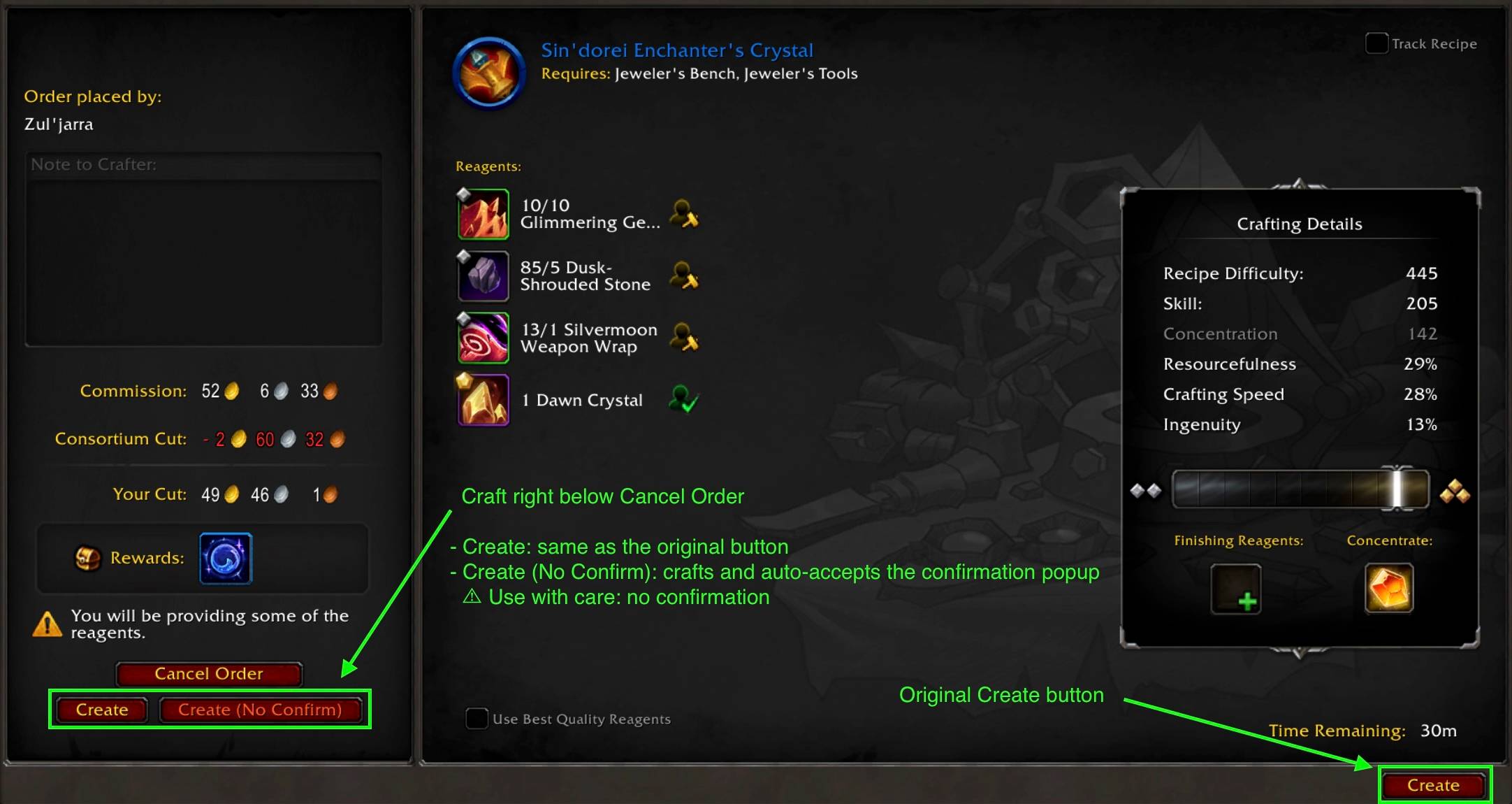
- Two craft buttons right below the Release Order button:
- Create: works exactly like the default Create button, confirmation popup included.
- Create (No Confirm): crafts and automatically accepts the confirmation popup.
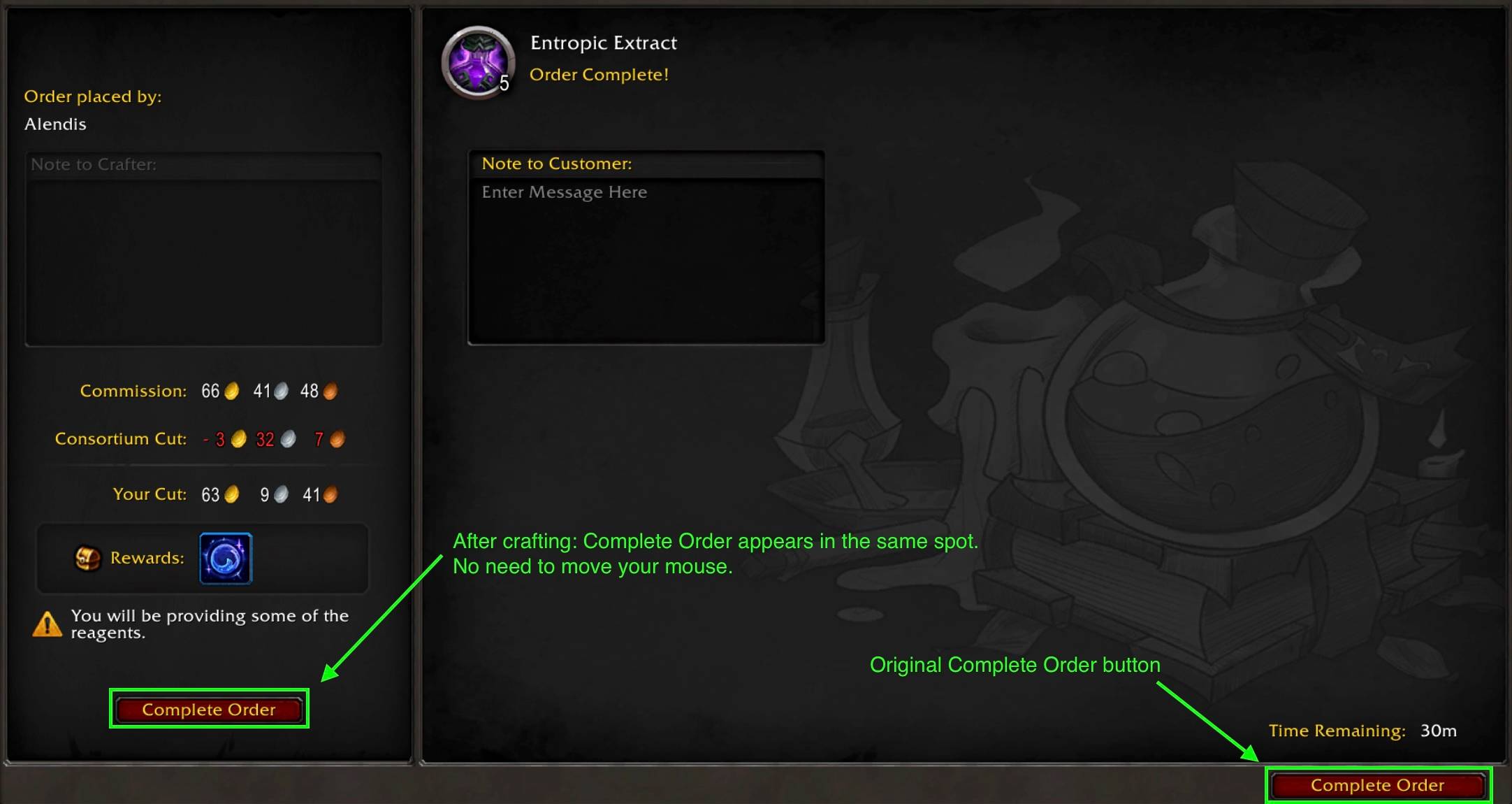
- Complete Order appears in the same spot once the craft finishes. Click again without moving your mouse.
- The original Blizzard buttons stay where they are. This addon only adds shortcuts.
- Works with every order type: patron, personal, guild and public orders.
- No settings and no saved data. Install it and it just works.
- Localized in English and Korean.
Typical flow
- Open an order and click Start Order.
- Click Create (No Confirm), which appears right below the Release Order button.
- When the craft is done, click Complete Order, which appears in the same spot as the craft buttons.
Important: about "Create (No Confirm)"
Always check the order details (reagents, quality, commission) before clicking. Once you click, the craft goes ahead without a second chance to cancel.
Create (No Confirm) accepts any confirmation popup that appears as a result of that click, not only the usual "use some of your own reagents" prompt. For example, a warning about using soulbound or expensive reagents is also accepted automatically. If you want to review a warning, use the plain Create button instead.
The auto-accept only happens when you click the button yourself. The addon never crafts or accepts anything on its own.
Feedback
Bug reports and suggestions are welcome in the comments or the issue tracker.
GatheredOrderButtons (한국어)
NPC 손님 의뢰를 처리하면서 주문 시작 버튼과 제작 버튼 사이를 오가는 게 너무 귀찮아서 만든 애드온입니다. GatheredOrderButtons는 필요한 버튼을 주문 화면 왼쪽 아래 한곳에 모아, 마우스를 거의 움직이지 않고 주문을 끝낼 수 있게 해 줍니다. NPC 손님 의뢰가 주 목적이지만, 다른 종류의 주문에서도 똑같이 동작합니다.
기능
- '주문 취소' 버튼 바로 아래에 제작 버튼 2개:
- 제작: 기본 '제작' 버튼과 똑같이 동작합니다. 확인 팝업도 그대로 뜹니다.
- 제작 (확인 생략): 제작하면서 확인 팝업을 자동으로 수락합니다.
- 제작이 끝나면 같은 자리에 '주문 완료' 버튼이 나타납니다. 마우스를 움직이지 않고 그대로 한 번 더 누르면 됩니다.
- 블리자드 기본 버튼은 원래 자리에 그대로 있습니다. 이 애드온은 바로가기 버튼만 추가합니다.
- NPC 손님 주문, 개인 주문, 길드 주문, 공개 주문 모두에서 동작합니다.
- 설정과 저장 데이터가 없습니다. 설치만 하면 바로 동작합니다.
- 영어와 한국어를 지원합니다.
사용 순서
- 주문을 열고 주문 시작을 누릅니다.
- '주문 취소' 버튼 바로 아래에 나타난 **제작 (확인 생략)**을 누릅니다.
- 제작이 끝나면 제작 버튼이 있던 자리에 나타난 주문 완료를 누릅니다.
주의: '제작 (확인 생략)'에 대해
버튼을 누르기 전에 주문 내용(재료, 품질, 수수료)을 꼭 확인하세요. 누르는 순간 취소할 기회 없이 바로 제작이 진행됩니다.
**제작 (확인 생략)**은 그 클릭으로 뜬 확인 팝업을 종류와 상관없이 모두 수락합니다. 흔히 뜨는 "보유한 재료 일부를 사용" 팝업뿐만이 아닙니다. 예를 들어 귀속되거나 비싼 재료를 사용한다는 경고도 자동으로 수락됩니다. 경고 내용을 직접 확인하고 싶을 때는 일반 제작 버튼을 사용하세요.
자동 수락은 사용자가 직접 버튼을 눌렀을 때만 동작합니다. 애드온이 스스로 제작하거나 팝업을 수락하는 일은 없습니다.
의견
버그 제보와 제안은 댓글이나 이슈 트래커에 남겨 주세요.
GatheredOrderButtons Team
