


Gamepad Shoulder Slots
- By
Adds 4 more buttons to your gamepad action bar pages! It's free real estate!
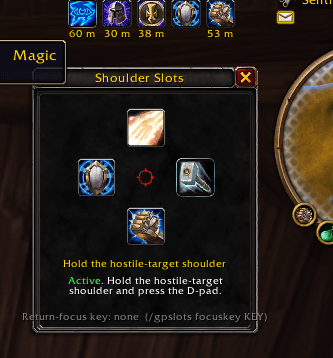
Shoulder Slots screenshot.png
Description
- Click the minimap button, or type
/gpslots, to open the editor. - Drag a spell from the spellbook, a macro from
/macro, or an item from your bags onto a D-pad slot.- Dropping onto a filled slot swaps: the old action goes back to your cursor.
- Dragging a slot out lifts its action onto the cursor.
- Right-click a slot to clear it.
- Hold the hostile-target shoulder and press the D-pad.
Slots are saved per character. Changes made in combat apply when combat ends, because Blizzard's buttons can only be changed out of combat.
| Command | Effect |
|---|---|
/gpslots |
Open or close the editor |
/gpslots status |
List the slots and their state |
/gpslots set <up|left|right|down> [spell|item|macro <name>] |
Assign by name, or from the cursor when no name is given |
/gpslots clear <direction|all> |
Clear slots |
/gpslots focuskey <KEY|off> |
Bind a key that returns gamepad focus from an open panel to the world (TOGGLEUIFOCUS) |
/gpslots minimap |
Show or hide the minimap button |
(And if you want a chill place to relax with friends, check our discord out :) )
Gamepad Shoulder Slots Team
