GameMargins
- By
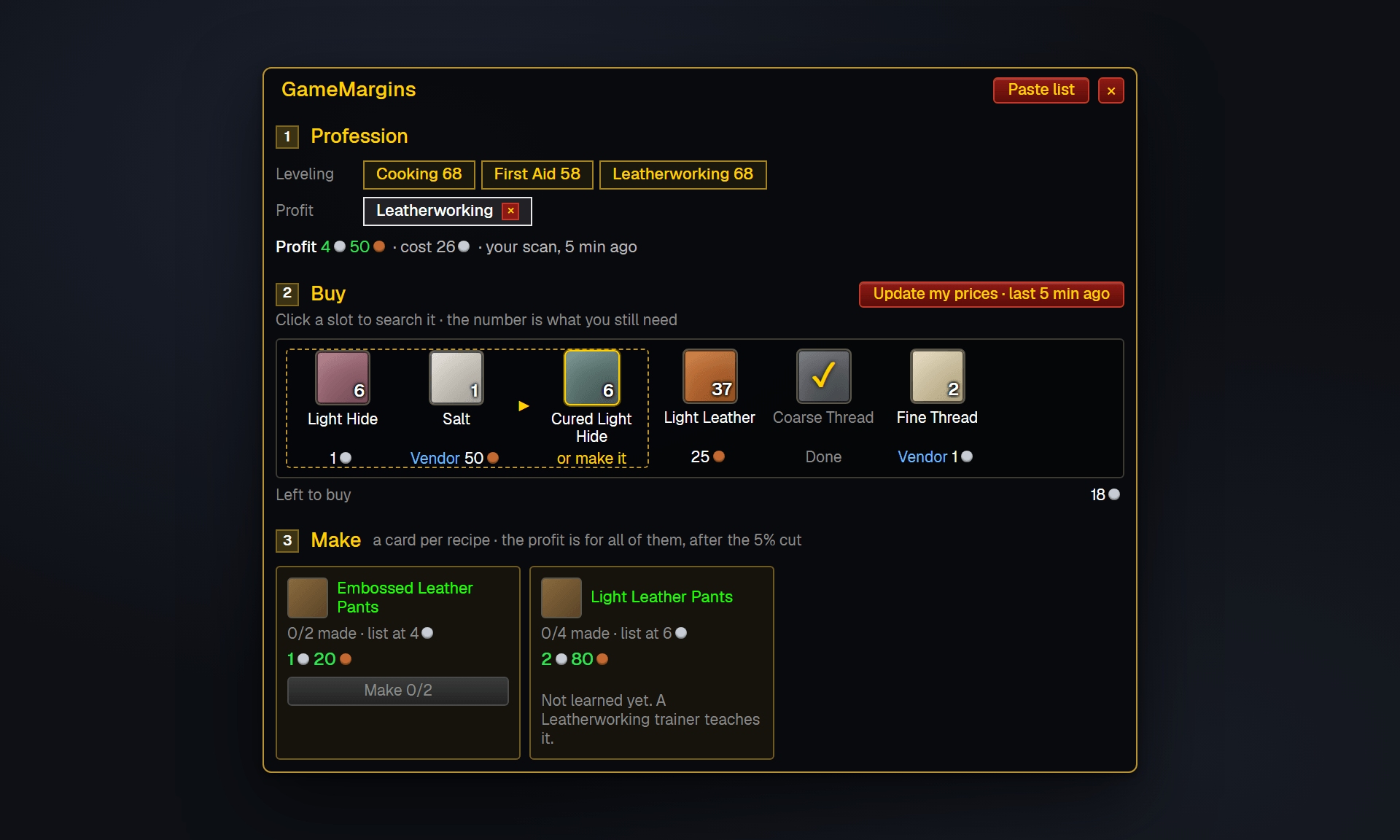
The hub at the auction house: what to buy and what to make
Description
GameMargins for WoW: Forever
Your gold-making and leveling companion. One window beside the auction house and your profession window shows what to buy and what to make, from your own lists on gamemargins.com. One click scans the auction house.
The GameMargins hub
The hub opens beside the auction house and beside your profession window (you can switch that off, see Settings below), or from the minimap button and /gm hub. It reads top to bottom:
- Profession: your crafting professions with your skill. Pick one to see its leveling route, with a bar that marks your skill, or its profit list with the profit and the cost.
- Buy: every material once, with how many you still need (your bags and your mailbox count) and the cheapest price from your last scan. At the auction house, click a slot and the game's own Buy list shows it. What you can make yourself says "or make it".
- Make: a card per recipe. "Make 23" makes what is left, as far as your materials go; on a route it stops when the step is done. A recipe you have not learned yet says where to learn it.
- Update my prices: scans every listing on your auction house in one click (the game allows one full scan per 15 minutes), with the age of your last scan.
Your lists from gamemargins.com
On Profession leveling (the cheapest route from your skill) or Crafting profit (tick the recipes you want to sell), press "Copy for the GameMargins addon". In the game, press "Paste list" in the hub and paste with Ctrl+V. Each profession holds one route and one profit list.
Also in the addon
- Prices in tooltips: your last scan's price in item tooltips.
- Farm panel: XP, gold and kills per hour while you farm, with an optional auto pause and auto start.
- Notes for the site: what vendors sell and where, what profession trainers teach, and your characters' level, professions, recipes and bags, so the site's tools match your characters.
Settings
Switch any part off, or back on, in one window: /gm settings, Settings in the minimap button's menu, or Options › AddOns › GameMargins.
- The hub beside the auction house and beside your profession window: off means it no longer opens by itself; the minimap button and
/gm hubstill open it. With the hub off at the auction house, a small "Update my prices" bar sits beside it, so scanning stays one click. - Count XP, gold and kills: off means no farm panel and no counting, on every character.
- Prices in item tooltips and the minimap button (
/gm minimapbrings the button back).
Everything is on until you change it, and your choices count for all your characters.
Upload your scans
- By itself: GameMargins Desktop, our free Windows app (open source), uploads every scan the moment the game writes the file and keeps the addon up to date: https://gamemargins.com/wow-forever/addon
- By hand: type /reload, then drop
WTF\Account\YOUR_ACCOUNT\SavedVariables\GameMargins.luafrom your game folder at https://gamemargins.com/wow-forever/upload
On gamemargins.com, prices also come from Blizzard's own auction house data every hour; your scans keep your market fresh in between.
Markets
Prices are kept per region (EU, US), ruleset (Normal, PvP, Roleplay, Roleplay PvP) and auction house (Alliance, Horde and the goblins' Blackwater house), just like the game's.
Privacy
The addon records no player names: no character, account, seller or bidder names. When you upload, we keep the prices and quantities of the listings, and your characters' level, class, professions and recipes in your gamemargins.com account, so every device shows them. Gold, bags and bank are read in your browser and stay there. We don't keep the file itself. Your lists and counts stay in your own per-character file and are never uploaded.
Free
The addon, the desktop app and the site's WoW tools are free for everyone, with no ads in the game. The addon never buys, sells or posts anything by itself: you buy and sell with the game's own buttons. The code is plain Lua under the MIT licence.
GameMargins: by gamers, for gamers.
GameMargins Team