Gale Count
- By
WoW: Forever addon: Windfury tracker for Shamans. Counts Windfury procs live, then shows Windfury's damage, share and average per proc from the game's own damage meter.
wf.png
Description
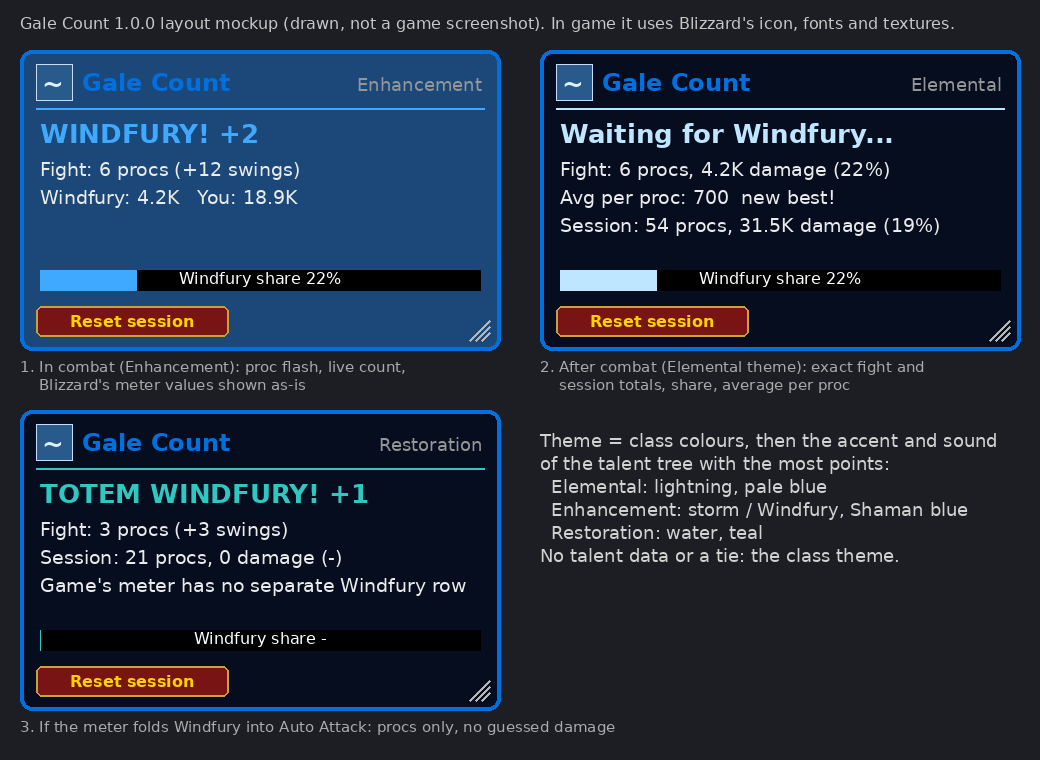
Gale Count is a Windfury tracker for Shamans on WoW: Forever. A small storm-blue box flashes WINDFURY! every time Windfury procs and keeps count. When the fight ends it shows how much damage Windfury did, its share of your damage and the average per proc, taken from the game's own damage meter.
What it shows
- Every proc, live: the box lights up with
WINDFURY! +2(Windfury Weapon) orTOTEM WINDFURY! +1(Windfury Totem, yours or another Shaman's). - This fight: procs and extra swings; after combat, Windfury damage, Windfury's share of your damage and average damage per proc.
- This session: procs, Windfury damage and share, average per proc and your best fight average. The Reset session button starts a new session.
- Share bar: Windfury's share of your damage.
Where the numbers come from
WoW: Forever runs on the modern client, which gives addons no combat log, and every single hit's damage reaches addons as a hidden ("secret") value. Gale Count never guesses a number:
- Procs are exact. Each Windfury proc is its own game spell, and the game tells addons when you gain it.
- Damage comes from Blizzard's built-in damage meter. During combat its numbers are hidden from addon maths, so the box shows them exactly as the game hands them over. Once combat ends they are normal numbers, and Gale Count works out the fight and session totals, share and average.
- Biggest single proc is not shown. The game does not let addons read single hits on this client, so no addon can measure one proc's damage. Average per proc is exact.
- If the game's meter counts Windfury's extra swings as ordinary Auto Attack (it then has no Windfury line of its own), the box says "counting procs only" and shows proc counts without damage.
/gale meterlists the meter's lines for your last fight so you can see what the game reports.
Turn on the game's meter if the box shows no damage: Options > Gameplay > Advanced > Damage Meter > Enable Damage Meter.
Theme
The box takes your class colours, then the accent colour and sound of the talent tree with the most points:
- Shaman / Elemental: pale lightning blue, lightning bolt impact
- Shaman / Enhancement: Shaman blue, shaman thunder (storm)
- Shaman / Restoration: water teal, water shield
- Mage / Arcane, Fire, Frost: violet / orange / ice, with the matching game sound
- Warlock / Affliction, Demonology, Destruction: shadow purple / fel violet / fel green, with the matching game sound
Every class has its own entry (Warrior, Paladin, Hunter, Rogue, Priest, Druid too). With no talent points spent or a tie, you get the class theme. Every sound and texture is built into the game; nothing is bundled.
Thunder
/gale sound streak(default): thunder when Windfury procs 2 times within 4 seconds (/gale streak 3 6makes it 3 procs within 6 seconds)./gale sound every: every proc./gale sound record: when a fight beats your best average per proc./gale sound off./gale soundfile theme|thunder|crack|boltpicks the sound (and plays it once).themeuses your talent tree's sound.
Slash commands
Type /gale (backup: /galecount). /gc is the game's own guild chat command, so Gale Count does not use it.
/gale show/hide·lock/unlock·resetpos/gale scale 0.5-2·size <width> <height>/gale reset(session) ·test(preview a proc out of combat)/gale sound …·soundfile …·streak <procs> <seconds>/gale theme(re-check your talents) ·meter·debug·report
Move the box by dragging it; resize it with the corner grip. Both stop working while it is locked.
Install
Use the CurseForge or Wago app, or unzip the GaleCount folder into World of Warcraft\_forever_\Interface\AddOns\ and restart the game or /reload.
Free, MIT, no paid features. Built-in game sounds and textures only; no other addons needed.
Source and issues: https://github.com/masterred92/GaleCount CurseForge: https://www.curseforge.com/wow/addons/gale-count Wago: https://addons.wago.io/addons/galecount
Gale Count Team