3079d91b-ba25-447b-bb70-e60bfb45b162.png
5617d5d4-f263-434a-8bb7-68b5205aa9da.png
Description
Gag Gag is a fun, lightweight addon that brings your chat emotes to life! Whenever you trigger specific emotes, the addon plays a corresponding custom sound effect.
✨ NEW: Create & Share Your Own Sounds! Adding your own custom sounds is now easier than ever. We've introduced GagSoundManager, a brand-new standalone Windows app designed to manage your custom sounds without ever touching a single line of Lua code.
⬇️ DOWNLOAD GAGSOUNDMANAGER HERE:
https://github.com/SDreow/GagSoundManager-1.0/releases/tag/relase
(Note: CurseForge policy does not allow standalone .exe applications in addon downloads. You can safely download the open-source manager from our official GitHub repository linked above).
With the new manager, you can easily add your own .mp3 or .ogg files via simple drag & drop! You can even export your custom sounds as .gagsound packages to share with your guildmates. All your custom sounds are safely stored in a separate GagCustomSoundpack module, meaning they will never be deleted when you update the main addon.
How does the addon work? It's simple! You do an emote, and the sound plays. However, to keep things balanced and avoid spamming everyone around you, the sounds are only heard by you and other players who also have the Gag addon installed. It's the perfect little tool for guild events, hanging out in Shattrath, or just messing around with your friends! Grab your guildmates, make them install it, and enjoy the chaos.
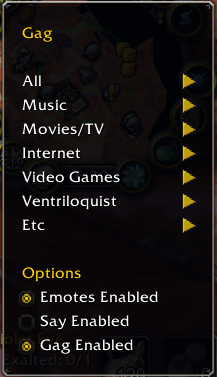
Slash Commands: You can manage the addon via the custom minimap button or by typing the following commands in your chat:
-
/gag enable- Enables Gag emotes and sounds for your own character. -
/gag disable- Disables Gag emotes and sounds for your own character. -
/gag list- Prints a list of all available sound commands in your chat window. -
/gag ping- Pings your group/raid to see who else has the Gag addon installed. -
/gag enableEmotes- Toggles sending the text emote into the chat on/off. -
/gag enableGroup- Toggles Gag on/off for the entire group (You must be the Party/Raid Leader to use this). -
/<soundname>- Plays a specific sound (use/gag listto see what sounds are currently installed).
Credits: Originally created by Potdisc. Fixed, heavily expanded, and updated for TBC by Dreow.
Gag - TBC Anniversary Team