FuocoNote Collector: Rare Mount & Pet Helper
- By
Mount, pet, toy, illusion and transmog tracker: what you're still missing this week, where each one drops (boss, rare, vendor or quest), which lockouts you have left and what it costs at the Auction House. Warns you before season rewards disappear.
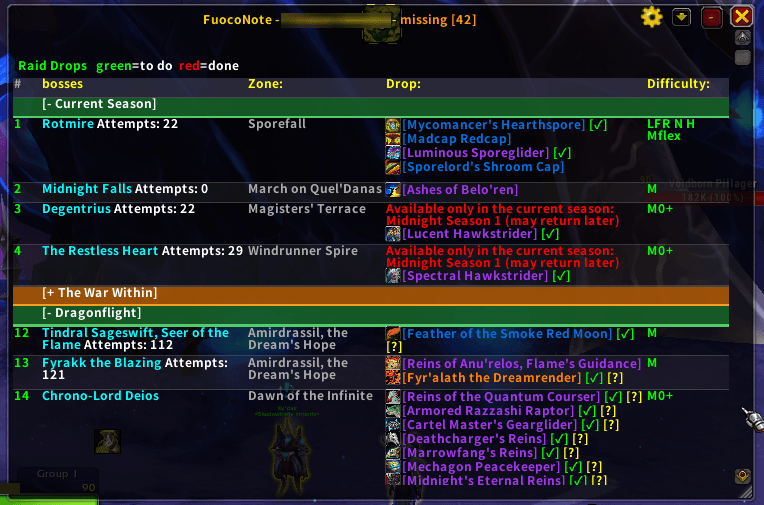
What you're still missing, in one panel
![The [?] next to a drop says how to get it: from whom, for how much, and when.](https://media.forgecdn.net/attachments/1828/266/tooltip-png.png)
The [?] next to a drop says how to get it: from whom, for how much, and when.
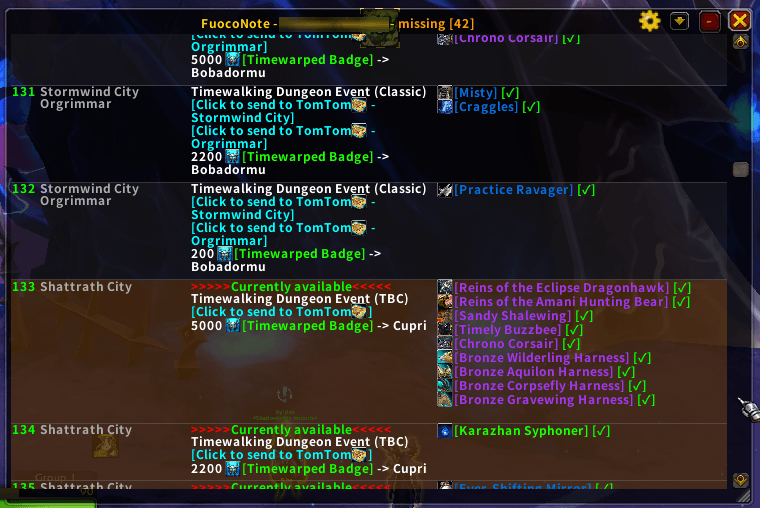
Events, vendors and prices, one click to TomTom
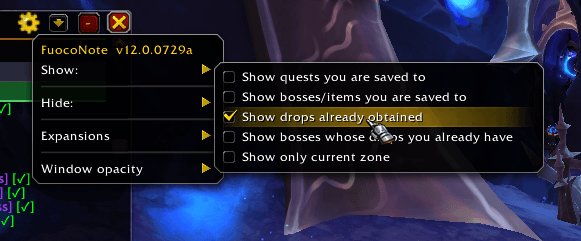
Show / Hide / Expansions / Window opacity
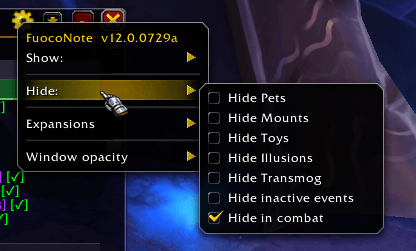
Show / Hide / Expansions / Window opacity
Description
One window to answer one question: what can I still get this week?
FuocoNote Collector is a rare mount and pet helper: a compact, movable panel that tracks the mounts, battle pets, toys and illusions still missing from your collection, and tells you where each one comes from. Rare drops, rare spawns, dungeon and raid bosses, quests, treasures, vendors and their prices, achievements, reputation and Renown thresholds: everything in one scrollable list with colour-coded sections. What you have already done takes itself off the list.
It is a collection checklist built the slow way, row by row, by someone who actually goes and looks. Rarity is only half the problem: the other half is knowing which of the four ways to get a mount is the one still open to you.
Why you'll keep it
Never run a boss for nothing. Lockouts are visible at a glance, and bosses you are already saved to hide themselves from the checklist. Difficulty is a single letter: red if saved, green if not.
How many times you've already tried. Where the game keeps a kill statistic for a boss, the row carries your attempt count, added up across every character on every realm and not just the one you are logged in on. What the game buries in a separate panel sits in the row you are already looking at, so you can see a low drop rate for what it is.
Only what's actually missing. Items you own are highlighted or hidden, your choice, and the title carries a live count of what is left. A mount you can get from three different sources counts once, not three times.
Your list, your rules. Every row has a checkbox. Tick the collectibles you have decided not to chase, press "Hide selection", and they leave the list and the counter until you change your mind. "Manage hidden collectibles" in the menu shows what you put away, with a one-click restore.
Filter until only what you're after is left. Toggle by type (mounts, pets, toys, illusions, transmog), pick a single expansion, narrow it down to the zone you are standing in, or drop the events that are not running. And if you would rather keep an eye on what is already done, one click brings finished quests, cleared bosses and owned drops back into view.
Or just search for it. Type a mount, a zone, the npc that sells or drops it, a raid boss, a holiday, a quest, an achievement, or a currency like "dubloons", and the list shows only the collectibles tied to it. While you search, everything turns up, owned drops, collapsed groups and hidden rows included; clear the field and the list goes back to how you like it.
A warning while it still matters. Rewards leaving with the season, and the ones that might return later, are flagged in the list before they are gone. Rows tied to a world event show up only while that event is running, and the Events window lists what is on right now and what you still miss from it, or the next event when nothing is running. Mounts you earn outside the game, like a Twitch drop, get their own notice while they last.
It tells you what you need first. Prerequisite quests, the currency or the barter item a vendor asks for, the reputation rank that unlocks the stall: all in the row, with hoverable links. World quests included, with title, objectives, time left and rewards, without leaving the window.
And when the row isn't enough, a [?] explains. Invisible targets, chains that have to be started elsewhere, portals that appear at random, a chest that opens only after a ritual, a bauble you have to throw in the water and then fish: the awkward ones carry a note saying what you are walking into, written in your own language. A red [!] warns you when a row is for one class, one race or one faction only, before you save up a thousand badges for it.
See it before you go. Hover a mount, a pet, a toy or a wearable item in the list and a small window shows the model, turning slowly, on the game's own stage. A mount comes with your character on it, a piece of armour on your own character, undressed. On by default, one click to turn off.
It celebrates when the drop finally lands. The moment a tracked mount, pet or toy reaches you, a golden banner announces it by name, with its icon and a sound. It fires when the item drops and again when you learn it after a restart, because those are two different moments. Both the banner and its automatic screenshot can be turned off.
It follows you outside the window. Hover a tracked item anywhere in the game and its tooltip says so: FuocoNote: this item is tracked and you have it in green, or and you still need it in orange. You know before buying, selling or discarding.
Or simply buy it. With Auctionator or TSM installed, a collectible's tooltip says what it costs at the Auction House, rounded to the gold, and a third section in a gold frame lists the ones you're missing that are for sale, cheapest first. A pet sold in a cage counts at its lowest price, a grey price is the region average when your realm has none, and with the Auction House open a click on a row searches for it. You pick Auctionator or TSM, and each one is optional.
Group loot, announced once. When someone in your group loots a tracked collectible, FuocoNote congratulates them in chat, and a raid BoE epic gets a line too, so everyone knows one dropped. It can't see their collection, so their fifth Squashling gets the same cheer as their first. Built-in sync keeps it to a single message even if half the raid is running the addon. And if you would rather it never spoke at all, "Mute chat" under Alerts keeps it silent: no announcements, yours or anyone else's, never the group's speaker, while update notices still reach you. Off by default.
Straight to the spot. Click a waypoint link to send the coordinates to TomTom, or to drop a native map pin if you do not use it.
Also in the box
- Mounts, battle pets, toys and illusions, from classic to the current patch
- Wild pets as well: the ones you catch instead of looting, each row holding every spot the species shows up in on a single waypoint
- A panel at the first login after an update lists what was added, and the menu can bring it back
- Raid drops, everything else and what the Auction House sells in three framed sections, with groups per expansion and plus and minus buttons to open or close them all
- Gets out of the way during combat, and you pick the window opacity, solid again while the mouse is over it
- Minimap button and LDB support
- Light on CPU, quiet by default
Commands
/fn, or /fuoconote, shows and hides the window. Every option lives in
the window's own menu, behind the gear button in the title bar.
Languages
English, Italiano, Español, Deutsch, Français, Русский, Português (Brasil), with translation fixes always welcome.
Also from me
FuocoAtal'utek puts the Windcaller flight points of the Vaults of Atal'Utek on a clickable map, instead of a list of dialog options.
FuocoGoldFarm: every gold source of Midnight in one window, with timers and a line to the nearest one. Just in time for the seven-million-gold Sporebearer Fungal Strider.
Website
https://fuocovivo.pages.dev/fuoconote has screenshots, the changelog and every option explained one by one, in six languages.
Support
FuocoNote is free and it stays free. Most of the work isn't code: it's checking that every single row sends you to the right place, because a wrong coordinate is easy to publish and hard to notice.
If it has saved you an evening of searching, you can offer me a coffee. And telling me about a row that sent you nowhere is just as welcome. <3

FuocoNote Collector: Rare Mount & Pet Helper Team