FreezingTracker
- By
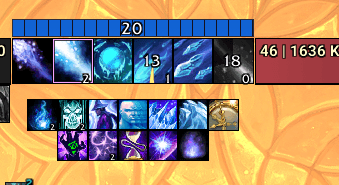
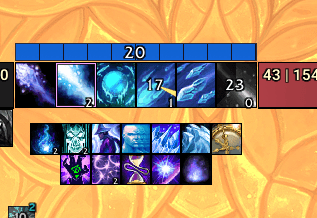
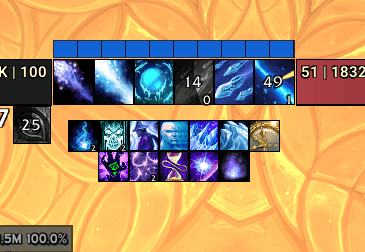
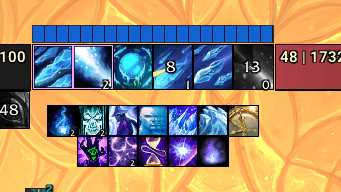
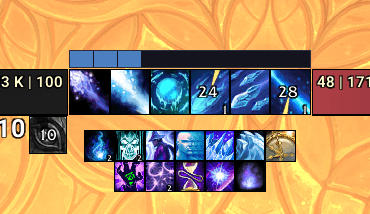
A moveable tracker bar for Frost/Arcane Mage that displays live Freezing debuff stacks, and Salvo stacks.
Screenshot 2026-04-15 141746.png
Screenshot 2026-04-15 141742.png
Screenshot 2026-04-15 141814.png
Screenshot 2026-04-15 141751.png
Screenshot 2026-04-15 141829.png
Description
FreezingTracker
FreezingTracker turns the Freezing stack icon from Blizzard's Cooldown Manager into a dedicated bar you can place anywhere on your screen. Built for Frost Mage, and now Arcane Mage too. Where it tracks Arcane Salvo instead.
What it does
- Reads your stacks straight from the Cooldown Manager your current Freezing stack count on Frost, or Arcane Salvo stack count on Arcane.
- Draws it as a horizontal segmented bar that fills as stacks build, one segment per stack.
- Changes color when you cross a stack threshold you pick, so you can see at a glance when you're ready to spend. On Frost you can add a second color breakpoint on top of that, on Arcane, an optional Max Stacks Color tints the whole bar when Salvo caps out.
- Glows in native gold matched to the Cooldown Manager's own look. On Frost you get a glow at a threshold you choose plus a brighter one at the 20-stack cap, on Arcane the bar lights up when Salvo hits its cap. The glow traces the bar's real shape at any width or height, and clears the moment you're not tracking anything.
- Knows your Arcane hero talent: the Salvo bar and its glow fill all the way to the true cap 25 stacks under Sunfury, 20 under Spellslinger and update the instant you swap, no
/reload. - Smooths the fill animation as stacks build — no jittery snapping in the moment you're about to Shatter.
- Hides the numeric stack text if you only want the bar.
- Keeps a separate setup per spec size, colors, breakpoints, glow, texture, and position are all saved per specialization, and the addon swaps to the right one automatically when you change spec.
- Positioned with a full anchor system in the options panel you cna attach the bar to UIParent or one of several unit/HUD frames, choose which corners meet, and nudge it with X/Y offsets for pixel-precise placement.
- Fully themeable through LibSharedMedia bar texture, border color, dimensions, and all state colors are configurable from
/ft(stack-text size too), each spec themed independently.
Setup requirement
In Blizzard's Cooldown Manager, open the Buffs tab (lightning icon on the right) and add Shatter to the Tracked Buffs row in the first slot. If you play Arcane, add Arcane Salvo the same way. That's the whole setup.
Commands
| Command | What it does |
|---|---|
/ft |
Open the options panel |
/ft reset |
Return the bar to center screen |
/ft lock |
Lock the bar in place |
/ft unlock |
Unlock the bar so you can drag it |
FreezingTracker Team