FrameNet Graph
- By
Description
FrameNet Graph
A lightweight FPS and network latency monitor for World of Warcraft Retail and Forever.
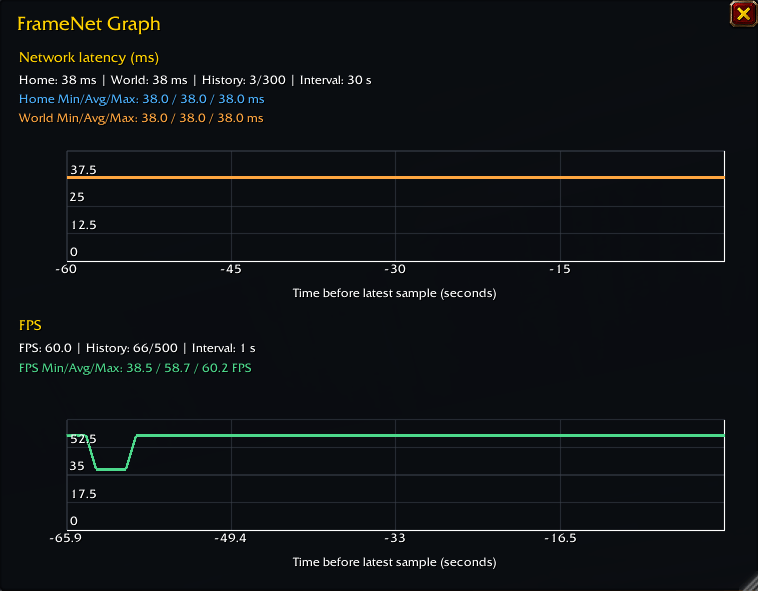
Track FPS drops and latency spikes with history graphs, current readings, and minimum, average, and maximum values.
Features
- FPS history graph with automatic scaling.
- Home and World latency graph with two colored lines and a shared scale.
- Min/Avg/Max statistics for each metric.
- Independent sampling intervals and configurable history capacities.
- A movable, resizable window with saved size and position.
- Built-in Blizzard Settings integration.
- A draggable minimap button with an option to hide it.
- Compatibility with MinimapButtonButton (MBB).
- All required libraries are included.
Getting started
Type /fng or left-click the minimap button to open the monitoring window.
- Left-click the minimap button to open or hide the window.
- Right-click to open settings.
- Drag the window's title bar to move it.
- Drag its bottom-right corner to resize it.
Collection continues while the window is hidden. The network graph needs two samples before it can draw a line.
Settings
Open Settings → AddOns → FrameNet Graph, or type /fng settings.
| Setting | Default | Range |
|---|---|---|
| FPS sampling interval | 1 second | 1 second or longer |
| Network sampling interval | 30 seconds | 30 seconds or longer |
| FPS history capacity | 200 samples | 2–2000 samples |
| Network history capacity | 200 samples | 2–2000 samples |
Press Enter or leave a field to apply a change. Press Escape to cancel an edit.
Commands
| Command | Action |
|---|---|
/fng |
Open or hide the monitoring window |
/fng status |
Show collection status and latest measurements in chat |
/fng settings |
Open settings |
/fng set <setting> <value> |
Change a collection setting |
Examples:
/fng set fpsInterval 2
/fng set fpsCapacity 500
How history works
Each collector keeps its most recent samples in memory. When a buffer fills up, new samples replace the oldest ones.
- Statistics describe the currently retained history.
- Home and World lines overlap when their values are equal.
- History resets after
/reloador a new login. - Settings, window size and position, and minimap preferences are saved.
- All measurements stay local.
FrameNet Graph monitors performance without changing graphics settings or network behavior.
Feedback and source
Report bugs or suggest improvements on GitHub Issues.
Credits
Uses LibGraph-2.0 Revived, LibStub, CallbackHandler-1.0, LibDataBroker-1.1, and LibDBIcon-1.0.
Original addon code is licensed under GPL-2.0-or-later. Third-party libraries retain their own licenses and author notices.
FrameNet Graph Team