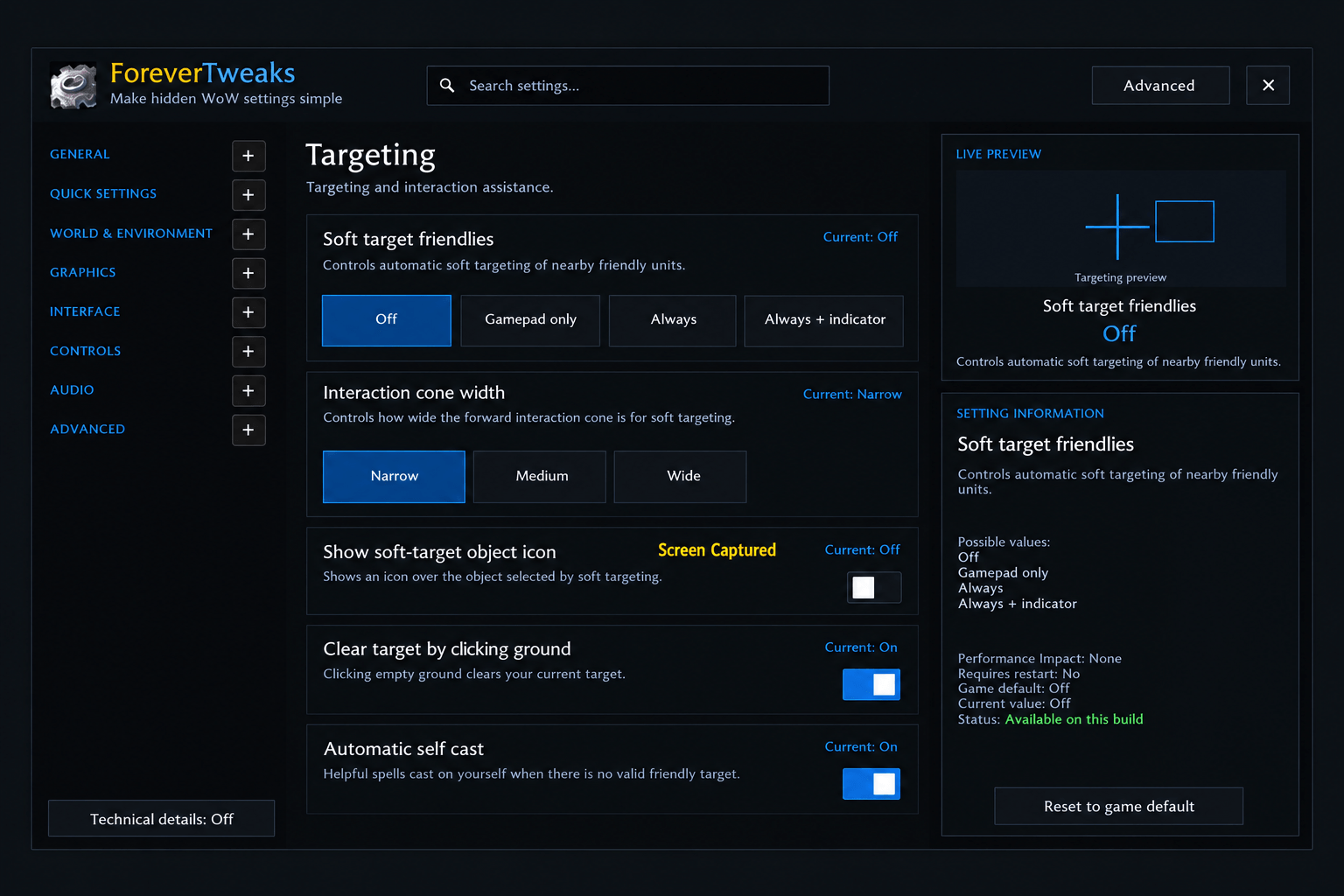
ForeverTweaks Instellingenpaneel.png
Description
ForeverTweaks makes hidden and advanced World of Warcraft: Forever settings simple, safe, and understandable.
Instead of requiring players to use /console commands or remember raw CVar names and values, ForeverTweaks provides a clean settings interface with readable labels, explanations, safe controls, current/default values, performance information, and visual previews.
Features include:
- 147 curated settings across 23 pages
- Graphics Quality and Display & FPS controls
- Weather, Environment, View Distance, Lighting and Shadows
- Separate Raid Graphics controls
- Camera and Field of View settings
- Nameplates and Targeting options
- UI & HUD, Chat and Sound settings
- Blizzard Combat Text controls
- Live visual previews for many settings
- Simple, Advanced and Developer modes
- Search by normal setting names or technical CVar names
- 4 curated presets with a preview of every change before applying
- Undo Last Change
- Restore All ForeverTweaks changes
- Read-only runtime CVar Explorer for advanced users
- Hardware-aware graphics validation
- Automatic client-build safety audit
- Embedded Ace3 libraries — no separate dependency required
Safety
ForeverTweaks does not blindly change CVars.
Before allowing a setting to be changed, it checks the current WoW Forever client. Locked, secure, read-only, unsupported and combat-protected settings are handled safely.
Graphics settings use Blizzard hardware-support checks where available, and changed values are read back from the client to verify the actual result.
Unknown CVars shown in the Developer CVar Explorer remain read-only.
Languages
ForeverTweaks includes full interface support for:
- English
- Nederlands
- Deutsch
- Français
- Español
English is the default and fallback language. An Auto option can follow the WoW client locale where supported.
Compatibility
- World of Warcraft: Forever
- Forever baseline: 1.60.1.70205
- Interface: 16001
- Camelot Interface: 16001
Commands
- /ft — Open ForeverTweaks
- /ft audit — Re-run the safety audit
- /ft explorer — Open the Developer CVar Explorer
- /ft resetui — Reset the ForeverTweaks window position
ForeverTweaks is designed to make useful WoW Forever settings accessible to normal players while keeping advanced and experimental controls safe and clearly separated.
ForeverTweaks Team