ForeverThreat - Threat Meter for WoW Forever
- By
A lightweight Omen-style threat meter built specifically for WoW Forever, featuring live group threat, tank detection, aggro warnings and a compact customizable interface.
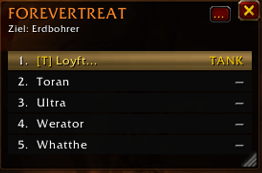
# ForeverThreat
**ForeverThreat** is a lightweight threat meter created specifically for **World of Warcraft: Forever**.
It provides a clear overview of group threat without filling your screen with unnecessary information. The interface is inspired by the readability of classic threat meters while being designed around the current WoW Forever addon environment.
## Features
**Live Threat Tracking**
ForeverThreat displays the threat situation of your current group against the selected enemy target.
Depending on the data available from the WoW Forever client, the meter can display:
- Current threat ranking
- Tank / current aggro holder
- Scaled threat percentage
- Absolute threat values
- Threat difference to the current tank
- Class-colored threat bars
- Player highlighting
- Optional pet tracking
## Tank Detection
ForeverThreat attempts to identify the current tank or aggro holder using the available WoW threat information.
The current tank is marked with:
`[T]`
This makes it easy to see who currently controls the enemy.
## Aggro Warnings
ForeverThreat includes optional warnings for dangerous threat situations.
Features include:
- Aggro warning
- Warning sound
- High-threat warning
- Configurable high-threat threshold
The aggro warning is designed to trigger on an actual aggro change rather than simply when entering combat.
## Compact and Resizable
The threat window can be freely resized.
ForeverThreat automatically adapts the displayed columns when the window becomes narrow, keeping the most important information readable.
The window position and dimensions are saved between sessions.
## Minimap Button
ForeverThreat includes its own minimap button.
Controls:
**Left Click**
Show or hide the threat window.
**Middle Click / Mouse Wheel Click**
Open the ForeverThreat settings.
**Right Click**
Lock or unlock the threat window.
**Drag**
Move the minimap button around the minimap.
## Integrated Settings
ForeverThreat includes its own configuration interface with separate categories for:
- Welcome
- Display
- Warnings
- General settings
The configuration window does **not** automatically open when logging in or using `/reload`.
## Standalone Addon
ForeverThreat is completely standalone.
You do **not** need to install:
- LibDBIcon
- LibDataBroker
- LibStub
- Ace3
- BugSack
- Any other library addon
The required libraries are embedded directly inside ForeverThreat.
Included libraries:
- LibStub
- CallbackHandler-1.0
- LibDataBroker-1.1
- LibDBIcon-1.0
## WoW Forever Compatibility
WoW Forever can protect certain combat-related values as secret values.
ForeverThreat contains additional handling for these protected values to avoid Lua errors and taint problems while still using all threat information that the client makes available.
## Slash Commands
`/ft`
Shows the available ForeverThreat commands.
`/ft config`
Opens the ForeverThreat configuration.
`/ft welcome`
Opens the Welcome page.
`/ft wowsettings`
Opens the Blizzard settings entry.
`/ft testsound`
Tests the aggro warning sound.
`/ft auto on`
Enables automatic opening of the threat window when combat starts.
`/ft auto off`
Disables automatic opening.
`/ft width <number>`
Changes the window width.
`/ft height <number>`
Changes the window height.
`/ft size <width> <height>`
Changes width and height.
`/ft resetsize`
Restores the default window size.
## Version 1.0
ForeverThreat 1.0 has been tested during real 5-player dungeon gameplay on WoW Forever.
The first stable release focuses on providing a reliable, readable and lightweight threat meter without unnecessary dependencies.
---
The ForeverThreat - Threat Meter for WoW Forever Team