Forever Quest Details
- By
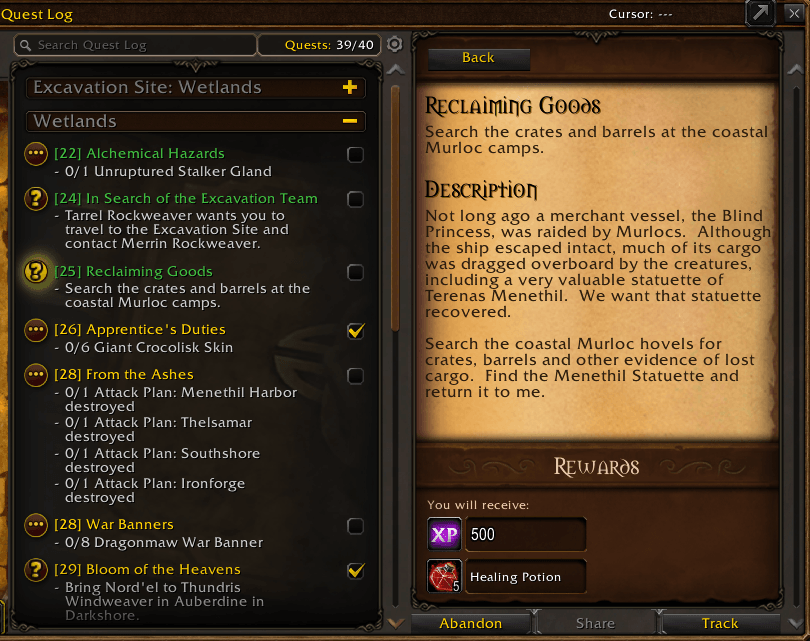
Keeps your map and quest list visible while showing native quest details in an attached side pane on WoW: Forever.
Screenshot 2026-11-27 225135.png
Description
Forever Quest Details
Read your quest. Keep your place. Keep Blizzard's Map & Quest Log, quest list, and original quest details visible together on WoW: Forever.
Selecting a quest should not mean losing sight of the rest of your quest log. Forever Quest Details attaches the native details pane to the right of the map window instead of letting it replace your quest list.
Your Map, List, and Details Together
- Side-by-side quest details: read the selected quest without hiding your map or quest list.
- One connected window: the details pane shares the map's extended outer border instead of looking like a detached popup.
- Original pane widths: the map and quest list keep their normal widths.
- Native quest information: descriptions, rewards, item tooltips, and the Abandon, Share, Track, and Back buttons use the client's existing quest-details interface.
- Active selection highlight: the list highlights the quest displayed in the details pane.
Keep Your Place
- Stable zone order: selecting a quest in another zone no longer moves that zone to the top of the visible list.
- Remembered headers: expanded and collapsed zones are preserved while reading, including your manual changes and when you use Back.
- Preserved scrolling: list refreshes retain your scroll position, adjusted only if the content becomes shorter.
- No hover-driven jumps: hovering map quest pins does not automatically scroll the list while details are visible. Manual scrolling still works.
- Search stays available: the native search continues filtering quests and managing its own expanded headers.
The map still moves to the selected quest's zone. Only the list's automatic reordering and collapsing are held steady while you read the attached details. Normal map-pin scrolling resumes when details are closed.
Fits Your Screen
The map and attached pane temporarily scale down together when needed to fit the screen. The details and their scrolling area follow the map's height. Closing the details restores the original map border, scale, and screen-clamping settings.
Optional Kaliel's Tracker Integration
With a compatible version of Kaliel's Tracker installed, selecting a quest from its tracker opens the same attached native details pane. Kaliel's separate details overlay is closed to avoid duplicate descriptions or a covered quest list.
No Kaliel's saved settings or other tracker features are changed. Kaliel's Tracker is not required.
Installation and Compatibility
Extract the ForeverQuestDetails folder into your WoW: Forever
Interface\AddOns folder, restart the game, and enable Forever Quest Details
in the AddOns menu. Open Map & Quest Log and select a quest to use it.
Targets WoW: Forever 1.60.1 (Camelot), build 70959, interface 16001. This release does not declare support for Retail or other Classic clients.
No configuration, slash commands, saved variables, or third-party addons are required. Disable the addon and reload the UI to restore the original layout.
Good to Know
- This addon moves the client's existing quest-details frame; it does not replace quest text or reward handling.
- Addons that replace the map or quest-details frame may conflict. Native-frame reskins can still apply.
- Automated lifecycle and native-function integration checks do not replace in-game rendering, quest-pin, and taint checks.
Feedback and Issues
Found a problem or have an idea? Use the project's Issues page if available.
For bug reports, include your game client and build, addon version, selected quest and zone, relevant map or tracker addons, and any error text or screenshot.
Forever Quest Details Team