ForeverGuildAnnounce
- By
A guild recruitment addon. Must click button to announce your current guild is recruiting. If someone uses your keyword you can click the button again to ginvite them.
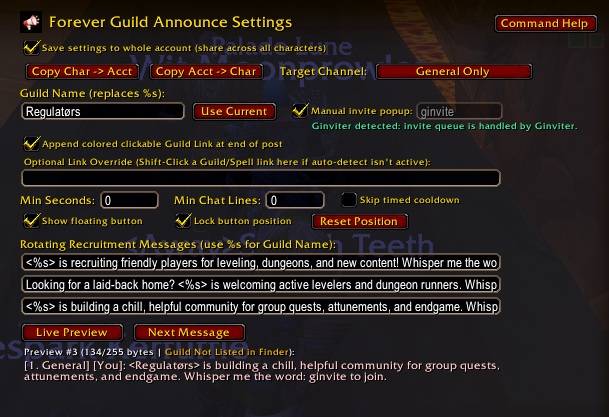
ForeverGuildAnnounce Panel.jpg
Description
# Forever Guild Announce
**Forever Guild Announce** is a lightweight, non-spammy guild recruitment announcer for **World of Warcraft: Forever** (`16001`) and **Retail World of Warcraft** (`12.x`). Instead of blasting repetitive messages on a blind timer, it paces your announcements using both elapsed time and real channel chat activity, appends a colored clickable guild hyperlink in retail, rotates through multiple recruitment templates, and adapts automatically to each client's guild invite rules.
---
## Features
- **Smart Anti-Spam Pacing & Channel Fallback:** Tracks both elapsed time and the number of messages scrolling by in **Trade** or **General**, automatically falling back from Trade to General when Trade isn't joined (or letting you lock to **General Only** or **Trade Only**).
- **Client-Aware Whisper Invite Handling (`ginvite`):**
- **When `Ginviter` Is Installed & Enabled:** Automatically detects `Ginviter` (`C_AddOns.IsAddOnLoaded("ginviter")`) and delegates all whisper invite queuing and sound chimes directly to `Ginviter` so there are no duplicate popups or overlapping alerts.
- **WoW: Forever (`16001`) Standalone Mode:** Never calls protected `GuildInvite()` / `C_GuildInfo.Invite()` APIs (preventing `ADDON_ACTION_FORBIDDEN`). Instead, when someone whispers `ginvite`, a clean instruction window pops up displaying their name and walking you through typing `/ginvite <PlayerName>` manually in chat.
- **Retail WoW (`12.x`) Standalone Mode:** Plays an audio chime and turns the floating button **gold** (`Invite: PlayerName`) so a single `Left-Click` (or `/fga invite`) sends a compliant hardware guild invite.
- **Colored Clickable Guild Links:** Automatically appends your guild's clickable Guild Finder link (or a custom Shift-clicked link override) to the end of every post while protecting the 255-byte chat limit.
- **Whisper Lead Alerts & One-Click Reply:** Listens for general recruitment inquiry keywords (`ginvite`, `guild`, `join`, `recruit`, `info`) for 5 minutes after an announcement so you can right-click the floating button to reply immediately.
- **Per-Character & Account-Wide Profiles:** Saves settings per character by default, with a one-click checkbox to share settings across your whole account and utilities to copy profiles back and forth.
- **Rotating Message Templates & Live Preview:** Store up to 3 customizable recruitment pitches using `%s` as a placeholder for your guild name, with a live preview showing exact byte counts and link status.
---
## Installation
1. Download **`ForeverGuildAnnounce.toc`**, **`ForeverGuildAnnounce.lua`**, **`README.md`**, and **`CHANGELOG.md`** (alongside your existing **`ForeverGuildAnnounce.tga`** megaphone icon).
2. Create a folder named **`ForeverGuildAnnounce`** inside your World of Warcraft `AddOns` directory:
- **WoW: Forever:** `World of Warcraft/_forever_/Interface/AddOns/ForeverGuildAnnounce/`
- **Retail WoW:** `World of Warcraft/_retail_/Interface/AddOns/ForeverGuildAnnounce/`
3. Place all files inside the `ForeverGuildAnnounce` folder *(the folder name must match `ForeverGuildAnnounce.toc` without spaces)*.
4. Restart World of Warcraft or type `/reload` in chat.
---
## Usage & Controls
### Floating Button Controls
| Action | Effect |
| :--- | :--- |
| **Left-Click** | Opens the manual `/ginvite` instruction window in **WoW: Forever** (or invites the next queued whisperer in **Retail**) when the button is **gold**, or posts the next recruitment message when **green**. |
| **Shift + Left-Click** | Post the next rotated recruitment message even when recruits are waiting in the invite queue. |
| **Right-Click** | Open a whisper reply to the last player who messaged you with a recruitment keyword. |
| **Shift + Left-Drag** | Move the floating status button anywhere on screen (when unlocked). |
| **Shift + Right-Click** | Open the **Forever Guild Announce** options menu. |
### Slash Commands
You can use `/fga`, `/ga`, or `/foreverguildannounce` for any command:
- `/fga` — Post the next guild announcement (if cooldown and chat line conditions are met).
- `/fga invite` — Open the manual invite instruction window (WoW: Forever) or send the next queued guild invite (Retail).
- `/fga clear` — Clear all pending players from the whisper invite queue.
- `/fga channel` — Cycle target channel mode (`Auto (Trade -> General)` -> `General Only` -> `Trade Only`).
- `/fga options` — Open the in-game configuration panel.
- `/fga help` — Print all available slash commands and mouse controls in chat.
- `/fga toggle` — Show or hide the floating status button.
- `/fga lock` — Lock or unlock the floating button's screen position.
- `/fga reset` — Reset the floating button back to the default lower-center screen position.
ForeverGuildAnnounce Team