
ForeverBuffs
Capture3.PNG
Capture.PNG
Capture2.PNG
Description
ForeverBuffs
Spread the love. ForeverBuffs finds nearby players who are missing your buff and lets you buff them with a single keypress. Walk through town, tap your key, and make some strangers' day.
How it works
A small button shows the next player who needs your buff, along with how many others are waiting. Press your keybind (or click the button) and it casts the right buff on them. Then it moves on to the next person.
Blizzard doesn't allow addons to cast on their own, so every buff is one press from you. ForeverBuffs does the searching, sorting, and targeting.
Supported classes
- Mage: Arcane Intellect (mana users only)
- Priest: Power Word: Fortitude, Divine Spirit, and optional Shadow Protection
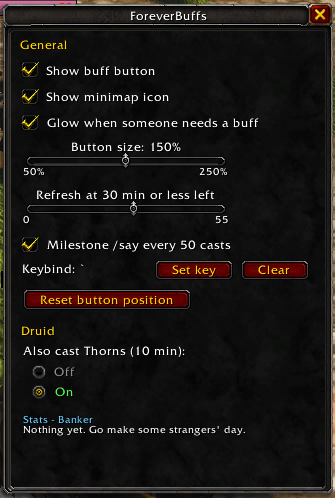
- Druid: Mark of the Wild, and optional Thorns
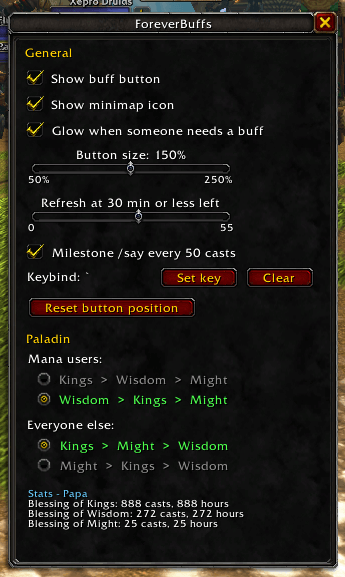
- Paladin: a smart priority system you can customize
- Mana users: Kings > Wisdom > Might or Wisdom > Kings > Might
- Everyone else: Kings > Might > Wisdom or Might > Kings > Wisdom
- Everyone can always get a blessing from you, even if other paladins already covered the first two
Features
- Always the right rank: the game automatically uses the highest rank each player can receive
- Skips players who are too low level for a buff and gives them the next one instead
- Skips players who already have the buff, including group versions (Arcane Brilliance, Prayer of Fortitude, Gift of the Wild, Greater Blessings)
- Refreshes buffs when they're running low (you choose how many minutes left)
- Skips PvP-flagged players so you don't flag yourself
- Line of sight handling: if a cast fails from LoS or range, that player is skipped for 10 seconds
- Glows while someone nearby needs a buff
- Works in any language: German, French, and other game clients are supported
- Tracks your stats per character: total casts and hours of buffs handed out
- Optional milestone brags: every 50 casts, your next buff comes with a /say like:
I've handed out 50 hours of Arcane Intellect to random players with ForeverBuffs!
Getting started
1. Open the options
Click the ForeverBuffs minimap icon or type /fb. Everything is set up from there.
2. Set a keybind
In the options window, click Set key and press the key you want (Shift, Ctrl, and Alt combos work). You can also set it in Esc → Options → Keybindings → AddOns → ForeverBuffs.
Once it's set, just keep pressing that key while you walk around. Each press buffs the next player.
3. Move the button
Hold Shift and left-click drag the button to wherever you want it. It remembers its spot between logins. If you lose it, use Reset button position in the options.
4. Nameplates
ForeverBuffs uses friendly nameplates to find nearby players. If yours are off, the button will say "Click to turn on nameplates". Press it once and you're set.
Options
- Show buff button and Show minimap icon
- Glow when someone needs a buff
- Button size: 50% to 250%
- Refresh at X minutes or less left: set to 0 to only buff players who don't have it at all
- Milestone /say every 50 casts: off by default
- Keybind and Reset button position
- Class options: paladin blessing priority, druid Thorns, priest Shadow Protection
- Your stats for the character you're on
Minimap icon
- Left-click: open options
- Right-click: show or hide the buff button
- Drag: move it around the minimap
Reading the button
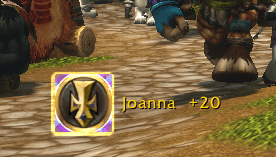
- Glowing icon + a name: that's who gets buffed next. The icon shows which buff you'll cast. +3 means three more players are waiting after them.
- Dimmed icon, "Nobody to buff": everyone nearby is already covered.
- Yellow "Click to turn on nameplates": press the button to turn them on.
- Red icon, "In combat": the button pauses during combat and picks back up when combat ends.
Commands
/fbopens the options window/fb statsshows your buff totals for this character/fb say on//fb say offturns milestone messages on or off/fb bind <KEY>sets your keybind, for example/fb bind F/fb unbindremoves the keybind/fb show//fb hideshows or hides the button/fb minimapshows or hides the minimap icon/fb resetmoves the button back to the center of your screen
Notes
- Only players on your screen can be found, so turning your camera helps.
- Pauses during combat (a Blizzard restriction).
- Druids need to be out of shapeshift form to cast.
- Only buffs on other players count toward your stats.
ForeverBuffs Team
