


Forever Sleek UI
- By
gm.png
options.png
graphite small.png
Description
SleekUI
A modern, flat reskin of the entire default interface, plus a built-in Group Finder, player ratings and assist macros. One colour palette, every window movable and scalable, no dependencies.
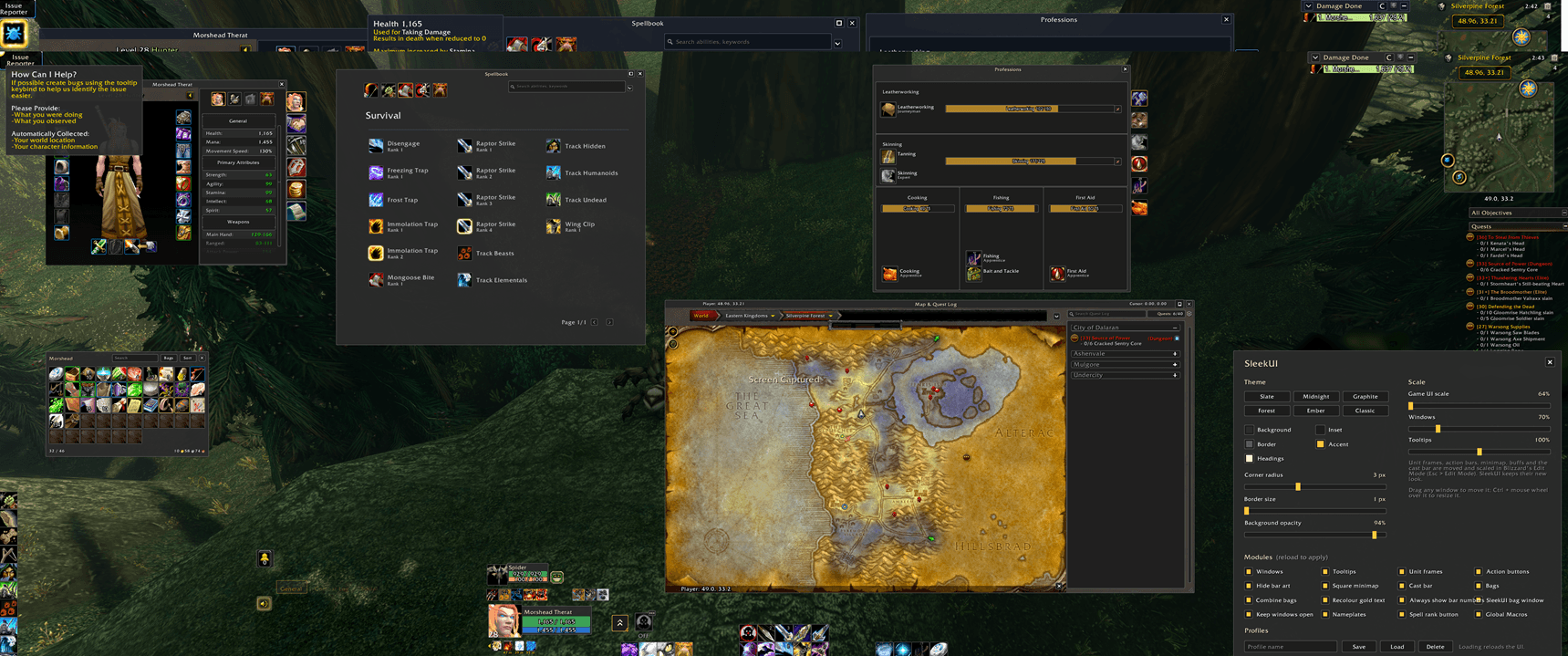
SleekUI replaces Blizzard's ornate frames, parchment and gold trim with a clean, consistent look: dark flat panels, thin borders, slightly rounded corners and soft, readable text. Everything follows one palette, so a single click restyles your whole UI. It doesn't replace Blizzard's frames; it restyles them, so everything keeps working the way you know.
On top of the look, SleekUI adds tools for grouping up: a full Group Finder with filters, a Whispers window that sorts replies into tanks, healers and DPS, star ratings for the players you group with, and a small Sleek console that puts them all one click away.
Type /sleek in game to open the options, or use the Sleek console.
Features
One palette for everything
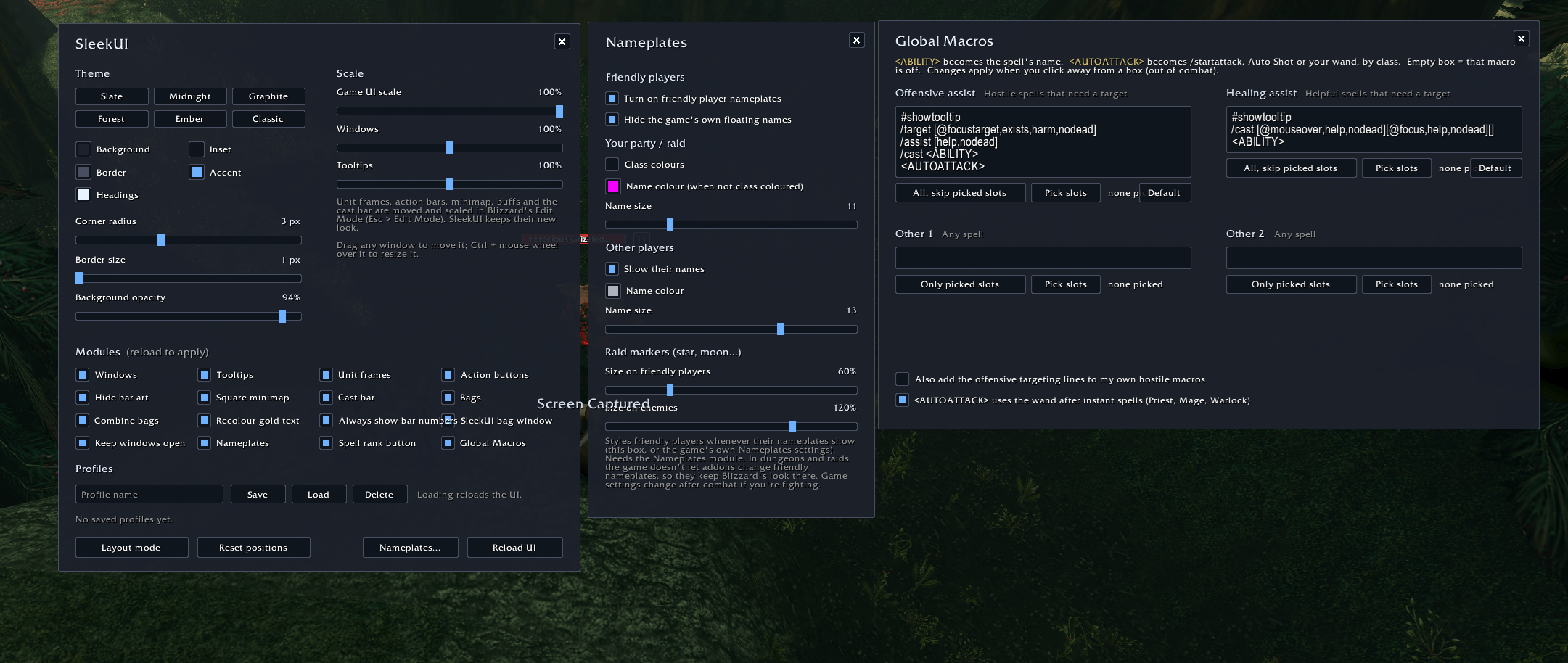
- Six built-in themes: Slate, Midnight, Graphite, Forest, Ember and Classic (dark gold and beige).
- Pick your own colours for the background, inset, border, accent and heading text.
- Adjustable corner radius (square to softly rounded), border thickness and background opacity.
- Gold Blizzard text is recoloured to your heading colour. Dark text written for parchment is lightened so it stays readable.
Windows
- Flat reskin of the default windows: character, spellbook and talents, professions, social, guild, quests, gossip, mail, merchant, map and more.
- Parchment backgrounds removed from quest, gossip, mail and book pages, including the quest details page on the world map.
- Every window is movable. Drag it anywhere, and SleekUI remembers where you put it.
- Every window is scalable. Ctrl + mouse wheel over a window, plus one Windows scale slider for all of them.
- Keep windows open: opening one window no longer closes another.
- Resizable world map: drag the corner to make the map bigger while the quest panel stays the same size.
Group Finder (/gf)
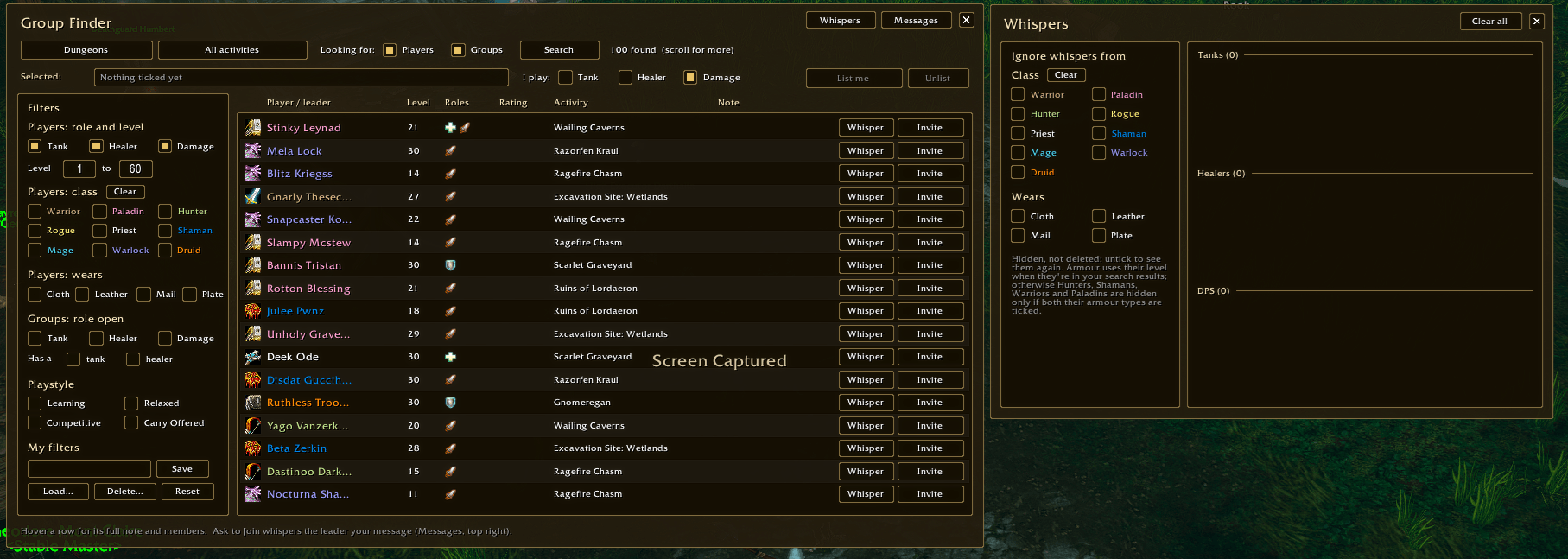
- A SleekUI window over the game's Group Finder listings: players and groups in one list, each under its own heading (or just one of them, your choice). Your own listing, guildmates and friends come first, then the newest.
- Activity picker with suggested level ranges, sorted by level: dungeons around your level first, then lower, then higher, coloured like quests (white, green, orange, grey, red).
- Filters that apply instantly, no new search needed:
- Players by role (tank, healer, damage) and level range
- Players by class
- Players by armour they wear (cloth, leather, mail, plate), including the level 40 step up to mail and plate for Hunters, Shamans, Warriors and Paladins
- Groups with a role still open, or that already have a tank / healer
- Playstyle (Learning, Relaxed, Competitive, Carry Offered)
- My filters: save your favourite filter sets by name and load them back any time
- List yourself: see the activities you've picked, tick your roles and click List me (or Update / Unlist).
- On every row: class or group icon, level, roles or role counts, activity, note, your star rating, and Whisper, Invite or Ask to Join. Hover for the full note and the group's members.
- Your own messages for Ask to Join and invites, with placeholders:
%class%,%level%,%talents%,%role%,%dungeon%.
Whispers window (/gf whispers)
- Every whisper you receive, one line per player, sorted into Tanks, Healers and DPS: by their listing if they have one, by what they wrote ("tank", "heal", "dps"), or by their class.
- Reply and Invite on every line; hover to see all their recent messages.
- Ignore whispers from chosen classes or armour types, laid out like the Group Finder's filters. Hidden, not deleted.
- Its own window, so it can stay open while you play.
Player ratings (/rate)
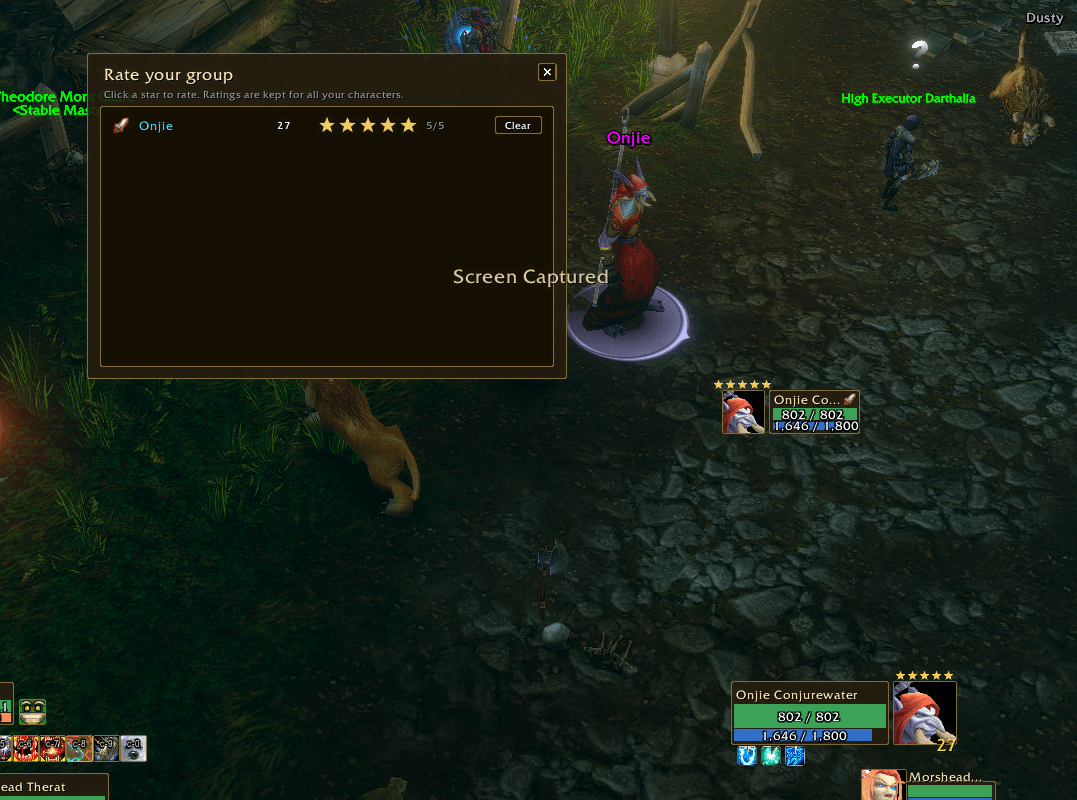
- Rate your group: everyone you're grouped with, with their role icon and five clickable stars. Shows "Unrated" for anyone you haven't rated yet.
- Ratings are remembered across all your characters.
- Your stars show next to those players in the Group Finder, the Whispers window, and above their portrait on party, target and focus frames.
Sleek console
- A small, movable strip of buttons: Options, Group Finder, Whispers, Rate group, Global Macros and Upgrade spell ranks, with badges for new whispers and spells to upgrade.
Unit frames
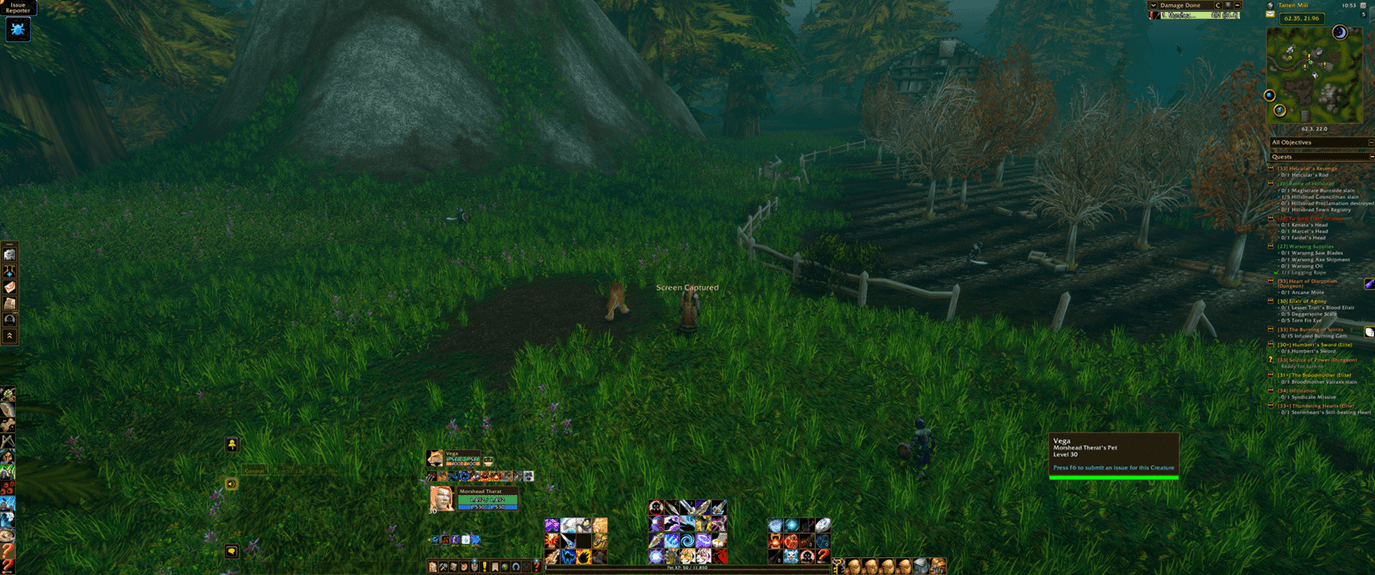
- Square portraits (no circles), sized to match their name and bar panel, with flat health and power bars.
- Muted, easy-on-the-eyes health, mana and rage colours.
- A clean Elite / Rare / Rare Elite / Boss indicator on the target and focus frames (coloured double outline and a small tag) instead of the dragon border.
- Optional always-visible health and power numbers.
- A clean pet mood (happiness) icon for hunters.
Nameplates
- Flat health and cast bars, a small square level box, and the current target outlined in your accent colour.
- Smaller, cleaner plate text, and a softer hostile red and neutral yellow.
- Friendly player names: party and raid members in class colours (or a colour you choose) at a size you choose. Other players can be dimmed, resized or hidden.
- Raid marker size sliders (star, moon, skull...) for markers on friendly players and on enemies.
Bags
- SleekUI's own all-in-one bag window. Every bag in one grid with item quality borders, quest item highlights and junk markers.
- Search box, one-click sort, used/total slot count and your gold.
- Profession bags, quivers, ammo pouches, soul bags and the keyring are hidden by default, with a menu to show any of them.
- Empty slots in special bags show a faint icon of what belongs there (arrows, bullets, herbs, soul shards...).
- Bagnon users: Bagnon is detected and given the SleekUI look instead.
Bars, HUD and everything else
- Flat action buttons, micro menu and bag bar, with optional hiding of the bar art.
- Square minimap with a flat border and mouse-wheel zoom.
- Flat cast bar, and thin, divider-free XP and reputation bars, plus a pet XP bar for hunters.
- Flat tooltips, chat, right-click menus and dropdowns.
- Restyled party/raid manager, quest tracker (follows the Windows scale) and a compact damage meter header.
Spell rank button
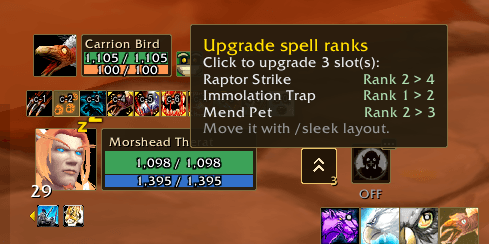
- A button (in the Sleek console) that counts hotbar slots holding a lower rank of a spell than the best one you know.
- Hover it to see what would change. Click it to upgrade them all at once (out of combat).
Global Macros (assist macros)
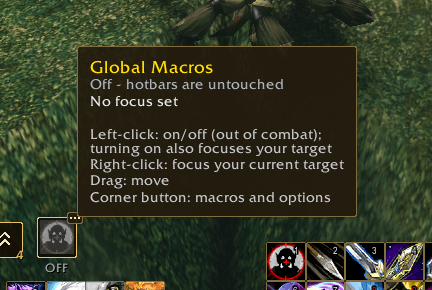
- One click turns your hotbar spells into macros built from four editable templates:
- Offensive assist: by default, casts at your focus's target (perfect for following a tank).
- Healing assist: by default, casts on your mouseover, otherwise your focus.
- Other 1 and Other 2: your own templates for anything else.
- Write any macro and put
<ABILITY>where the spell name goes.<AUTOATTACK>adds the right auto-attack line for your class (/startattack, Auto Shot or your wand). - For each template, choose apply to all and skip the slots you pick, or apply only to the slots you pick. Pick slots by clicking your hotbar buttons.
- Click again and everything goes back exactly as it was.
- Right-click the button to set your focus, and bind a key to toggle it.
Layout and profiles
- Layout mode (/sleek layout) to move and scale frames that Blizzard's Edit Mode doesn't handle.
- Profiles: save your whole setup (theme, scales, positions, modules) under a name, then switch or restore it any time.
- Every part of SleekUI is a module you can switch off.
Lightweight
- No libraries and no dependencies.
- Only hooks Blizzard's UI and never replaces it, to avoid "action blocked" errors.
Commands
/sleek: options (themes, colours, scales, modules, profiles)/sleek plates: nameplate and friendly-name options/sleek layout: move and scale frames outside Edit Mode/sleek reset: reset window and frame positions/gmacro: toggle Global Macros (/gmacro optionsfor the macro editor)/gf: Group Finder (/gf whispersfor the Whispers window,/gf optionsfor your messages)/rate: rate the players in your group
Notes
- Unit frames, action bars, the minimap and buffs are positioned with Blizzard's Edit Mode (Esc > Edit Mode). SleekUI keeps their new look.
- Inside dungeons and raids the game doesn't let addons change friendly nameplates, so friendly names show Blizzard's style there.
- Searching and listing in the Group Finder work from a click (the game requires it), so there's no automatic refresh.
- Ask to Join whispers the group's leader your message, which is how this version of the game's Group Finder handles joining.
Forever Sleek UI Team
