Forever Quest Tracker
- By
A quest tracker drawer with a guide arrow, map route, and party quest sharing. Type /fqt.
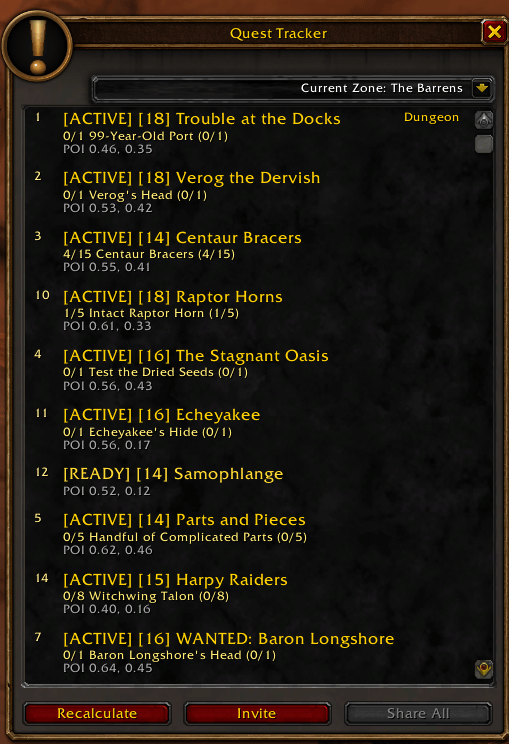
All your quests with progress, sorted by distance.
Description
Forever Quest Tracker
A quest tracker for WoW Forever that shows you where to go next.
Features
- Quest Drawer: your quest list sits in a drawer on the side of the screen instead of the default tracker. Click the pull tab to slide it open or shut, and drag the tab up or down to move it. You can show only quests in your current zone, or all of them.
- Guide Arrow: a gold arrow on screen points to your nearest objective. Under it you see the objective, the quest name and how many yards away it is. Click the quest name to open that quest in your quest log.
- World Map Route: open the map to see your quests numbered in the order to do them, joined by a teal line. Click Recalculate in the drawer to plan the route again after you pick up new quests.
- Invite Nearby: click Invite in the drawer to see nearby players with class colors and levels. Click a name to invite one, or Invite All to group up fast.
- Share All: shares every quest you can share with your party in one click.
- Quest Marks: Elite, Dungeon, Raid and Heroic quests are marked in the list, so you know what needs a group before you go.
- Optional Helpers (Off Unless You Turn Them On): Auto-Accept and Auto-Complete speed up quest dialogs you open, and Auto-Track follows the map's quest pins.
- Quest Loot Highlight: choose Sparkle to make quest loot stand out, or Leave to keep the game's look.
How To Use
- Click the ! button on the minimap to open or close the tracker. Right-click it for settings, and drag it to move it around the minimap.
- In settings you can pick the drawer side, unlock the guide arrow to drag it anywhere, hide the default quest tracker and set the loot highlight.
- Slash commands:
/fqtor/foreverquest: open or close the tracker/fqt settings: open settings/fqt accept,/fqt complete,/fqt track: turn Auto-Accept, Auto-Complete or Auto-Track on or off/fqt loot sparkleor/fqt loot leave: set the quest loot highlight/fqt minimap: show or hide the minimap button
Notes
- Works on its own. Forever Core is optional, not required.
- The guide arrow position, drawer height, open or closed state and zone filter are saved per character. Other settings are shared by all your characters.
- The game's own quest window is left as it is.
Feedback
Found a bug or have an idea? Tell us at https://github.com/Forever-Addons/ForeverAddons-Issues
Forever Quest Tracker Team