Forever Minimap Button
- By
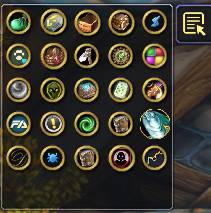
Collects your minimap buttons into a clean, movable drawer with persistent manual drag-and-drop sorting, auto-sort modes, and reserved slots so icon positions never shift unexpectedly.
Button1.jpg
Button2.jpg
Description
Forever Minimap Button gathers your addon minimap buttons into a single movable toggle button and expandable grid drawer—designed so your icons stay exactly where you put them.
Key Features
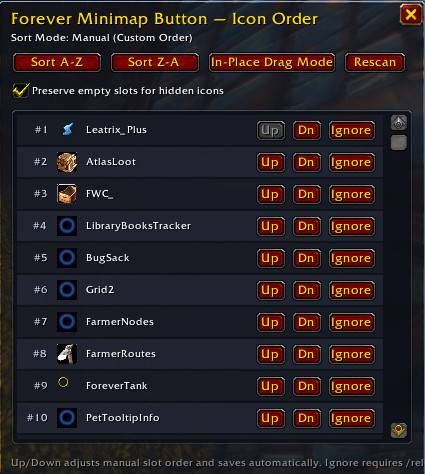
- Persistent Custom & Automatic Sorting: Choose between Manual (Custom Order), Alphabetical (A–Z), or Reverse Alphabetical (Z–A). Late-loading addon buttons are sorted immediately instead of jumping to the end out of order.
- Two Easy Ways to Reorder Icons:
- In-Place Drag Mode (
/fmb sortor Right-Click → Reorder Icons): Drag and drop icons directly on the drawer without accidentally clicking them. - Sort Manager Window (
/fmb orderor Right-Click → Open Sort Manager): View all collected icons in a scrollable list with Up/Down controls, quick A–Z / Z–A sorting, and Ignore buttons.
- In-Place Drag Mode (
- Preserve Empty Slots for Hidden Icons: Enabled by default so when an addon temporarily hides its minimap icon, its grid slot stays reserved and neighboring icons never shift around.
- Broad Button Detection: Automatically collects
LibDBIcon-1.0,LibMapButton-1.1, and standard minimap buttons while ignoring Blizzard secure frames and map pins, plus manual include (whitelist) and ignore (blacklist) commands. - Flexible Layout & Controls:
- 8 growth directions (
Left > Down,Right > Up, etc.), configurable buttons per row, icon spacing, main button scale, and collected icon scale. - Optional auto-close on mouse leave, pet battle hiding, ElvUI/Tukui flat-border compatibility, and optional hiding of Blizzard's Addon Compartment button.
- 8 growth directions (
Quick Controls
- Left-Click: Toggle the icon drawer
- Right-Click: Open quick menu (Reorder Mode, Sort Manager, Settings, Rescan)
- Middle-Drag or Alt + Drag: Move the main button anywhere on screen
- Slash Commands:
/fmbor/foreverminimapbutton(config,sort,order,list,include,ignore,reset)
Forever Minimap Button Team