Forever Magic Wheel
- By
Simple addon that allows adding a keybind to bring up a magic wheel with macros, spells and other player actions to use against targets or the mouseover target or more
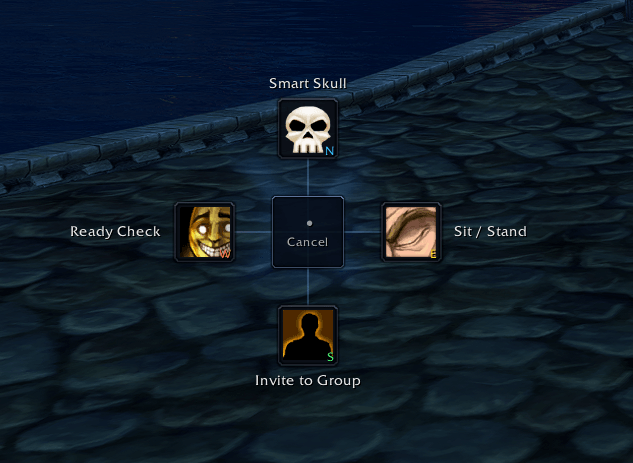
image.png
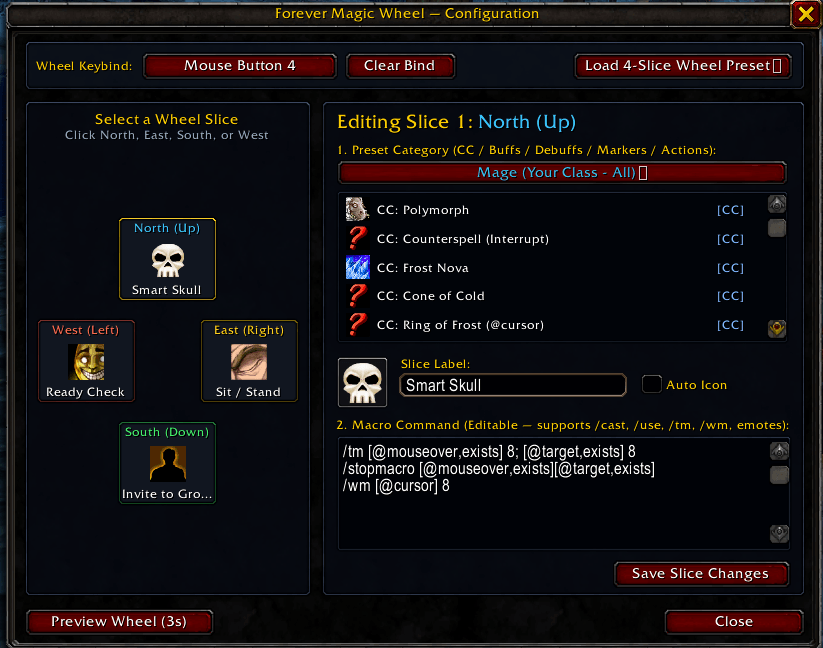
image2.png
Description
# ForeverMagicWheel
**Version:** 1.1.0
**Author:** merlointhesky (Merlointhesky)
**WoW Version:** WoW Forever Beta (v1.60.1 / Interface 16001)
---
## Overview
**ForeverMagicWheel** is a fast, League of Legends-style 4-way radial action menu designed specifically for **World of Warcraft Forever**. Hold your trigger key, flick your mouse in one of four directions (**North**, **East**, **South**, or **West**), and release to immediately execute a spell, macro, raid marker, or social action.
---
## Features
- **4-Way Radial Menu**: Hold your trigger key to open the wheel at your cursor, move toward a cardinal slice (**North / Up**, **East / Right**, **South / Down**, **West / Left**), and release to fire. Cancel cleanly by keeping the cursor in the center deadzone or right-clicking.
- **Per-Character Setups**: Each character gets an independent 4-slice wheel configuration, trigger keybind, and class-aware default setup. Easily copy another character's wheel layout from the **Load Preset...** dropdown.
- **Combat-Safe Execution**: Powered by Blizzard's `SecureActionButtonTemplate` and `SecureHandlerWrapScript`, allowing spells, items, and macros to fire reliably both in and out of combat.
- **Target-First Smart Priority**: Built-in macros and smart social actions prioritize your current `target` first, falling back seamlessly to your `mouseover` unit when no valid target is selected.
- **WoW Forever First + Last Name Support**: Full support for WoW Forever's two-part character names (`First Last`) across `/invite`, `/whisper`, `/trade`, `/inspect`, and `/follow` without realm-separator issues or accidental Battle.net `/cw` redirects.
- **Drag & Drop Spellbook Integration**: Drag any spell directly from your Spellbook onto any slice card in the configuration window to auto-populate its name, icon, and target-first macro.
- **Curated Template Catalog & Presets**:
- **Class Core**: Authentic Vanilla / WoW Forever class spells for all 9 classes (Warrior, Paladin, Hunter, Rogue, Priest, Shaman, Mage, Warlock, Druid).
- **Utility & Social**: Invite, Whisper, Trade, Inspect, Follow, Ready Check, Pull Timer (`/countdown 5`), Mount, Hearthstone, Bandage, and Healthstone/Potion templates.
- **Target Markers**: One-flick Skull, Cross, Square, Moon, Triangle, Diamond, Circle, Star, and Clear Target Marker slices.
- **Quick Presets**: Load complete 4-slice setups (Class Default, Raid Leader / Markers, Social / Group, PvP / Quick Combat, or Copy from another character) in two clicks.
- **Live Cooldowns & Usability Dimming**: Slices display live spell cooldown sweeps and dim when spells are out of range or lacking mana/resources.
- **Minimap Button**: Draggable minimap icon for instant access to the configuration window and test preview.
---
## Installation
1. Copy the `ForeverMagicWheel` folder into your World of Warcraft Forever AddOns directory:
```
World of Warcraft\_forever_\Interface\AddOns\ForeverMagicWheel
```
2. Ensure the folder name is exactly `ForeverMagicWheel`.
3. Launch the game or type `/reload` in chat.
---
## Usage & Controls
### How to Use the Wheel
1. **Hold** your bound trigger key (default: **Middle Mouse Button (`BUTTON3`)**, or any key/mouse button configured in `/fmw`).
2. **Move** your cursor toward **North (Up)**, **East (Right)**, **South (Down)**, or **West (Left)**.
3. **Release** the trigger key to execute the highlighted slice's action.
- *To cancel without firing:* Release the key while inside the center deadzone, or press **Right-Click**.
### Slash Commands
| Command | Description |
| :--- | :--- |
| `/fmw`, `/magicwheel`, `/wheel` | Toggle the configuration window |
| `/fmw test` | Toggle a persistent preview of the radial wheel on screen |
| `/fmw reset` | Reset the current character's slices and settings to class defaults |
| `/fmw debug` | Toggle debug logging in the chat frame |
| `/fmw help` | Display available slash commands in chat |
### Minimap Button
- **Left-Click**: Open or close the Configuration Window.
- **Right-Click**: Toggle the on-screen Wheel Preview.
- **Drag**: Reposition the button around the minimap border.
---
## Configuration
Open the settings panel with `/fmw` or by left-clicking the minimap button:
1. **Keybind & Scale Bar**:
- Click the **Trigger Key** button and press any keyboard key or mouse button (`BUTTON3`, `BUTTON4`, `BUTTON5`, etc.) to bind the wheel.
- Use the **Scale** slider (`70%` – `150%`) to resize the radial menu.
- Use **Load Preset...** to apply a full 4-slice preset or copy a setup from one of your other characters.
2. **4-Slice Editor (North, East, South, West)**:
- **Pick from Catalog...**: Select from curated Class Core, Utility & Social, or Target Marker templates, or clear the slice.
- **Drag & Drop**: Drag a spell from your Spellbook and drop it onto any slice card.
- **Click Icon**: Open the scrollable icon picker (automatically includes icons from your character's known spells plus classic role/marker icons).
- **Macro Editor**: Customize the raw macro text directly (up to 255 characters).
Forever Magic Wheel Team