Forever Loot Roll
- By
A lightweight mover for WoW: Forever to freely reposition, scale, center, and test group loot roll frames. Features magnetic center snapping, an alignment grid, and dungeon combat anchoring.
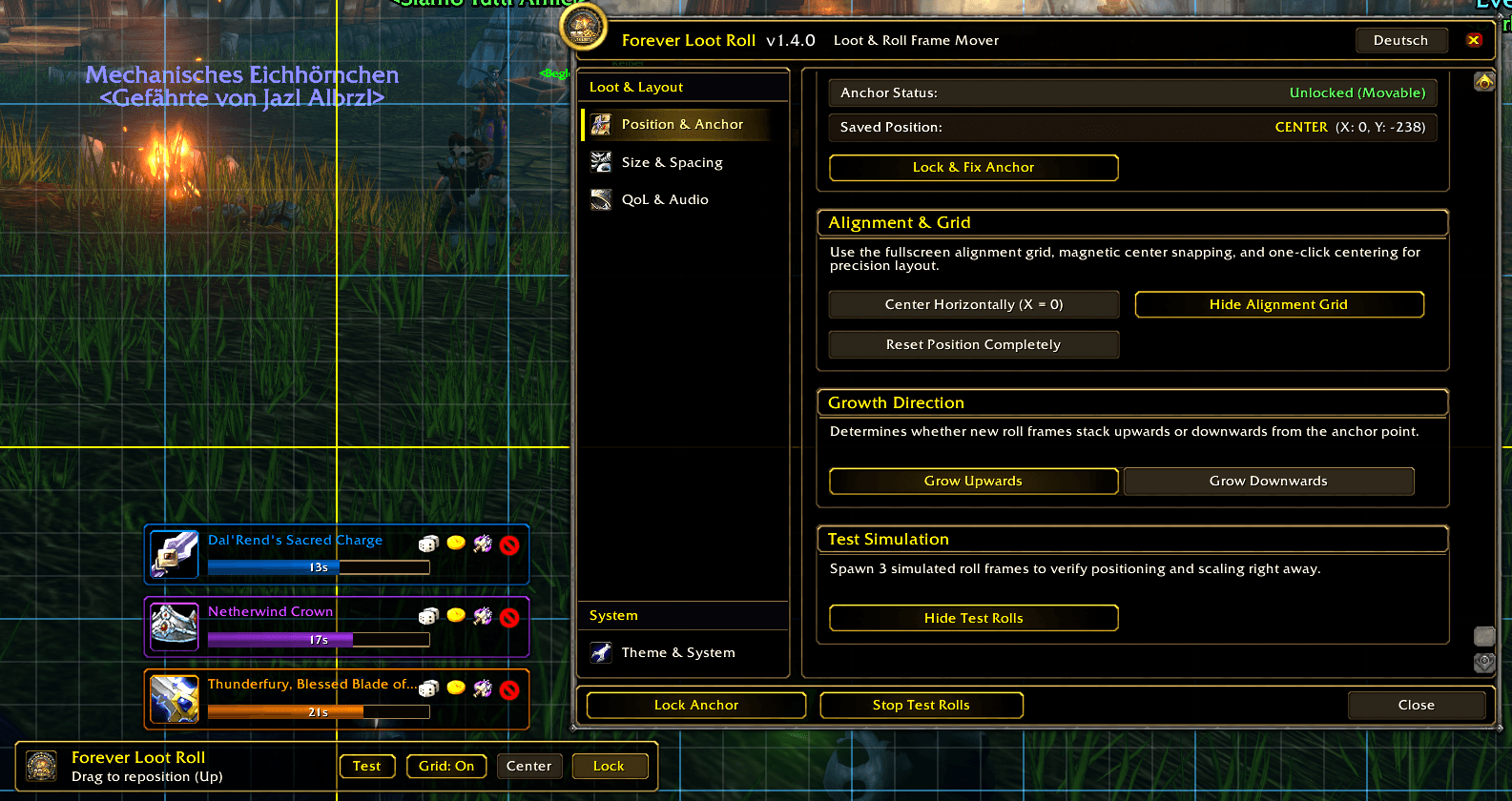
These are just test windows. After configuration, the original WoW loot window will be displayed.
Description
A lightweight, zero-taint frame mover and visual customizer built specifically for World of Warcraft: Forever (Camelot engine / Interface 16001). Decouples default group loot roll frames (GroupLootContainer) from Blizzard's static UI positions, allowing complete positioning freedom, bi-directional stacking, magnetic center snapping, a fullscreen alignment grid, and an interactive 3-frame roll simulator.
English
Forever Loot Roll gives you full control over Blizzard's group loot roll windows on World of Warcraft: Forever. Instead of letting active loot rolls sit locked above your action bars where they obscure health bars, cast bars, or cooldown trackers, this lightweight addon allows you to freely position, scale, and align the loot container anywhere on your screen. Complete with permanent decoupling from Blizzard's internal position manager, roll frames remain locked to your chosen anchor point even during active dungeon combat, stance shifts, and action bar paging.
Key Features
- Movable Drag Anchor & Dungeon Anchor Stability:
- Unlock with
/flr moveto position active loot roll frames anywhere on your screen with edge-clamping to prevent windows from sliding out of view. - Blizzard's internal
UIPARENT_MANAGED_FRAME_POSITIONSis permanently decoupled, eliminating milliseconds-long frame jumping or bottom-screen resets when boss loot drops during combat or stance changes.
- Unlock with
- Magnetic Center Snapping:
- Dragging the anchor near the horizontal center of your screen (within ±18px of
X = 0) automatically snaps it to dead center, accompanied by an acoustic click and a vivid green visual highlight.
- Dragging the anchor near the horizontal center of your screen (within ±18px of
- Fullscreen Alignment Grid (
/flr grid):- Displays a screen-wide alignment grid with highlighted golden center axes and 40px grid spacing to align loot windows with the rest of your UI.
- One-Click Centering:
- Snap directly to horizontal center (
X = 0) at any time via the quick-toggle on the movable anchor bar or through the options menu while preserving your chosen vertical height.
- Snap directly to horizontal center (
- Bi-Directional Stacking & Precision Spacing:
- Choose whether multiple active roll frames stack upwards or downwards from your anchor point.
- Smooth slider controls for container scale (70% to 150%) and vertical pixel gaps between active frames.
- Interactive 3-Frame Roll Simulator (
/flr test):- Spawns 3 simulated authentic roll frames (Thunderfury, Netherwind Crown, Dal'Rend's Sacred Charge) with animated countdown progress bars, full item tooltips, and functional Need, Greed, Disenchant, and Pass buttons to verify your layout outside of dungeons.
- Audio Alerts & Countdown Timer Seconds:
- Optional classic dice roll sound effect on new loot drops.
- Real-time numerical seconds displayed directly on the duration bar.
- Wrought-Iron Options Dialog & Minimap Crest:
- 4-category configuration dialog styled to match authentic Blizzard dialog aesthetics with dynamic text measurement and auto-fitting button padding.
- Circular draggable minimap button with 3-click shortcuts and native Blizzard Addon Compartment integration.
- Zero Taint & Ultra-Lightweight:
- Safe frame anchoring with strict combat lockdown compliance and a tiny memory footprint under 0.05 MB.
Slash Commands
/flror/lootrollor/rollmover— Open configuration menu/flr moveor/flr unlock— Toggle anchor bar to reposition frames/flr grid— Toggle fullscreen alignment grid/flr center— Snap anchor to horizontal center (X = 0)/flr test— Spawn or dismiss 3 simulated test roll frames/flr reset— Reset position back to screen center/flr up//flr down— Set frame growth direction (upwards or downwards)/flr scale <0.7 - 1.5>— Set container scale (e.g./flr scale 1.1)/flr minimap— Toggle minimap button visibility/flr help— Display command list in chat
Installation
Extract the ForeverLootRoll folder into your WoW AddOns directory: World of Warcraft\_forever_\Interface\AddOns\ForeverLootRoll\
Deutsch
Forever Loot Roll gibt dir die volle Kontrolle über die standardmäßigen Beute-Würfelfenster auf World of Warcraft: Forever. Anstatt zuzulassen, dass aufploppende Würfelfenster starr über deinen Aktionsleisten verharren und wichtige Lebensbalken, Zauberleisten oder Cooldowns verdecken, kannst du den gesamten Beute-Container mit diesem schlanken Addon frei verschieben, skalieren und ausrichten. Durch die vollständige Entkopplung von Blizzards interner Positionsverwaltung bleiben die Würfelfenster auch im hitzigen Instanzkampf, bei Haltungswechseln oder beim Durchblättern von Aktionsleisten zuverlässig an deinem gewählten Ankerpunkt fixiert.
Hauptmerkmale
- Frei verschiebbarer Anker & Feste Instanz-Verankerung:
- Mit
/flr moveentsperren und die Würfelfenster per Drag & Drop an beliebiger Stelle auf dem Bildschirm platzieren. Randfixierung verhindert ein Rutschen aus dem sichtbaren Bereich. - Blizzards interne Positionsverwaltung (
UIPARENT_MANAGED_FRAME_POSITIONS) wird dauerhaft neutralisiert – kein kurzzeitiges Springen oder Zurücksetzen an den unteren Bildschirmrand bei Beute im Kampf oder Haltungswechseln.
- Mit
- Magnetisches Einrasten in der Mitte:
- Beim Ziehen des Ankers in die Nähe der horizontalen Bildschirmmitte (innerhalb von ±18 px um
X = 0) rastet dieser automatisch millimetergenau in der Mitte ein – bestätigt durch einen Klick-Sound und einen leuchtend grünen Rahmen.
- Beim Ziehen des Ankers in die Nähe der horizontalen Bildschirmmitte (innerhalb von ±18 px um
- Bildschirmweites Ausrichtungs-Raster (
/flr grid):- Vollbild-Raster mit hervorgehobenen goldenen Mittelachsen und 40-px-Gitternetz zum exakten Ausrichten am restlichen Interface.
- 1-Klick-Zentrierung:
- Horizontales Ausrichten auf
X = 0jederzeit per Direkt-Schalter auf dem Ankerbalken oder im Einstellungsmenü bei Beibehaltung der vertikalen Höhe.
- Horizontales Ausrichten auf
- Flexible Wuchsrichtung & Stufenlose Abstände:
- Entscheide frei, ob aktive Würfelfenster vom Anker aus nach oben oder nach unten gestapelt werden.
- Stufenlose Skalierung von 70 % bis 150 % sowie anpassbarer Pixel-Abstand zwischen mehreren Fenstern.
- Authentische 3-Frame-Testsimulation (
/flr test):- Erzeugt 3 realistische Test-Würfelfenster (Donnerzorn, Krone des Arkanisten, Dal'Rends) mit animierten Restzeit-Balken, Item-Tooltips und interaktiven Bedarf-, Gier-, Entzaubern- und Passen-Buttons.
- Akustisches Signal & Sekundenanzeige:
- Optionaler klassischer Würfelsound bei neuem Beute-Drop.
- Genaue verbleibende Restzeit in Sekunden direkt auf dem Timer-Balken.
- Dialogmenü im Blizzard-Stil & Minimap-Integration:
- 4-Kategorien-Menü im klassischen Eisen- und Gold-Look mit automatischer Button-Weitenanpassung (keine abgeschnittenen Texte).
- Kreisförmig verschiebbares Minimap-Wappen mit 3-Klick-Gesten und nativer Addon-Fach-Einbindung.
- Taint-frei & Ultra-Leicht:
- Sichere Frame-Verankerung, volle Respektierung von Combat Lockdown und unter 0,05 MB Speicherbedarf.
Chat-Befehle
/flroder/lootrolloder/rollmover– Öffnet das Einstellungsmenü/flr moveoder/flr unlock– Schaltet den Ankerbalken zum Verschieben frei/flr grid– Schaltet das Ausrichtungs-Raster ein / aus/flr center– Zentriert das Fenster horizontal auf Bildschirmmitte (X = 0)/flr test– Blendet 3 simulierte Test-Würfelfenster ein / aus/flr reset– Setzt die Position auf die Bildschirmmitte zurück/flr up//flr down– Ändert die Wuchsrichtung (oben / unten)/flr scale <0.7 - 1.5>– Stellt die Skalierung ein (z. B./flr scale 1.1)/flr minimap– Schaltet das Minimap-Symbol ein / aus/flr help– Zeigt die Befehlsübersicht im Chat an
Installation
Den Ordner ForeverLootRoll in das WoW-Addon-Verzeichnis kopieren: World of Warcraft\_forever_\Interface\AddOns\ForeverLootRoll\
Credits & Disclosure
Developed by Zeroa (vibe coded for the most part) for WoW: Forever.
Forever Loot Roll Team