
Forever Loot Planner
1.png
2.png
Description
Forever Loot Planner
Plan your gear in WoW Forever: every dungeon, raid, quest, reputation and crafted item in one compact window.
Pick what you want, see where it comes from, and get a heads-up when it drops. No alt-tabbing to websites, no spreadsheets.
What it does
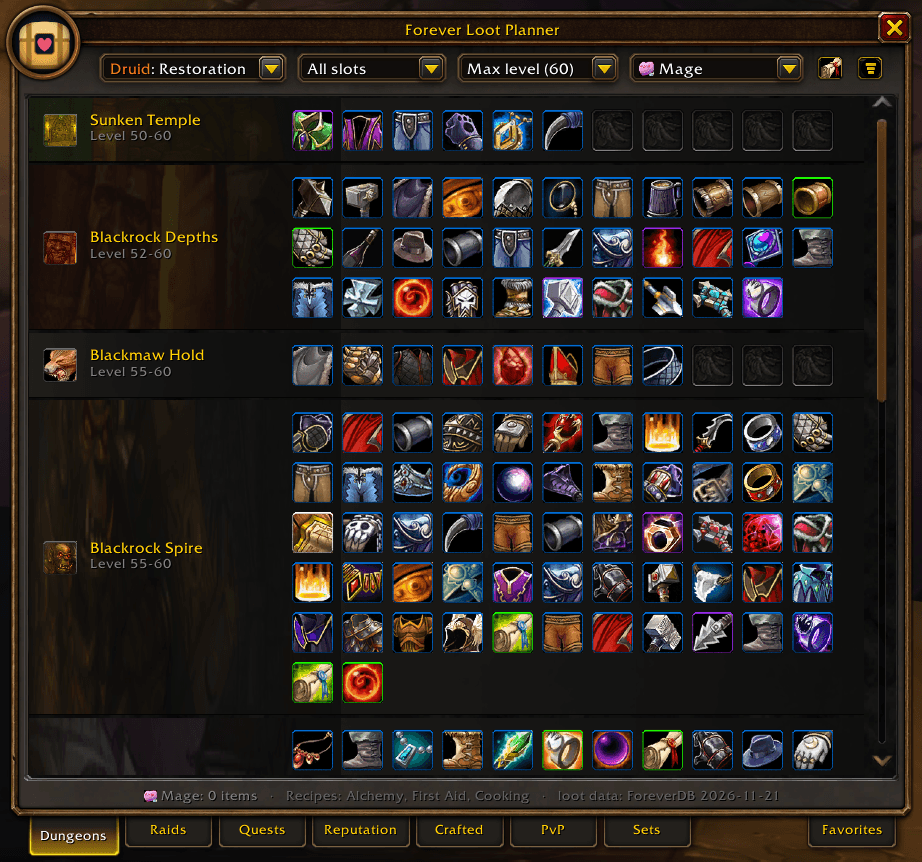
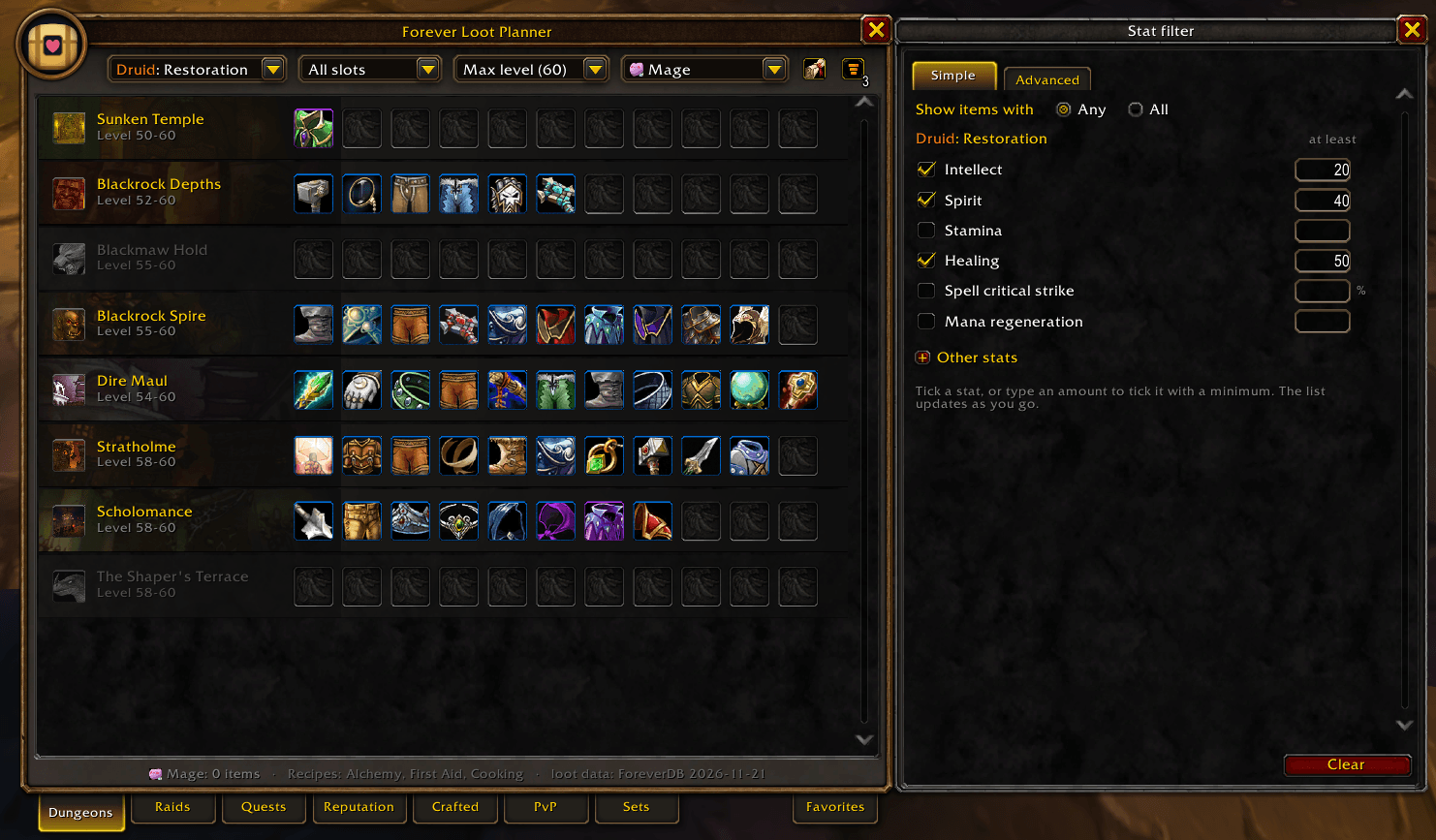
Forever Loot Planner shows the loot of WoW Forever as a clean list: one row per dungeon, zone, faction or profession, with every item as an icon. Rows with nothing for you are dimmed, so you see at a glance where your upgrades are. Hover any item to see exactly where it comes from: the boss and its drop chance, the quest, the reputation standing, or the recipe.
Built for WoW Forever, including all nine new dungeons (Hall of Thanes, Ruins of Lordaeron, Excavation Site: Wetlands, City of Dalaran, The Drowned City, Krol'dok Stronghold, Alcaz Prison, Blackmaw Hold and Shaper's Terrace).
Features
Every source of gear
- Dungeons: every boss, including event bosses like Hurley Blackbreath, the Ring of Law and Gahz'rilla, plus fixed chests like the Dire Maul tribute and bind-on-pickup trash drops.
- Raids: listed and ready; loot appears once Blizzard makes it public.
- Quests: gear rewards grouped by zone and by dungeon, for your faction only. Quests you've already done are greyed out.
- Reputation: gear from faction vendors, with the standing you need.
- Professions: crafted gear from Blacksmithing, Leatherworking, Tailoring and Engineering recipes.
Filters that stay out of the way
- Class and spec: pick a class, then a talent tree. Gear is filtered by its stats, so a Holy Priest doesn't see Strength plate.
- Slot: head, chest, trinkets, weapons and more.
- Level: For my level (default), Max level (60) for planning your endgame, Items I can wear now, or All levels.
- Stats: tick the stats you care about (Agility, Critical strike, Spell power ...) and choose whether items need any or all of them.
Favorites: simple enough for everyone
- Click an item to save it (heart). Click again to remove it.
- Right-click to make it your main pick for that slot (crown). One main pick per slot.
- The Favorites tab shows your plan as a gear sheet: one row per slot, with your main pick named and empty slots easy to spot.
Lists for every plan
Start with one list. When you want more, the heart menu creates separate lists, e.g. Holy PvE, Shadow PvP or Transmog. Each list remembers its class and spec, so switching lists sets the filters for you.
Share your list
- Share in chat: post a clickable [Forever Loot: list name] link to party, raid, guild, a whisper or any channel. Anyone with the addon clicks it and can add your list in one step.
- Share as text: copy a short string to paste in Discord, a stream panel or a guide. Perfect for streamers and guilds publishing their gear lists.
- Imported lists are always added as a new list, never overwriting yours.
Know when it matters
- Zone-in reminder: enter a dungeon and see which of your favorites drop there, and from which boss.
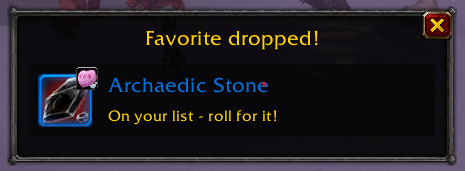
- Drop alert: a warning and sound when one of your favorites drops.
- Group awareness: group members with the addon share their favorites for the current dungeon; tooltips show "Wanted by", so loot rolls are easy to settle.
- Already have it: a green check marks items you have equipped or in your bags or bank.
Everywhere you look
- Item tooltips anywhere in the game show where the item comes from and whether it's on your list.
- Treasure-chest minimap button (click to open, right-click for options, drag to move).
Commands
| Command | What it does |
|---|---|
/flt or /floot |
Open or close the window |
/flt favorites |
Open the Favorites tab |
/flt share |
Share your current list as text |
/flt import |
Import a shared list |
/flt minimap |
Show or hide the minimap button |
/flt minimap reset |
Put the minimap button back in its default spot |
Installation
Install with the CurseForge app (choose WoW Forever), or unzip into: World of Warcraft\_forever_\Interface\AddOns\
Good to know (beta)
- WoW Forever is new and its loot is still being discovered. Some new-dungeon bosses have only a few known drops, and drop chances are unknown for most new-dungeon loot. The data is updated with each release.
- Raid loot shows once Blizzard publishes it.
- Reputation covers factions whose gear carries a reputation requirement in the data; professions cover recipes you find as items (Plans, Patterns, Schematics), not trainer recipes.
- Content from later Classic patches (Zul'Gurub, Ahn'Qiraj, Tier 0.5, Naxxramas era) is hidden; turn on Show upcoming content in the options to see it.
- Chat links need WoW Forever's chat to allow them. If a link doesn't arrive, Share as text always works.
Found a bug or missing item? Please report it on the issue tracker (link on this page) with the item and where it dropped.
Forever Loot Planner Team
