Forever Ledger
- By
buy-queue.png
disenchant-finder.png
dashboard.png
auction-house.png
crates.png
Description
Forever Ledger
Make gold in WoW Forever without the spreadsheet. Forever Ledger scans the auction house, tells you what every item is really worth to you, and lines up the best buys for one click each.
CurseForge · Wago · Discord · Guide
Status: pre-release, tested in the Forever beta and updated often. Expect the odd rough edge, and please tell us on Discord.
Major features
 |
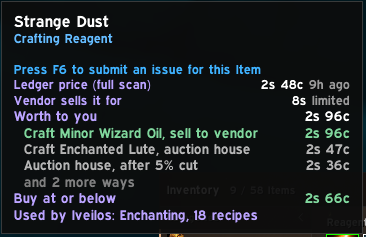
Know what everything is worth. Hover any item: sell it, vendor it, disenchant it or craft it, whichever pays most, and the most worth paying for it. |
 |
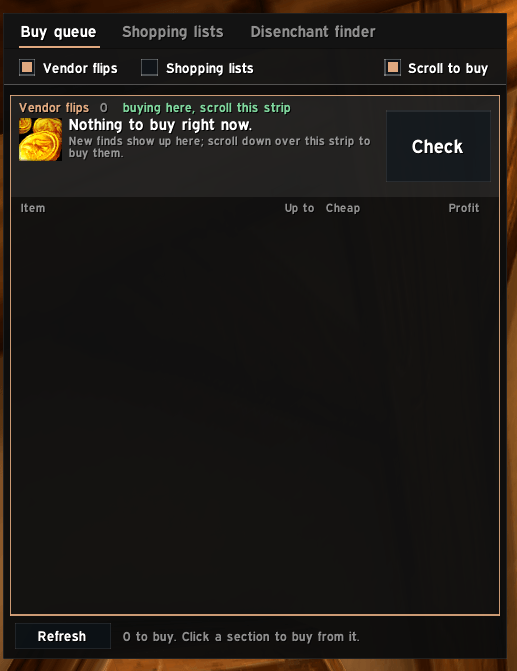
Buy the bargains in one click. Vendor flips and your shopping lists lined up beside the auction house: click or scroll to buy the next one. It never pays more than your limit. |
 |
Spot deals. Listings well below their usual price, with the resale profit after the cut and how sure the deal is. |
 |
Shopping lists. Twink gear to watch for or raid consumables to buy: search the whole list at once, see what you already own, buy with a tick. |
 |
Profit from your professions. Crafts and disenchants ranked by gold an hour, recipes and where to learn them, customers spotted in chat. |
 |
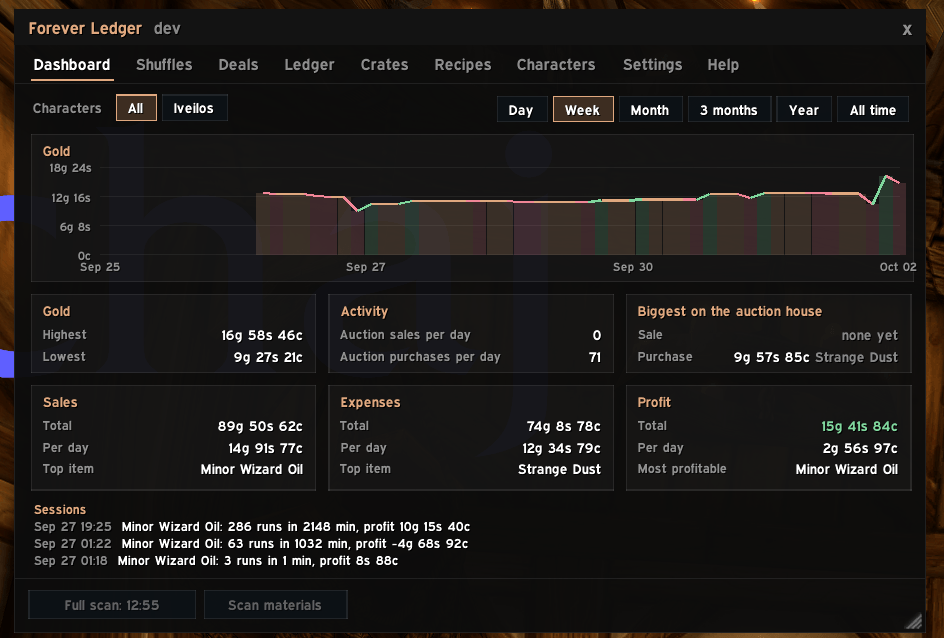
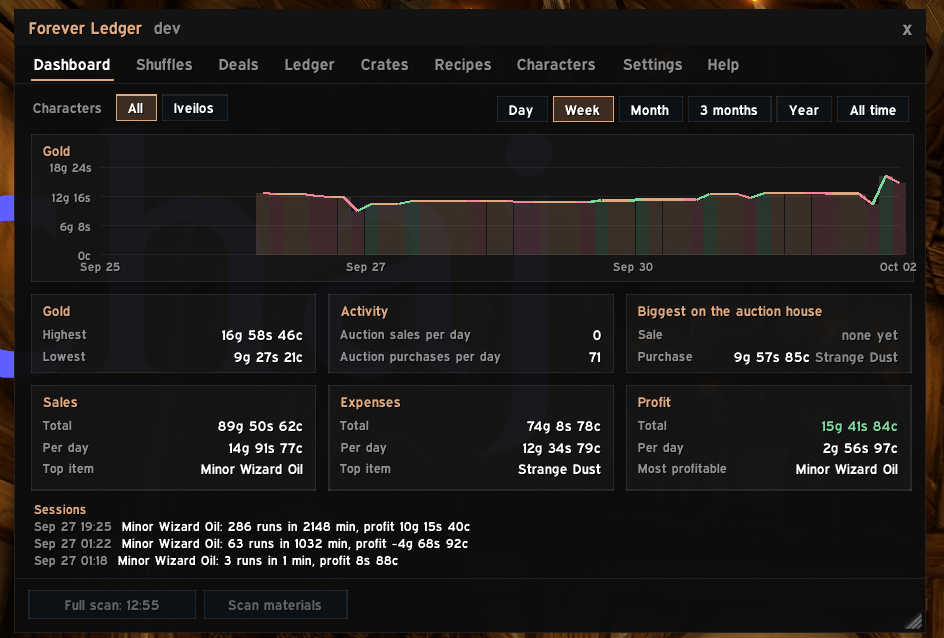
See where your gold goes. Gold over time, every sale and purchase in one list, and what each play session earned you. |
The addon suggests; you click. Every craft, purchase and auction is still your own click, as Blizzard requires.
Everything it does
Finding gold
- Tooltips: what an item is worth to you (you choose which ways count) and the best few ways to use it, the auction price, how fast it sells, what it disenchants into, which of your recipes use it, and quests that need it ("keep it" if you will). Hold Ctrl for its price history. One line with Shift for more, if you prefer.
- Deals: listings well below their usual price, with the usual price, how many days of scans it's based on, the next listing up and the resale profit, rated Good, Fair or Thin. A Booty Bay view compares the neutral auction house with yours, each after its own cut.
- Vendor flips: things on the auction house for less than a vendor pays. Watch flips keeps scanning while the auction house is open, reading every item's cheapest price about every 20 seconds between full scans, and chimes when one turns up. Pause holds it (and the Buy queue's own lookups) while you search yourself.
- Watched items: items you always want checked, each with the most you'd pay (or only under what a vendor pays). Watch flips checks them on every pass, and they go first in the Buy queue.
- Shuffles: buy materials, craft, disenchant or convert, and sell, ranked by gold an hour, with every step spelled out.
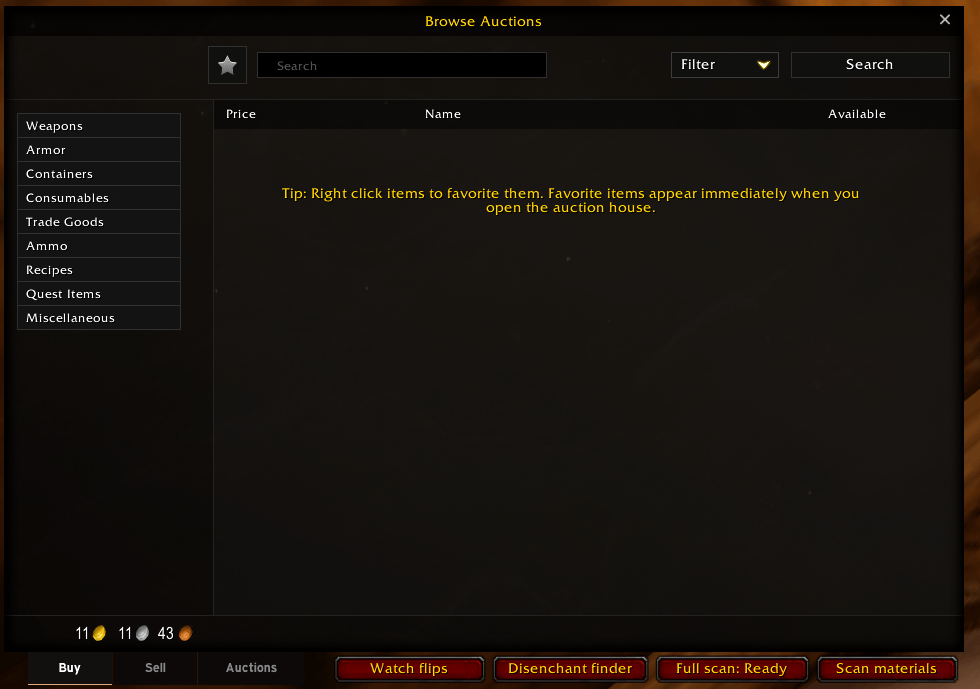
- On the auction house: listings worth buying get a green bar and a badge saying why (FLIP, DE, CRAFT, USE).
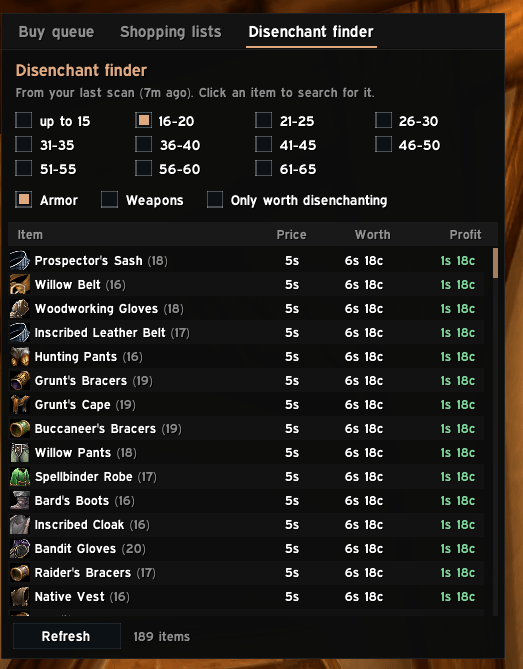
- Disenchant finder: green armor and weapons by item level, with what each is worth to disenchant, on average and on a bad or good roll; add them to a shopping list in one click.
- Price window: Alt-click any item, or look one up by name, for its usual price, trend, the cheapest now and a price graph over 2 weeks, 3 months or a year; for things you craft, the cost, the profit and the materials to a shopping list.
- Gear versions: "of the Eagle" and "of the Whale" are priced separately, each with its own price graph.
Buying
- Buy queue: flips and shopping list items beside the auction house, best profit you can afford first; click Buy or scroll over it to buy the next one.
- Spend at most: cap what the queue spends each auction house visit, or always keep some gold back for repairs.
- Shopping lists: Search all checks the whole list at once (even one version, "of the Monkey"); Have shows what you own across your characters; tick to buy (type any in Want to keep buying whatever is under your price) from it with how many you want and the most you'll pay; craft or buy, whichever is cheaper. Add a shuffle's materials in one click; each price limit says where it came from. Share a list as text.
Selling
- Your auctions: what you have up, what's been undercut (with a reminder), and Cancel next undercut, one click each; sold ones show what you get and when the gold reaches your mailbox, and what sold while you were away is in chat when you come back.
- Price helper: the usual price and the cheapest now on the Sell tab, with Undercut and Usual buttons that fill the price in, and a warning when someone is dumping.
- Sell protection: a warning, and Post grayed out, before you list something for less than a vendor pays.
Crafting and professions
- Recipes and trainers: every recipe for your professions, who knows it, where to get it, the skill needed and profit per craft; sort by any column.
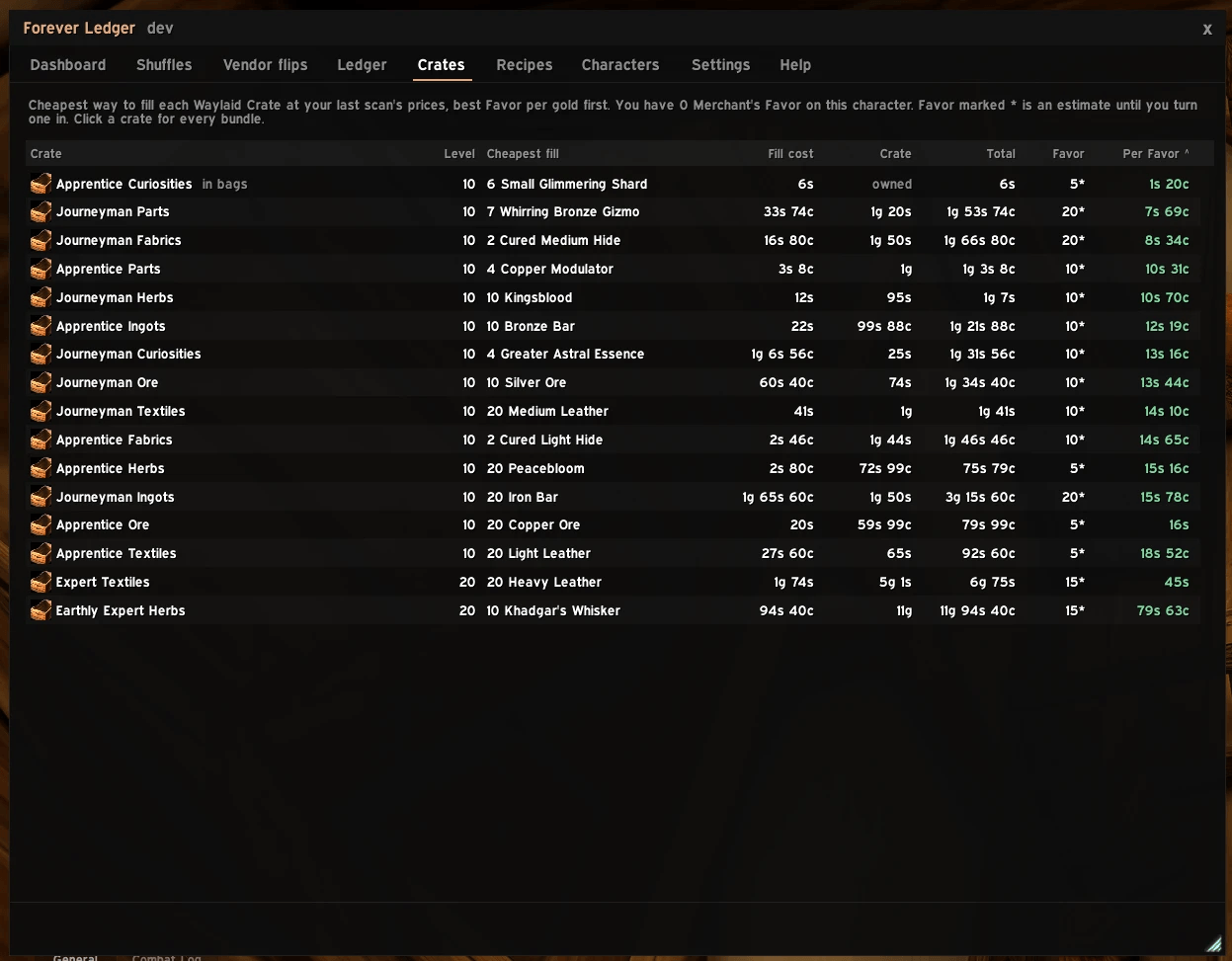
- Waylaid Crates: the cheapest way to fill each crate at today's prices, and gold per Merchant's Favor.
- Customer finder and ads: spots people in chat asking for what your character can do (enchanting, crafted items, Mage water and portals, Warlock summons, lockpicking), with Whisper and Invite buttons, one-click ads for Trade, and a Silence button.
Your gold
- Dashboard: gold now, profit, sales and expenses at a glance, gold over time, your best sales and buys, and recent sessions.
- Ledger: every transaction in one list; select rows to see what they add up to; resale profit per item.
- Characters: every character's bags and bank, per realm and faction, with what it's all worth and the best way to turn each item into gold.
- Bag value: a bag's tooltip shows what one slot costs and the cheapest bag per slot right now.
- Sessions: a small tracker for gold an hour, gold in and out and what you loot, and every session listed in the Ledger.
- Dungeon runs: runs, time, coin and what dropped for you, per dungeon.
- Riding fund: how close you are to riding at 40 and epic riding at 60, mount included.
- Leveling tab: below level 20, ways to make gold while leveling (gathering, cloth, bags, crafts for players), best first and priced from your scans.
- Training advice: beside your class trainer, which spells and ranks are must haves, nice to have, or skippable while leveling, with what each costs.
Getting around
- Welcome and Help: a short guide the first time, Help by topic with common questions, and search boxes for Settings and Help.
- Your look: three themes (FL Clean, FL Bronze, FL Gilded), your accent color (or EllesmereUI's), and a Size from 75% to 150%.
- Settings profiles: characters can share a set of settings or each have their own; export a profile for a friend.
- Works with Auctionator, TSM and Auctioneer prices and full scans, switches off what they (or ForeverForge) already show, and looks at home with EllesmereUI.
- Two accounts? Live sync shares prices, price history and recipes between them while both are online, and your gold, sales, bags and bank if you like. Remove characters you no longer have in Settings.
- Update notice: hear from your guild or group when a newer version is out.
What's coming
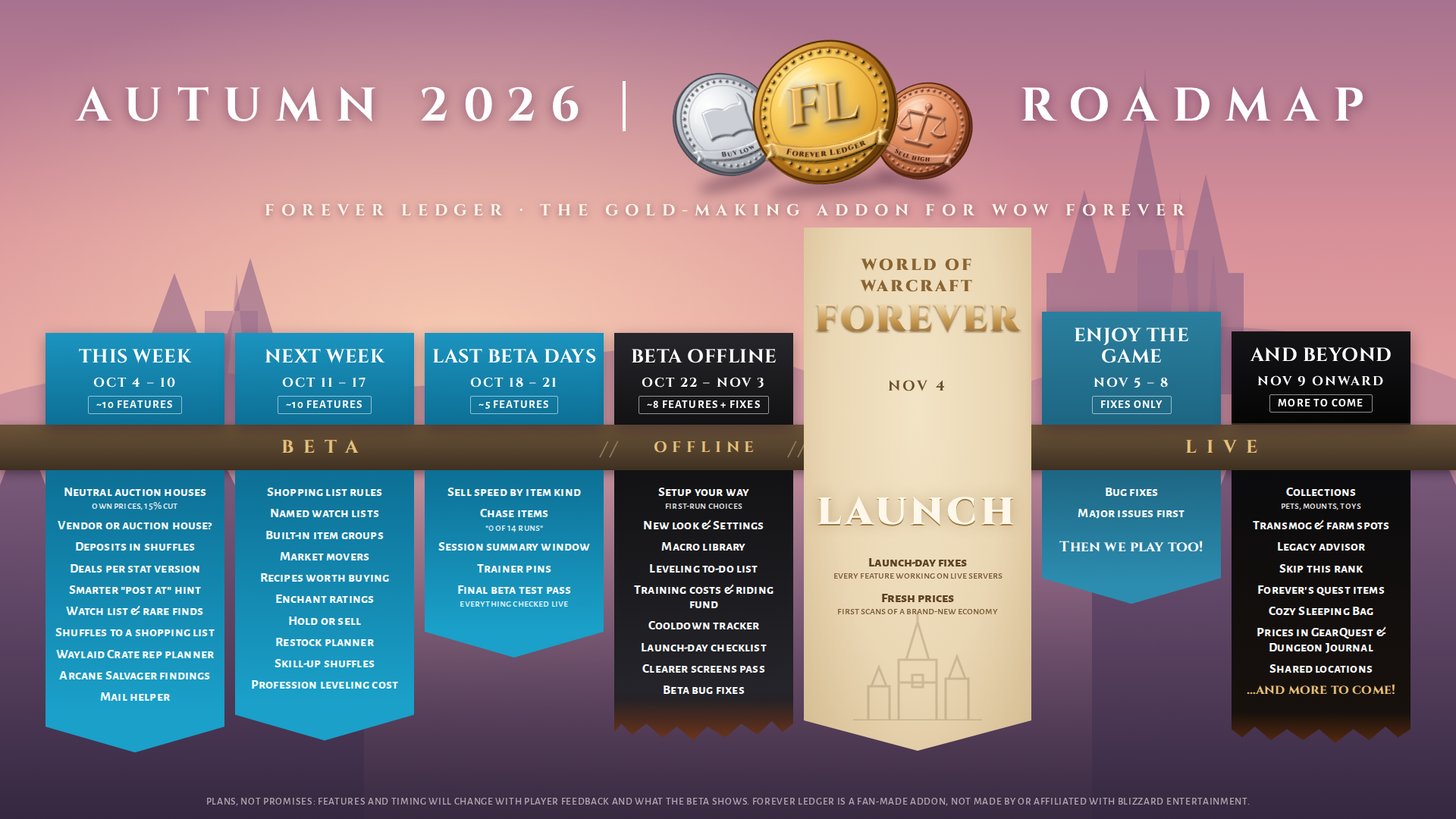
Plans, not promises: the full list is in the roadmap, and ideas are welcome on our Discord.
Your data
Forever Ledger keeps everything in its saved file on your own PC (WTF\Account\...\SavedVariables\ForeverLedger.lua). Nothing is sent to the author or anyone else.
- What it keeps: auction house and vendor prices and their history; recipe, vendor and trainer locations you've seen; your characters' professions and recipes, gold over time, sales, purchases and vendor trades; bag and bank contents (this account only); requests the customer finder spotted in chat; and your work-done log.
- What it sends: only two things, and only when you choose to. Live sync whispers prices, price history and recipes to your own linked character (off until you link one), and your gold, sales, bags and bank only if you say yes for that link, and the ad buttons post your ad in Trade chat when you click them.
- Export / import copies your data as text for you to paste on your other account; it goes nowhere by itself.
If a feature ever shares anything with other players (an idea on the roadmap: sharing where vendors and trainers are, so everyone's data fills in faster), it will be world facts only, never names, gold or bags, it will ask first, and you can turn it off.
Install
The easiest way is an addon manager: Forever Ledger is on CurseForge and Wago, so the CurseForge app, Wago app or WowUp install it and keep it updated.
By hand:
- Download the latest
ForeverLedger-x.y.z.zipfrom Releases, the file under "Assets", not "Source code". - Open the zip and drag the ForeverLedger folder inside it into your Forever client's
Interface\AddOnsfolder, so you end up withInterface\AddOns\ForeverLedger\ForeverLedger.toc. The folder must be named exactlyForeverLedger, with no version number and no extra folder in between, or the game won't see it. - Start the game and make sure Forever Ledger is ticked in the AddOns list, then type
/fl.
How to use it
The guide explains every feature, with pictures. The same text is in the game under /fl → Help.
What's next
See the roadmap for planned features. Ideas are welcome: use /feature on our Discord, or open an issue.
Commands
Most things have a button; these are for when you'd rather type. The main ones:
| Command | What it does |
|---|---|
/fl |
Open or close the window |
/fl scan |
Full scan if one is allowed, otherwise scan your materials (auction house open) |
/fl watch |
Watch flips: keep scanning while the auction house is open |
/fl queue, /fl lists |
The Buy queue, or your shopping lists (lists open anywhere) |
/fl session start, /fl session stop |
Start or stop a session |
/fl runs |
Your dungeon runs |
<details> <summary>Show all commands</summary>
| Command | What it does |
|---|---|
/fl scan full |
Scan every listing (Blizzard allows this about every 15 minutes) |
/fl scan materials |
Scan just the materials and products of your recipes |
/fl stop |
Stop a scan |
/fl shuffles |
List the best shuffles and vendor flips in chat (/fl shuffles all for everything) |
/fl deals |
Open the Deals tab (/fl deals list in chat) |
/fl price |
The price window: add a shift-clicked item or its name, or leave it off to look one up |
/fl customers, /fl work |
The Customers window, or its Work done view; /fl customers on / off turns the customer finder on or off |
/fl cut 5 |
Auction house cut used in values, in percent |
/fl margin 10 |
Safety margin for shuffles and "buy at or below", in percent |
/fl seconds 3 |
Seconds per craft, used for profit per hour |
/fl money |
Today's money in and out for this character |
/fl de |
Disenchant results so far, against what the addon expects (/fl de reset to start over) |
/fl new, /fl welcome |
What's new in this version; the welcome again |
/fl pair First Last |
Pair with your character on another account for live sync (do it on both); /fl unpair stops it and removes their characters |
/fl quiet |
Turns the game's sound off and plays Forever Ledger's chimes at full volume, for that character until you type it again |
/fl sync |
Sync status; /fl sync now sends everything, /fl sync ping First Last checks whispers reach someone |
/fl minimap |
Hide or show the minimap button |
/fl pull |
Copy prices from Auctionator, TSM or Auctioneer |
/fl source auto |
Where prices come from: auto, own, auctionator, tsm, auctioneer |
/fl export, /fl import |
Move data between accounts |
/fl csv |
Prices as plain text |
/fl tooltip |
Turn tooltip lines on or off |
/fl perf |
What the addon has spent time on (for lag reports) |
/fl api |
Which game functions are available (useful in bug reports) |
/fl debug |
Turn debug messages on or off |
</details>
Community and bug reports
Join the Forever Ledger Discord for updates, help and WoW Forever news. To report a bug, type /bug there and fill in the short form (or open an issue on GitHub); include the output of /fl api and any error text from BugSack if you can.
Project layout
| Path | What it is |
|---|---|
*.lua, ForeverLedger.toc |
The addon itself |
media/ |
Pictures the addon uses |
CHANGELOG.md |
What changed in each version |
docs/ |
The guide, and notes on testing, developing and releasing |
tools/flip-calculator.html |
The web version of the flip calculator |
.github/ |
Automatic checks, release builds and the bug report form |
License
MIT. See LICENSE.
Classic recipe sources in ClassicRecipes.lua are generated by tools/build-classic-data.ps1 from wow-classic-items by nexus-devs and pfQuest by shagu (both MIT license).
Forever Ledger Team