Forever Journey
- By
Overview.png
History.png
statistics.png
timeline2.png
Description
Forever Journey
Forever Journey is a personal character journal for World of Warcraft: Forever.
Instead of being another statistics dashboard, Forever Journey records the story of your character: places discovered, levels reached, quests completed, professions developed, deaths encountered, personal memories, and other meaningful moments along the way.
Your journey is more than numbers. It's a collection of moments worth remembering.
Help Shape Forever Journey ❤️
Forever Journey is a passion project, and I'd love to hear what you think!
What moments from your character's journey would you like the addon to remember?
If you've tried Forever Journey, I'd also love to know what you enjoyed or what could be improved.
Feel free to leave a comment below. Even a few words would be incredibly helpful!
Features
Overview
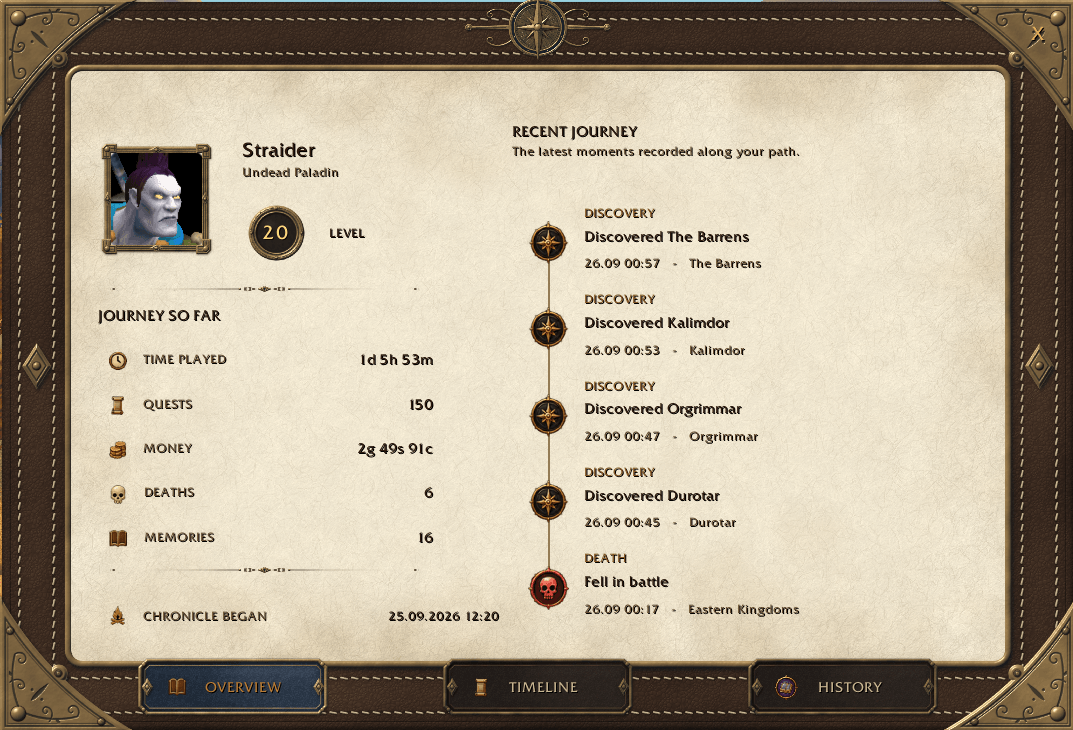
A compact summary of your current journey:
- Character portrait, race, class, and level
- Total played time
- Completed quests from game statistics when available
- Current money
- Lifetime deaths from game statistics (with a local fallback)
- Total recorded events
- Chronicle start date
- Recent journey events
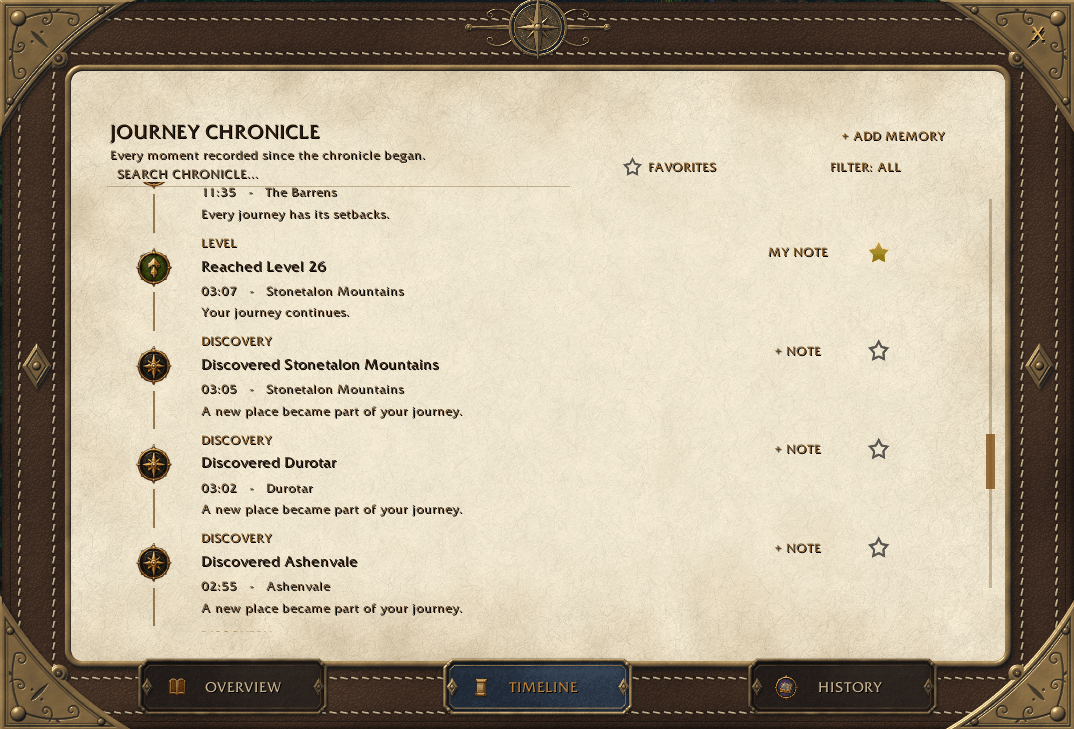
Chronicle
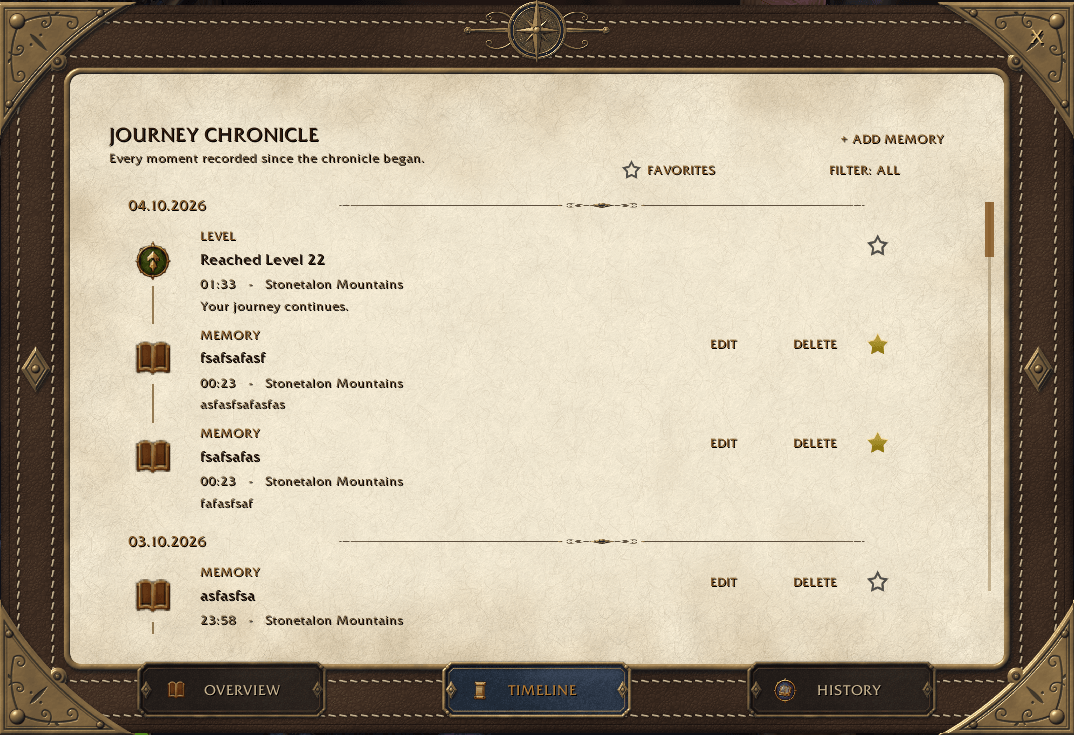
A chronological journal of recorded events.
Events are grouped by date and can include:
- Level ups
- New zone discoveries
- Dungeon and instance entries
- Boss victories
- Deaths
- Quest milestones
- Learned professions
- Profession skill milestones
- Manual memories created by the player
Chronicle also supports:
- Favorite stars on memories
- Editing and deleting manual memories
- Multi-select filtering by event type
- Favorites-only filtering
- Combining Favorites with one or more event-type filters
Manual Memories
Not every meaningful moment can be detected automatically.
You can add your own memories directly from the Chronicle.
A manual memory contains:
- A title
- An optional note
- The current date and time
- The current location
Manual memories can be edited or deleted later. Automatic journey events remain read-only.
Favorites
Some moments are worth keeping close.
Any Chronicle memory can be marked as a favorite.
Favorite state is persistent and is used by:
- The Favorites-only Chronicle filter
- The Memorable Moments section in History
History
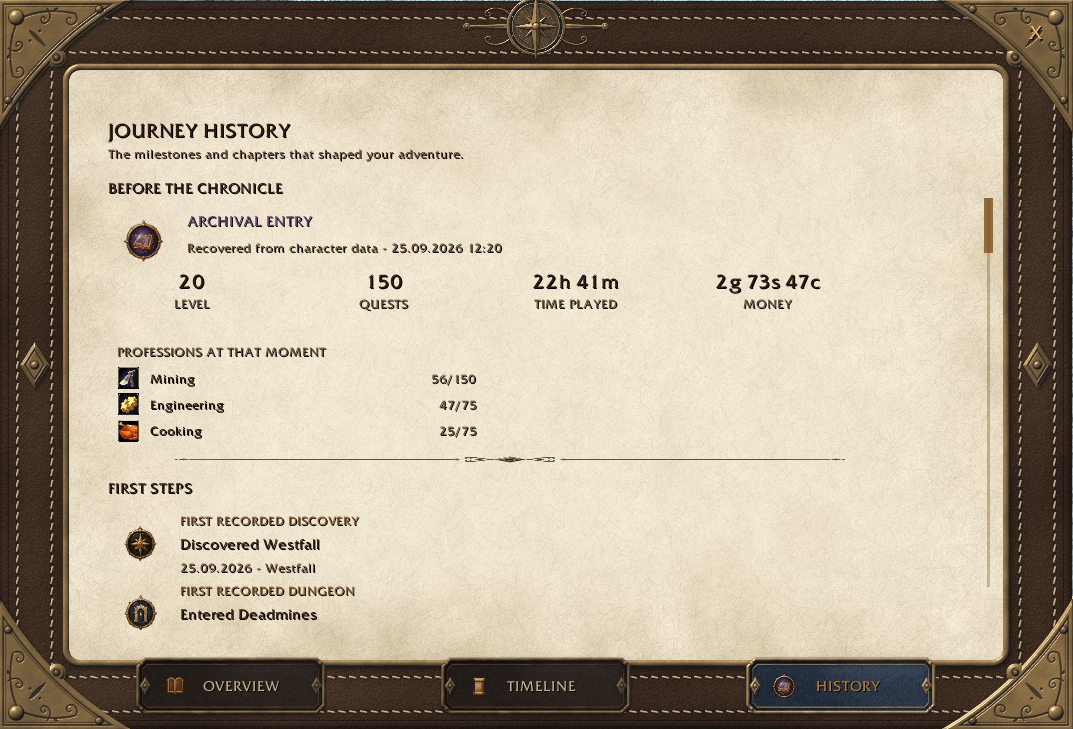
A retrospective view of your character's journey.
Depending on when Forever Journey was installed, History can contain:
- Recovered character state from before the journal started
- First recorded discoveries
- Level milestones
- Quest milestones
- Profession milestones
- Memorable Moments selected with favorite stars
- Journey summary
Recovered History
Forever Journey does not invent historical dates.
If the addon is installed on an existing character, it can recover information that is still available through the game API, such as:
- Current level
- Completed quest count
- Played time
- Money
- Professions
This information is displayed as a recovered snapshot rather than as fabricated historical events.
From the moment Forever Journey starts recording, new events are stored normally in the Chronicle.
If the addon is installed on a new character, the History begins naturally from the start without creating a recovered archive.
Quest Milestones
Forever Journey records quest milestones every 50 completed quests:
- 50
- 100
- 150
- 200
- And so on
Milestones that were already passed before the addon started recording are not recreated retroactively.
Profession Tracking
Forever Journey records:
- Newly learned professions
- Profession skill milestones every 75 skill points
Existing professions at the moment the journal starts are treated as part of the character baseline and do not generate fake historical events.
Boss Victories
Forever Journey records successful boss encounters from the moment this version starts tracking them.
A boss victory stores the boss, instance, difficulty, and group-size context exposed by the client.
Rapid duplicate notifications for the same encounter are suppressed so a single kill does not create duplicate Chronicle entries.
Boss victories are available as a dedicated Chronicle filter and can also be marked as favorites.
Death Memories
Even unfortunate moments become part of your story.
Deaths are recorded as part of your journey.
When the client exposes additional Death Recap information, Forever Journey can enrich a death memory with details such as:
- Killer
- Ability or spell
- Damage information
- Environmental cause
Supported environmental causes can include:
- Falling
- Drowning
- Fatigue
- Fire
- Lava
- Slime
Available detail depends on the information provided by the game client.
Journey Statistics
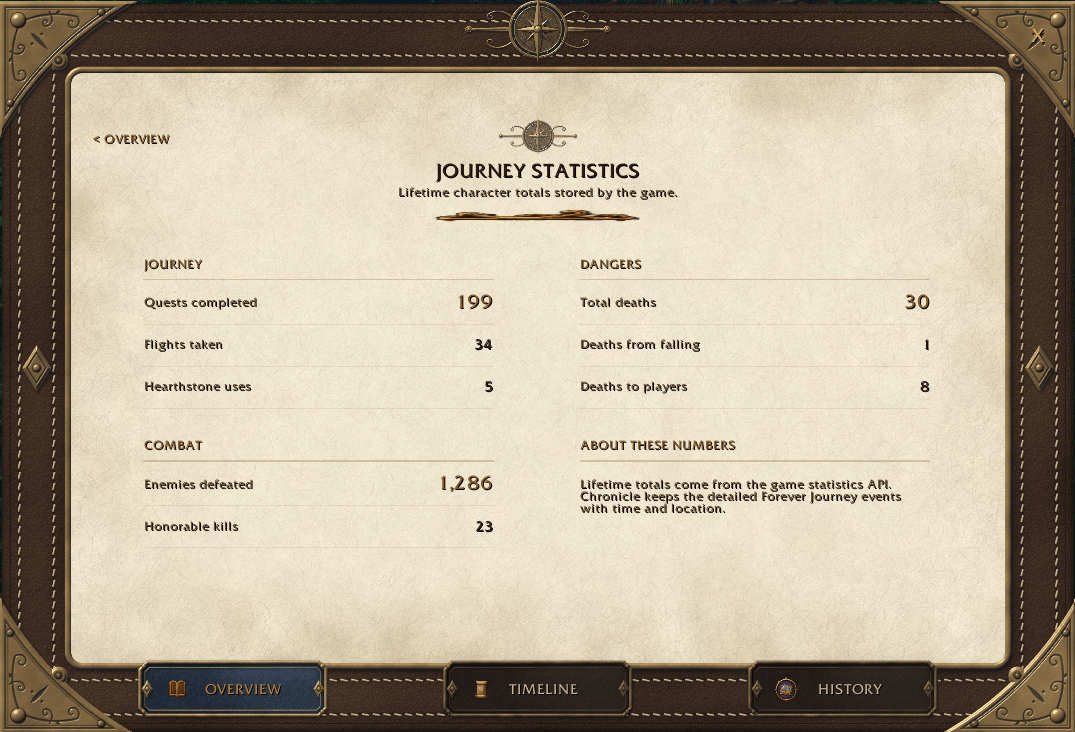
The Statistics action on Overview opens a dedicated journal page displaying lifetime values reported by the game.
Available statistics include:
- Total deaths
- Completed quests
- Enemies defeated
- Honorable kills
- Flights taken
- Hearthstone uses
- Deaths from falling
- Deaths caused by other players
These aggregate values can remain available after reinstalling World of Warcraft because they come from the game statistics API.
However, statistics cannot reconstruct the exact timestamps, locations, or circumstances of historical events.
Backup and Restore
Your character's story deserves to be preserved.
Forever Journey includes manual backup and restore functionality to help protect your Chronicle from accidental data loss.
Create a Backup
- Open Data > Export.
- Generate or refresh your backup.
- Select the complete backup text and press Ctrl+C.
- Paste the text into a UTF-8
.txtfile. - Save the file outside your World of Warcraft installation and its
WTFfolder.
For additional protection, keep another copy somewhere safe.
Restore a Backup
- Open Data > Import.
- Copy the previously saved backup text from your
.txtfile. - Paste it into the import field using Ctrl+V.
- Click Validate Backup to check the format, checksum, and character identity.
- Review the number of new and duplicate memories.
- Click Restore Data, followed by Confirm Restore.
- Run
/reloador log out normally to save the restored data.
How Restoration Works
- Existing Chronicle memories are preserved.
- Missing memories are restored from the backup.
- Duplicate entries are detected using stable memory IDs.
- Imported favorites and other saved details are preserved for newly restored memories.
- Backups can only be restored to the same character identity.
Important: Forever Journey cannot automatically create files outside the game's addon environment.
Your normal SavedVariables file is stored under:
WTF/Account/.../SavedVariables/ForeverJourney.lua
Deleting the WTF directory without a backup can permanently erase your locally recorded journey.
We recommend exporting your Chronicle periodically, especially after meaningful events or before reinstalling the game.
Minimap Launcher
Forever Journey adds a small journal launcher around the minimap.
- Left Click — open or close the journal
- Drag — move the launcher around the minimap
The launcher position is saved between sessions.
Slash Commands
Open or close the journal:
/fj open
Saved Data
Forever Journey uses World of Warcraft SavedVariables.
Journey data:
- Persists between game sessions
- Is stored separately for each character
- Survives
/reload - Survives a full client restart
Manual memories and favorite state are stored together with the rest of the character's memories using schema v3.
Remember that SavedVariables are local files. Keep a separate backup to protect against game reinstallation or accidental deletion.
Localization
Currently supported:
- English
- Russian
Compatibility
Designed for:
- World of Warcraft: Forever
- Client:
1.60.1(Forever) - Interface:
16001
Version
Current release candidate:
0.4.0-rc.1
Beta Status
Forever Journey is actively being developed for World of Warcraft: Forever.
The addon focuses on preserving meaningful moments from your character's journey while keeping the experience lightweight and unobtrusive.
New features and improvements will be guided by player feedback and the capabilities of the game client.
Known Limitations
- Exact chronology from before addon installation cannot be reconstructed when the game API does not expose it.
- Recovered History is a snapshot, not a fabricated timeline.
- Quest milestones already passed before recording begins are not recreated retroactively.
- Existing professions are treated as baseline history.
- Profession milestone tracking begins after the profession baseline has been established.
- Detailed Death Recap information depends on client API availability.
- Previously recorded NPC names are preserved as historical data and may remain in the client language in which they were originally captured.
- Boss victories are recorded forward-only from live encounter events; earlier boss kills are not reconstructed.
- Reputation records only standing-rank increases; individual reputation gains are intentionally ignored.
- Manual text backups are required to preserve detailed Chronicle events if the WoW
WTFdirectory is deleted.
Every adventure leaves a story. Let Forever Journey remember yours.
Forever Journey Team