
Forever Group Finder Next (FGFN)
- By
Screenshot 2026-10-17 201343.jpg
Screenshot 2026-10-17 201437.jpg
Screenshot 2026-10-17 201524.jpg
Screenshot 2026-10-17 201557.jpg
Screenshot 2026-10-17 201637.png
Description
Forever Group Finder Next (FGFN)
For World of Warcraft: Forever
Version 1.0.7.10 | Interface 16001
Tired of bouncing between the Group Finder and chat channels trying to put a dungeon group together?
That's why I made Forever Group Finder Next.
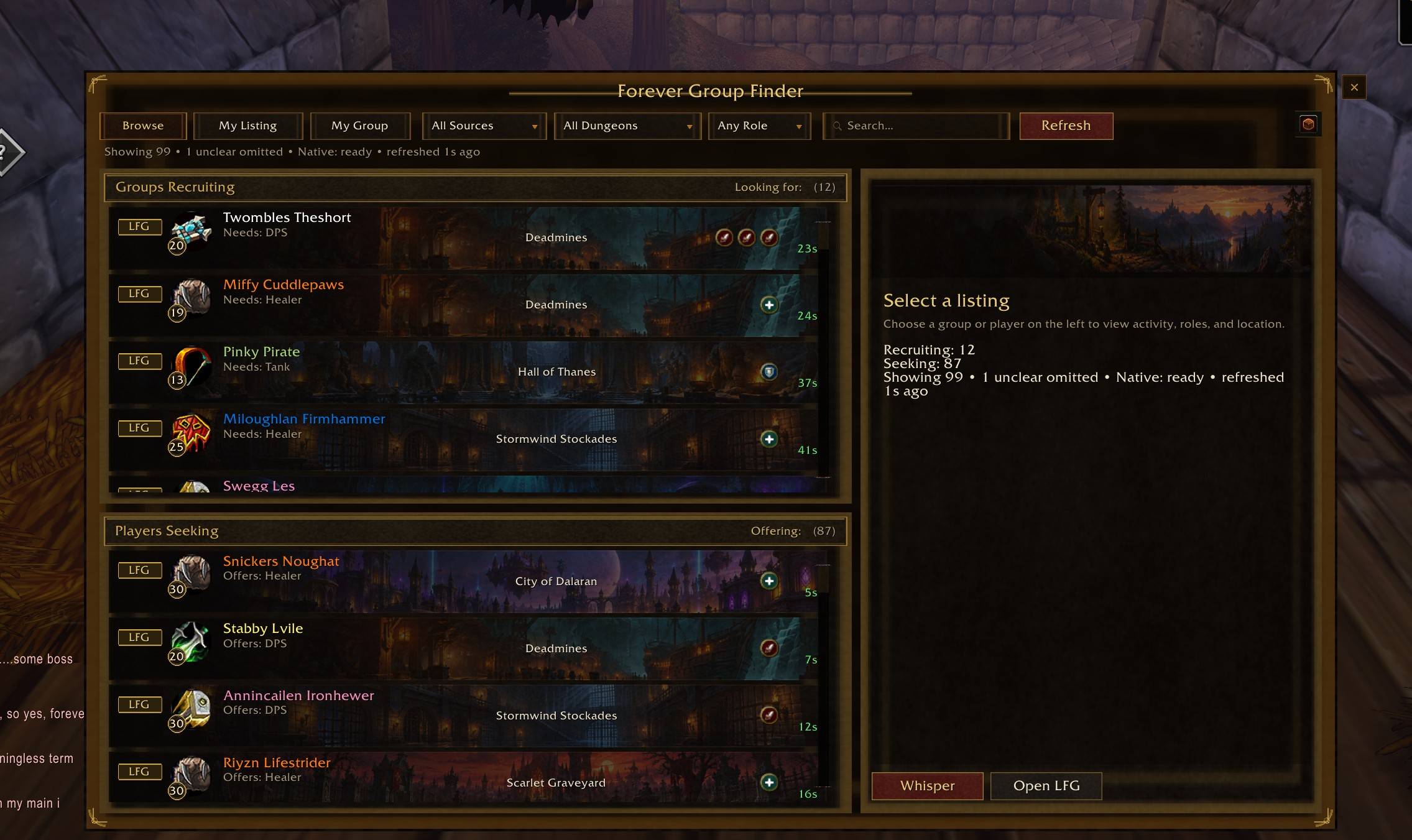
FGFN brings Forever's built-in Group Finder and LFG/LFM chat messages together in one place. You can browse groups, find players, create your own listings, and keep track of your party once you've found one.
It also includes dungeon maps, entrance locations, flight-path assistance, and a few other things I probably didn't need to add but did anyway.
There's even a game called FiGiFiN for when you're waiting on that last player to join.
FGFN works alongside Forever's existing Group Finder. It doesn't replace it, and it doesn't automatically advertise in chat.
Getting started
-
Extract the addon into
Interface/AddOns/Forever_Group_Finder_Next/. The.tocfile should be inside that folder. -
Restart WoW or type
/reload. -
Type
/fgfnor click the minimap button or press 'i' and click on the FGFN tab.
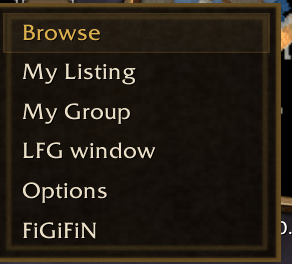
Right-clicking the minimap button gives you quick access to Browse, My Listing, My Group, the original Group Finder, Options and FiGiFiN.
Browse — Find your group
Browse combines two sources of listings:
-
Forever's Group Finder: Groups and players listed through the game's built-in system.
-
Chat channels: LFG and LFM messages picked up from the channels you've joined and enabled as well as Guild advertisements!
Groups looking for players and players looking for groups are displayed separately, so you don't have to dig through a wall of mixed advertisements.
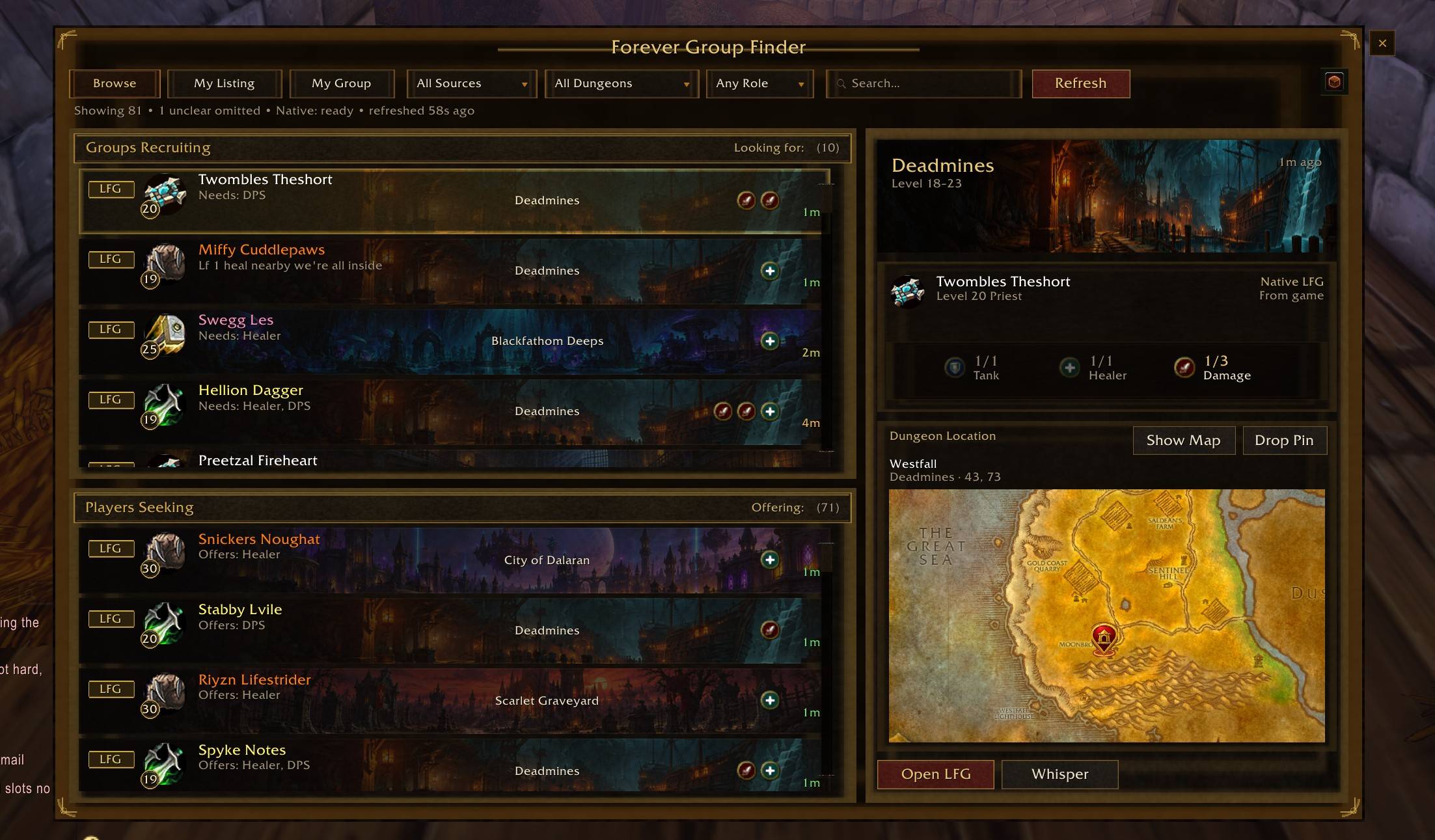
Click a listing to see more information, including the dungeon, available roles, entrance location, and a map preview.
Depending on the listing, you can whisper the player, invite them, or open the original Group Finder.
You can also right-click listings for additional options, including ignoring players.
Filters and searching
You can narrow things down using the dropdown menus for dungeon, role, and listing source.
If you want more control, there's also a search box with a few operators:
| Search | What it does |
|---|---|
mage |
Finds listings matching Mage |
mage | priest |
Finds Mage OR Priest |
hunter dead |
Finds Hunter AND Dead |
hunter & dead |
Same thing, with an explicit AND |
!deadmines |
Excludes Deadmines |
!mage !priest |
Excludes both Mages and Priests |
Spaces work as AND, so you don't have to type & unless you want to.
Searches can match player names, classes, and dungeon names.
FGFN also tells you how many listings are showing and how many your filters have hidden. If your search comes back empty, you can see whether your filters might be the reason.
Note: Native Group Finder searches need a manual Refresh to discover new listings. Existing results can continue updating after that.
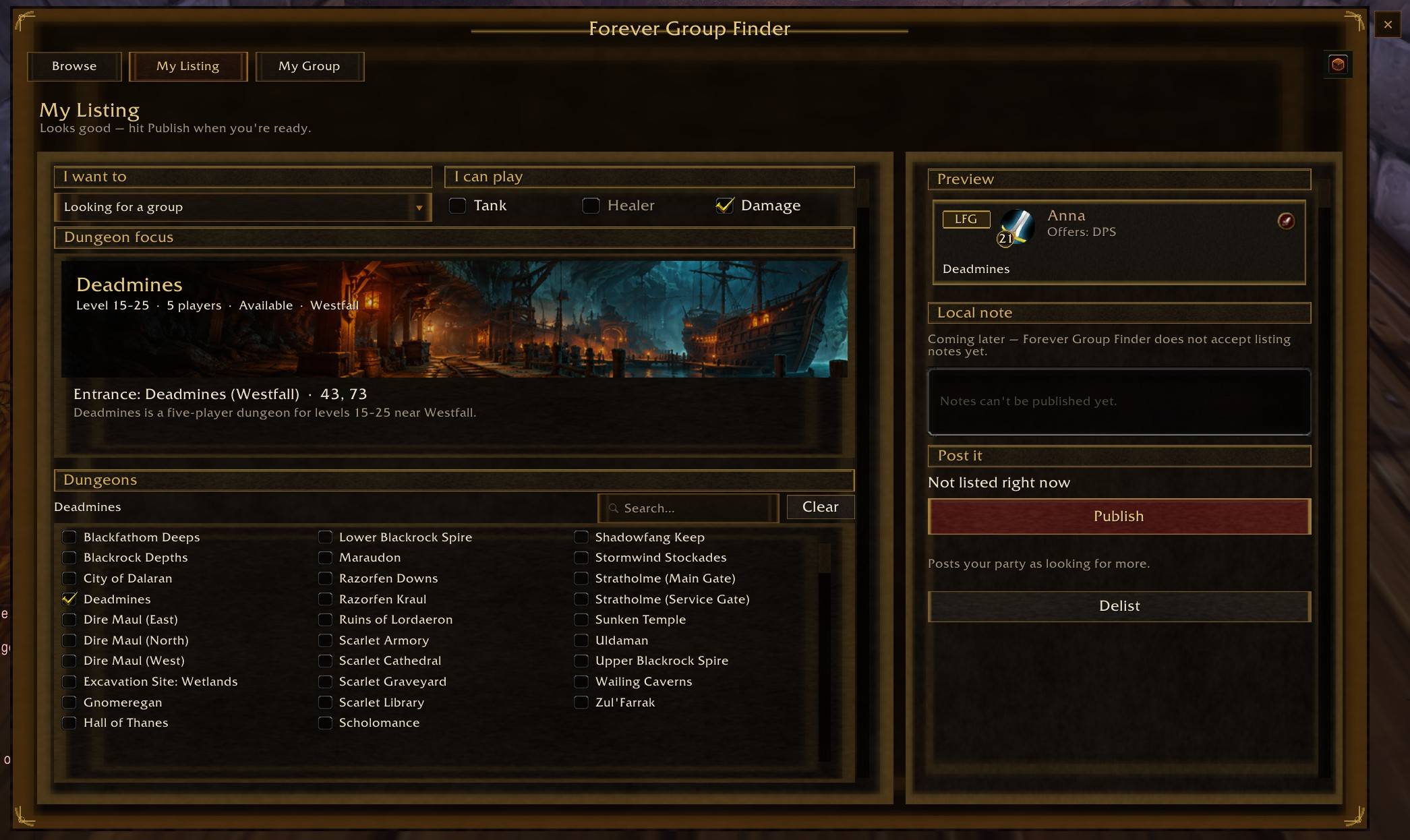
My Listing — Let people find you
If you'd rather make your own listing, head over to My Listing.
Choose the dungeon or dungeons you're interested in, select the roles you need or can fill, and hit Publish.
FGFN uses Forever's built-in Group Finder to publish your listing.
A couple of things to know:
- If you're playing solo, you'll be listed under Players Seeking.
- If you're already in a party, you can recruit additional players under Groups Recruiting.
- Notes are currently disabled due to a limitation from Blizzard. I'm working on finding a way to get those included, but nothing so far.
My Group — Everything you need once you're grouped
Finding a party is only half the battle. Now everyone has to get to the dungeon.
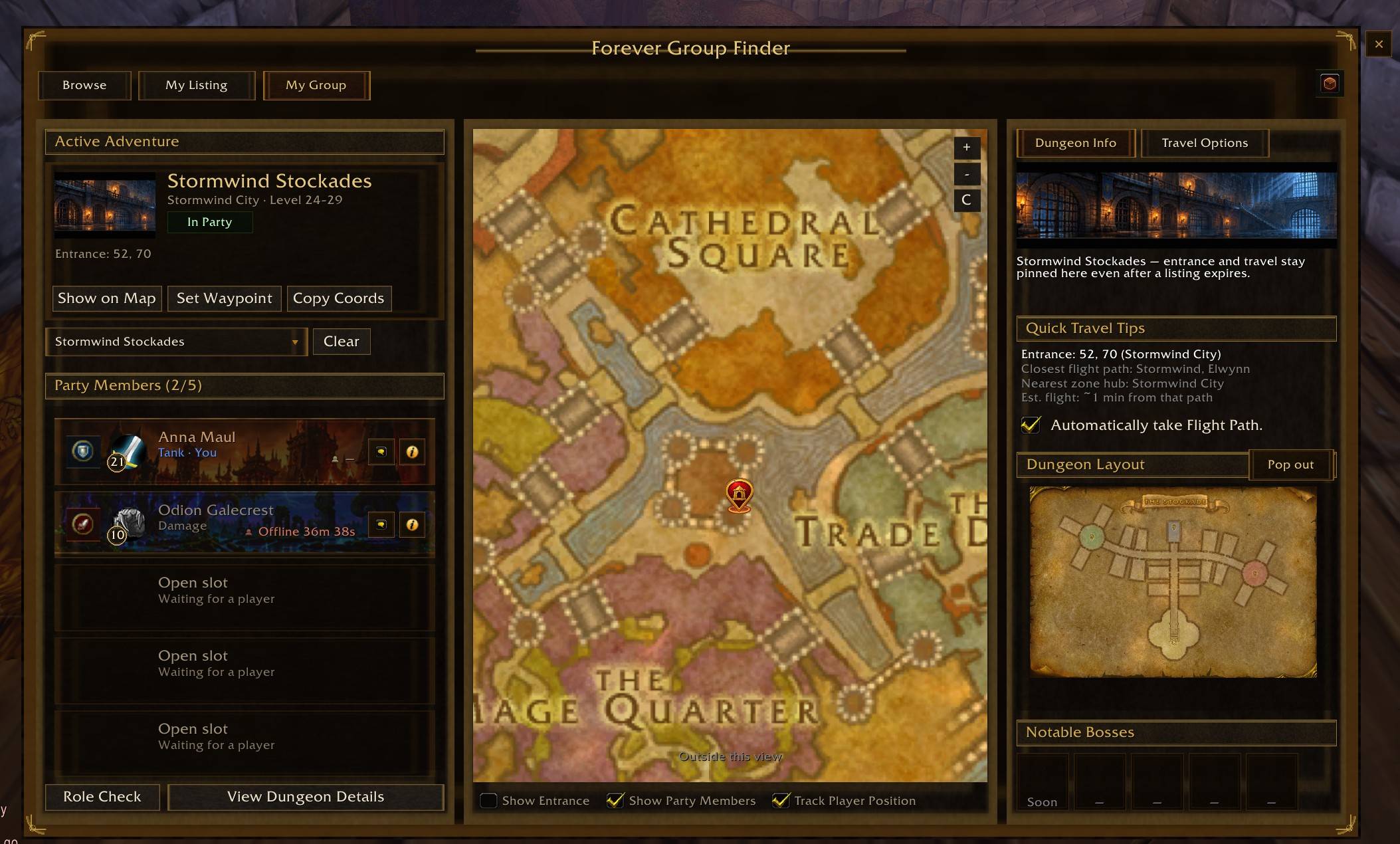
My Group gives you a place to keep track of your party, destination, and travel information without constantly switching between windows.
Dungeon maps and navigation
Pick your destination and FGFN will keep it selected until you change or clear it, even after /reload.
For supported dungeons, you'll get:
- Dungeon entrance locations and coordinates.
- An interactive map with zooming and panning.
- Interior dungeon maps, including multiple floors where available.
- A waypoint button for supported waypoint addons.
- Coordinates you can copy and share.
- Travel information, including nearby flight paths.
Not every dungeon has complete map coverage yet, but I'm continuing to expand it.
Party roster
My Group shows your party members, their classes, levels, and assigned roles, along with any empty party slots.
You can also:
- Find a party member: Right-click their name and choose Find to locate them on the map.
- Track players across zones: FGFN can switch to their zone and reveal available map areas to help locate them.
- Assign roles: Set Tank, Healer, or Damage.
- Kick party members: Party leaders can remove members directly from the roster.
- Track disconnects: Offline players are dimmed, and you'll see how long they've been disconnected.
Offline timers can survive a reload while the member remains offline.
The map can also retain a party member's last known location when they disconnect.
Click your own role icon to cycle through Tank, Healer, Damage, and no assigned role.
Flight-path assistance
FGFN can help you get to your selected dungeon.
When you talk to a Flight Master, it can suggest a flight toward your destination, using the closest available route it knows about.
If you haven't unlocked the ideal flight path, it can try to find another reachable option.
There's also an optional Automatically take Flight Path setting.
It's turned off by default, so you stay in control unless you decide otherwise.
FiGiFiN — Something to do while you wait
Yes, I put a game inside a group finder.
FiGiFiN is an optional minigame you can play while waiting for your group to fill or while taking a long flight.
Open it using /fgfn figifin, the minimap menu, or the available in-game shortcuts.
You don't need it to use any of FGFN's group-finding features.
Options
Type /fgfn options to open the settings. You can also find FGFN under the game's addon options when supported.
You can adjust:
- Browse layout: Change how much space the listing browser and details panel use.
- Map markers: Adjust party markers and player arrow sizes.
- Chat channels: Choose which channels FGFN watches for group advertisements.
- Ignored players: Manage players you've permanently ignored or temporarily hidden.
You can add custom chat channels, too. Just join the channel in-game first, then add it to FGFN's watched channels.
Most visual changes take effect immediately.
Slash commands
| Command | Description |
|---|---|
/fgfn |
Open or close FGFN |
/fgfn mygroup |
Open My Group |
/fgfn options |
Open settings |
/fgfn minimap |
Show or hide the minimap button |
/fgfn figifin |
Open FiGiFiN |
/fgfn split 60 |
Adjust the Browse panel split |
/fgfn channels |
Manage watched chat channels |
/fgfn channels add <name> |
Add a custom channel |
/fgfn channels remove <name> |
Remove a custom channel |
/fgfn lexicon |
View locally saved chat messages FGFN couldn't confidently interpret |
/fgfn lexicon clear |
Clear those saved messages |
/fgfn lfgtab reset |
Reset the button attached to Forever's LFG window |
/fgfnping |
Check addon communication with party members |
/fgfn help |
Show available commands |
A few things worth knowing
Native Group Finder unlocks at level 10.
That's a restriction from WoW itself. Below level 10, you can't use the native Refresh or Publish features.
However, FGFN can still pick up chat advertisements at lower levels if you're in the appropriate channels.
Chat listings aren't guaranteed to catch everything.
FGFN can only read messages your client actually receives. It looks for common LFG/LFM patterns, dungeon names, abbreviations, and similar wording.
Some messages are too ambiguous to identify reliably. Rather than invent a listing, FGFN may leave them out.
You can inspect locally saved ambiguous messages with /fgfn lexicon. That information stays on your computer.
Addon-to-addon listing sharing isn't available yet.
There's a communication test command, /fgfnping, but FGFN isn't currently exchanging group advertisements between players.
Maps and travel information are still growing.
Some dungeons have more complete information than others. Missing information is shown as unavailable rather than guessed.
Waypoint addons are optional.
FGFN can use TomTom or Waypoint UI if you have them installed. Neither is required.
Troubleshooting
| Problem | What to try |
|---|---|
| No native listings | Make sure you're level 10 or higher, then click Refresh |
| No chat listings | Join an enabled LFG or city channel and wait for advertisements |
| Can't recruit as a group | You need to be in a party; solo characters list as Seeking |
| Something looks wrong after updating | Try /reload |
| Minimap button disappeared | Type /fgfn minimap |
| LFG side button moved somewhere strange | Type /fgfn lfgtab reset |
| Can't change another player's role | You may need party leader or assistant permissions |
| Can't kick a player | Only the party leader can kick |
What's new in the 1.0.7 series?
This release series has focused on improving the interface, search tools, and party management.
Highlights include:
- Boolean search using
&,|, and!, including AND searches separated by spaces. - A count of listings hidden by your current filters.
- Improved My Group maps, zooming, panning, and party markers.
- Finding party members across zones, including available fog-of-war reveal.
- Better player-position tracking and steadier map arrows.
- Class-specific artwork for party members.
- Role assignment and party kicking from the roster.
- Offline timers for disconnected party members.
- Context menus that no longer interfere with movement keys.
Feedback and bug reports
This is a personal project that has grown quite a bit beyond my original idea of making dungeon groups easier to find.
I've tested it extensively, but I'm sure there are things I've missed.
If you run into a problem, please let me know what you were doing, which tab you were using, and whether the listing came from the native Group Finder or chat. If it involved searching, include what you typed. BugSack or another Bug Catching addon that captures the LUA error you may get will help tremendously in pinpointing bugs.
Suggestions are welcome, too.
Thanks for giving FGFN a try. I hope it makes finding and running dungeons a little easier — or at least gives you something to do while waiting for a tank.
Forever Group Finder Next (FGFN) Team
