


669251330-f23e04dc-ef35-4202-80fa-e6863f986b78-2.png
Description
Forever Graphics
Advanced graphics controls for World of Warcraft: Forever.
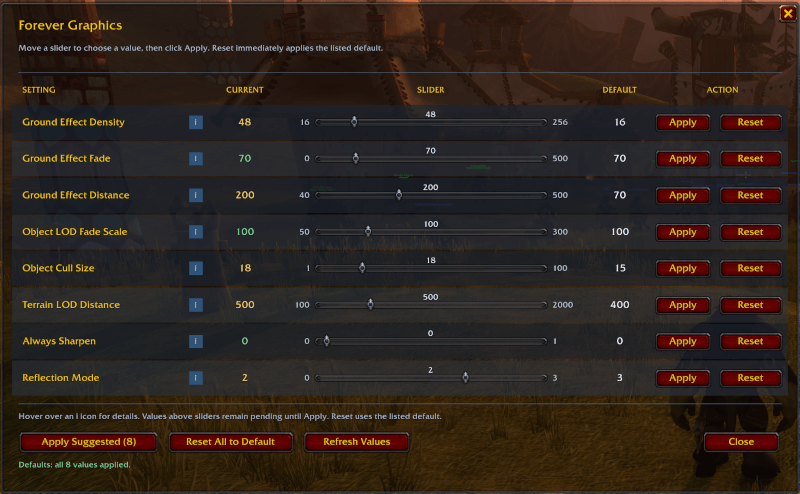
Forever Graphics provides a convenient in-game interface for adjusting eight advanced graphical settings that are normally only accessible through console commands.
Instead of manually entering console commands, you can adjust each setting using a slider, see its current value, read a description of what it controls, and restore its default with a single click.
Designed specifically for WoW Forever (Interface 16001).
Features
- 8 Advanced Graphics Sliders – Easily adjust graphical settings beyond those available in the standard WoW options menu.
- Individual Apply & Reset – Apply changes independently or restore any setting to its listed default.
- Current Value Display – View the actual value currently reported by the game.
- Information Tooltips – Hover over the information icon beside each setting to learn what it controls and its potential performance impact.
- Suggested Graphics Preset – Apply all eight recommended high-quality values with one click.
- Reset All to Default – Restore all eight settings to their documented defaults.
- Refresh Values – Re-read the game's current graphical settings.
- Draggable Interface – Move the window wherever you prefer. Its position is remembered between sessions.
Supported Graphics Settings
| Setting | Suggested | Default |
|---|---|---|
| Ground Effect Density | 256 | 16 |
| Ground Effect Fade | 370 | 70 |
| Ground Effect Distance | 500 | 70 |
| Object LOD Fade Scale | 200 | 100 |
| Object Cull Size | 8 | 15 |
| Terrain LOD Distance | 1000 | 400 |
| Always Sharpen | 1 | 0 |
| Reflection Mode | 3 | 3 |
The suggested values are intended to improve visual quality, foliage density, object visibility, and terrain rendering distance. They are not necessarily optimal for every computer.
The Reset buttons use fixed reference defaults from the Warcraft Wiki. These may differ from your particular client's native defaults.
Installation
CurseForge App
-
Find Forever Graphics in the CurseForge addon browser.
-
Select Install.
-
Ensure the addon is enabled on your character-selection screen.
-
Launch WoW Forever.
Manual Installation
-
Download the latest addon ZIP.
-
Extract the
ForeverGraphicsfolder into your WoW Forever AddOns directory:World of Warcraft\_classic_beta_\Interface\AddOns\ -
Verify that the resulting directory is:
AddOns\ForeverGraphics\ -
Start the game and enable Forever Graphics.
How to Use
Once logged into the game, enter:
/fgfx
This opens the Forever Graphics control panel.
Adjusting an individual setting:
-
Locate the graphical setting you want to change.
-
Hover over its information icon to learn what it controls.
-
Move the slider to your desired value.
-
The selected value appears directly above the slider.
-
Click Apply to commit the change.
The Current column displays the value read back from the game. Moving a slider alone does not modify the actual graphics setting.
Click Reset beside any setting to immediately restore its listed default.
Bulk Controls
- Apply Suggested (8): Applies all eight suggested graphics values.
- Reset All to Default: Restores all eight settings after confirmation.
- Refresh Values: Reloads the values currently reported by the client and discards pending slider adjustments.
Slash Commands
| Command | Action |
|---|---|
/fgfx |
Open or close the addon window |
/forevergraphics |
Alternative command to open or close the window |
/fgfx max |
Apply all eight suggested values |
/fgfx reset |
Reset all settings to their defaults |
/fgfx refresh |
Refresh the displayed values |
Important Notes
- Some settings can significantly affect FPS, particularly on lower-end hardware.
- The addon cannot override restrictions imposed by the game engine. Unsupported values may be rejected or clamped.
- Some graphical changes may require changing zones, relogging, or restarting the game before their full effect becomes visible.
- Uninstalling the addon does not automatically reverse settings you previously applied.
- This addon is developed for WoW Forever. Compatibility with other versions of World of Warcraft is not guaranteed.
Source Code & Support
Forever Graphics is available on GitHub.
GitHub: https://github.com/drengalis/foreverGraphics
For bug reports, feature suggestions, or compatibility issues, please submit an issue through the GitHub repository.
Graphics setting references: https://warcraft.wiki.gg/wiki/Console_variables
Forever Graphics is an independently developed addon and is not affiliated with or endorsed by Blizzard Entertainment.
Forever Graphics Team
