


Forever Goal Tracker
- By
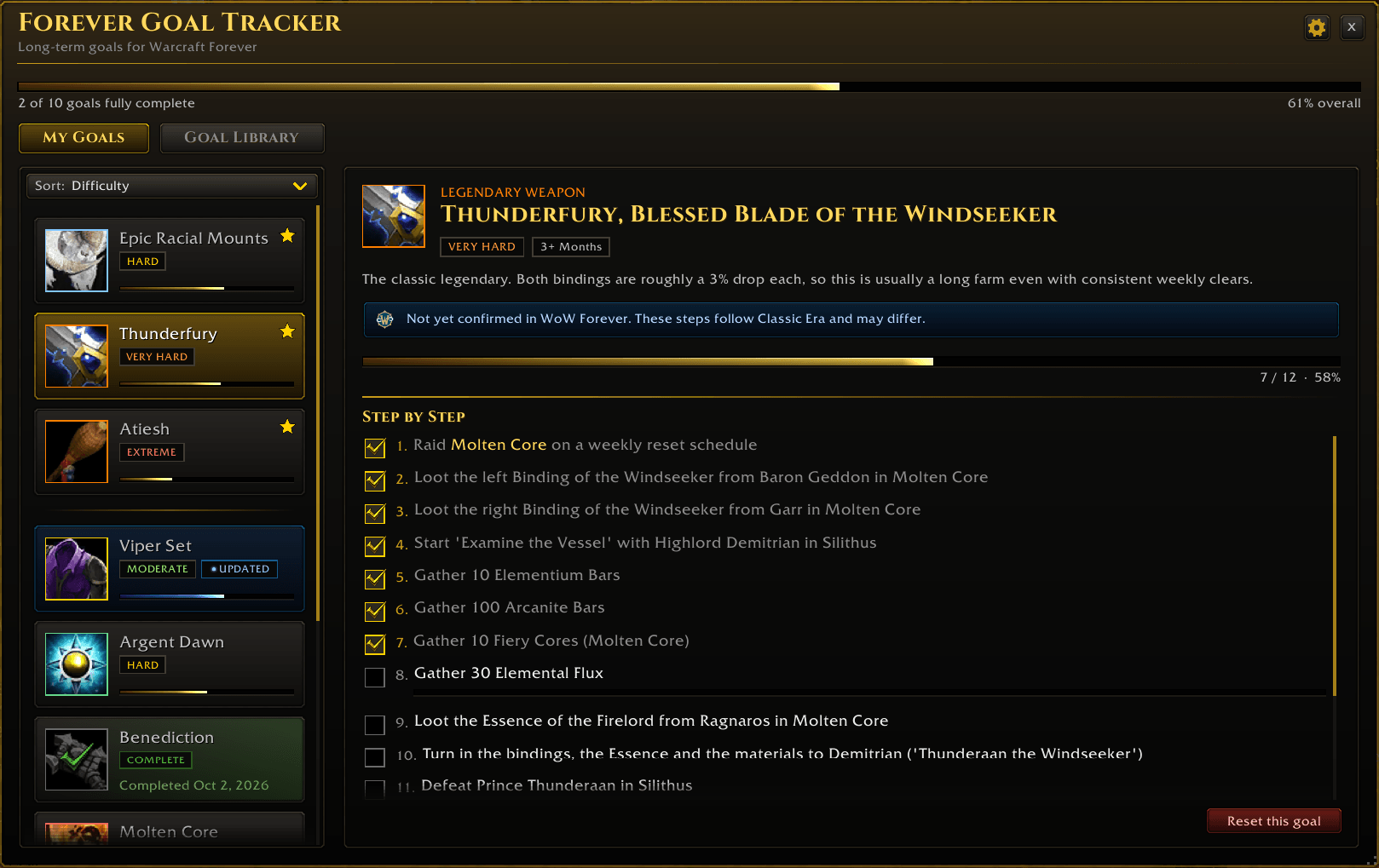
Pick long-term goals and follow step-by-step guides. Favorites stay on top, progress ticks itself across all your characters, and finished goals show the day you completed them.
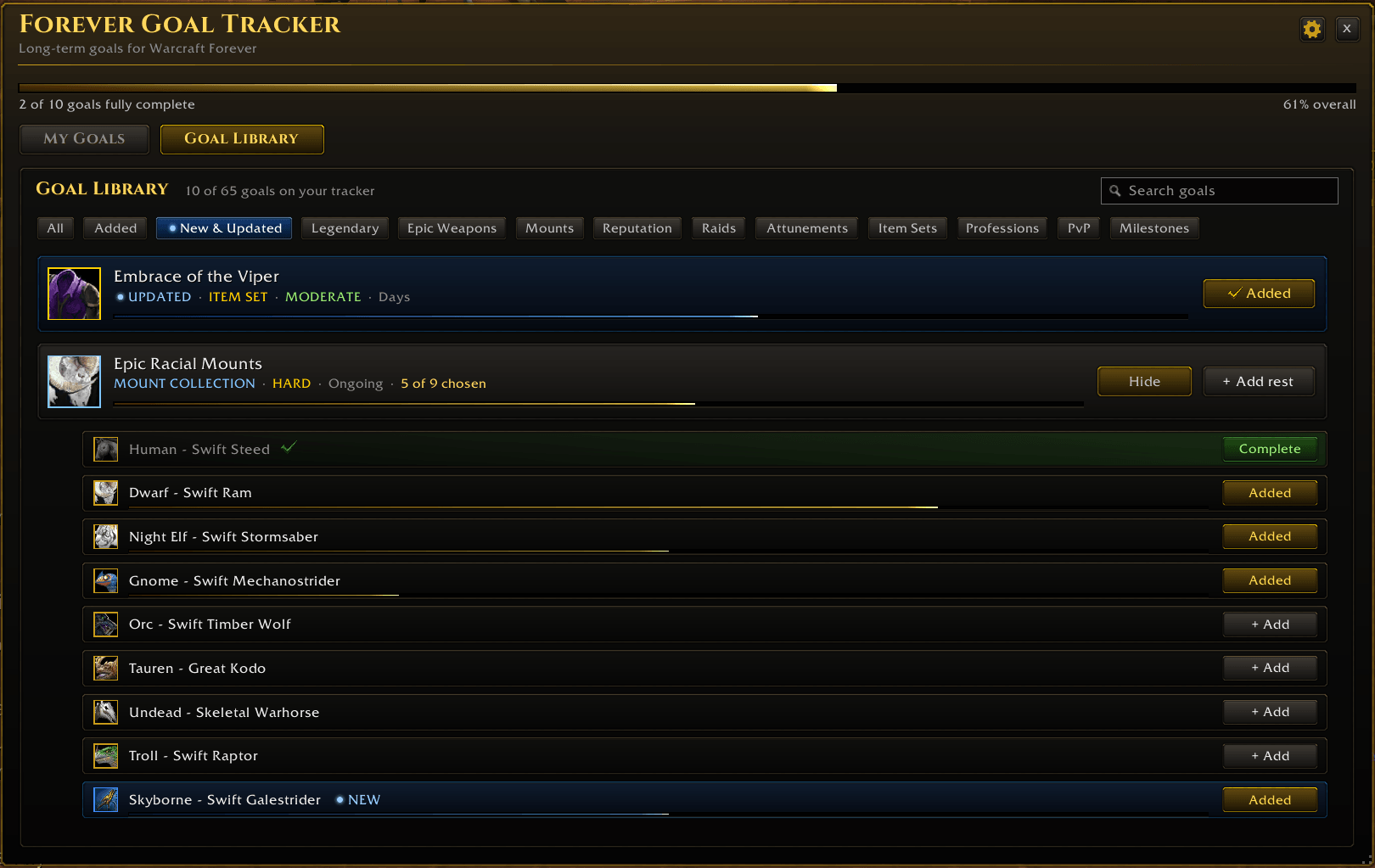
Content new to Warcraft Forever is marked NEW, and Classic content that is different in Forever is marked UPDATED, both in Forever blue. One click filters the Goal Library to just those goals.
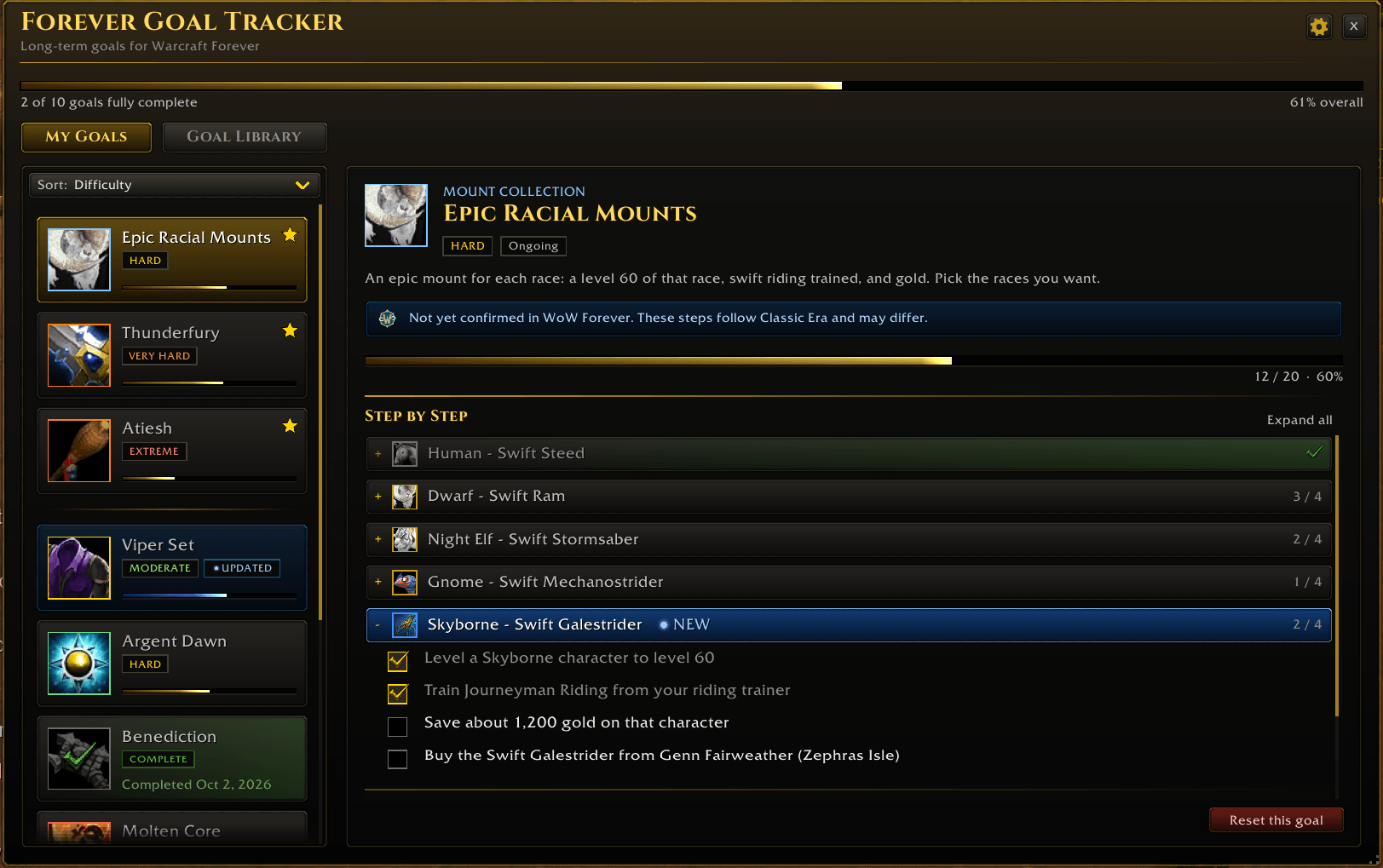
Multi-part goals let you pick individual races, classes or professions. Each part tracks its own progress, finished parts fold away, and the new Skyborne Swift Galestrider is already in.
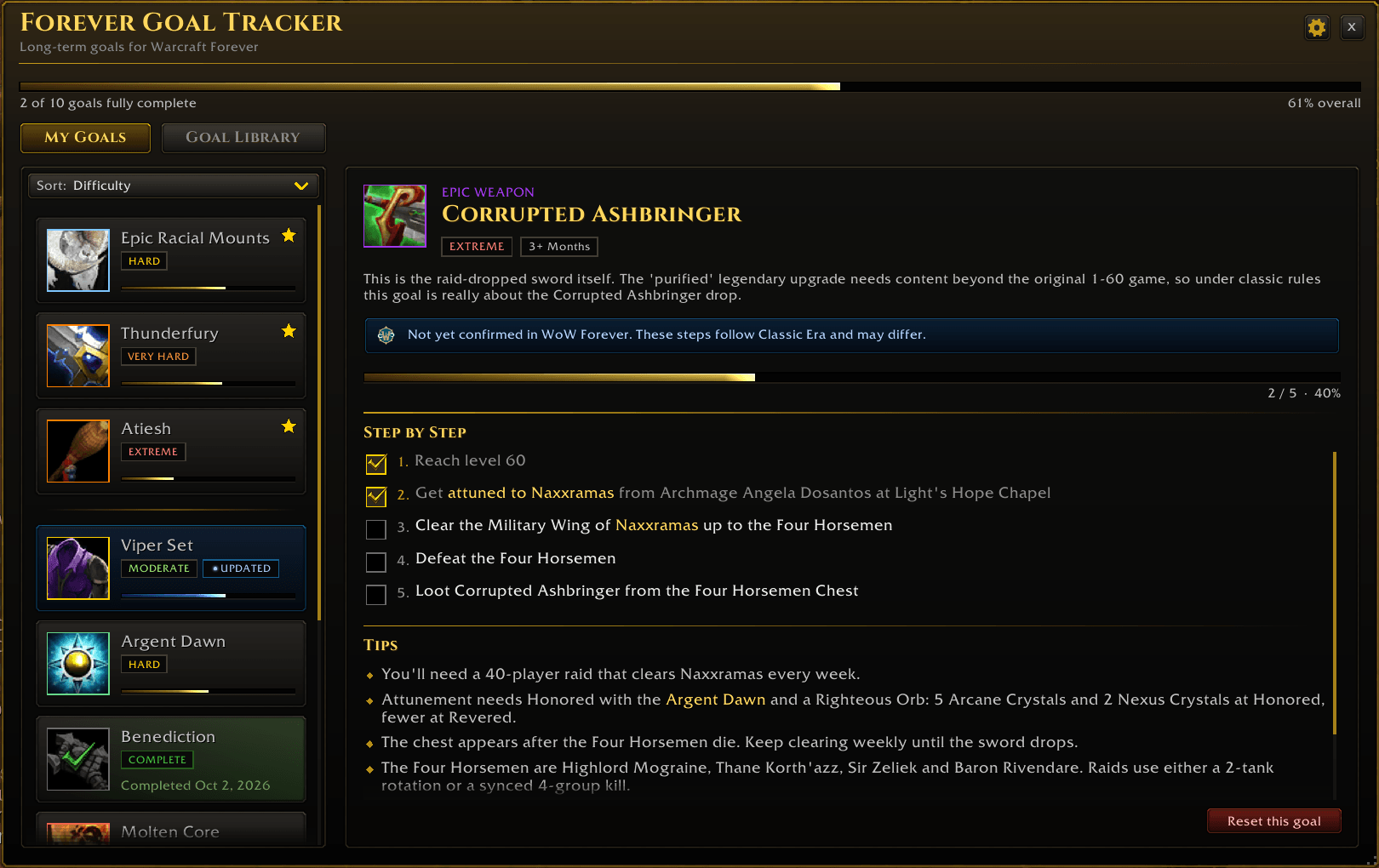
Steps link to the goals they depend on, like an attunement or a reputation. Click one to add it to your tracker. Tips under each guide hold the advice, and a notice flags guides not yet confirmed in Warcraft Forever.
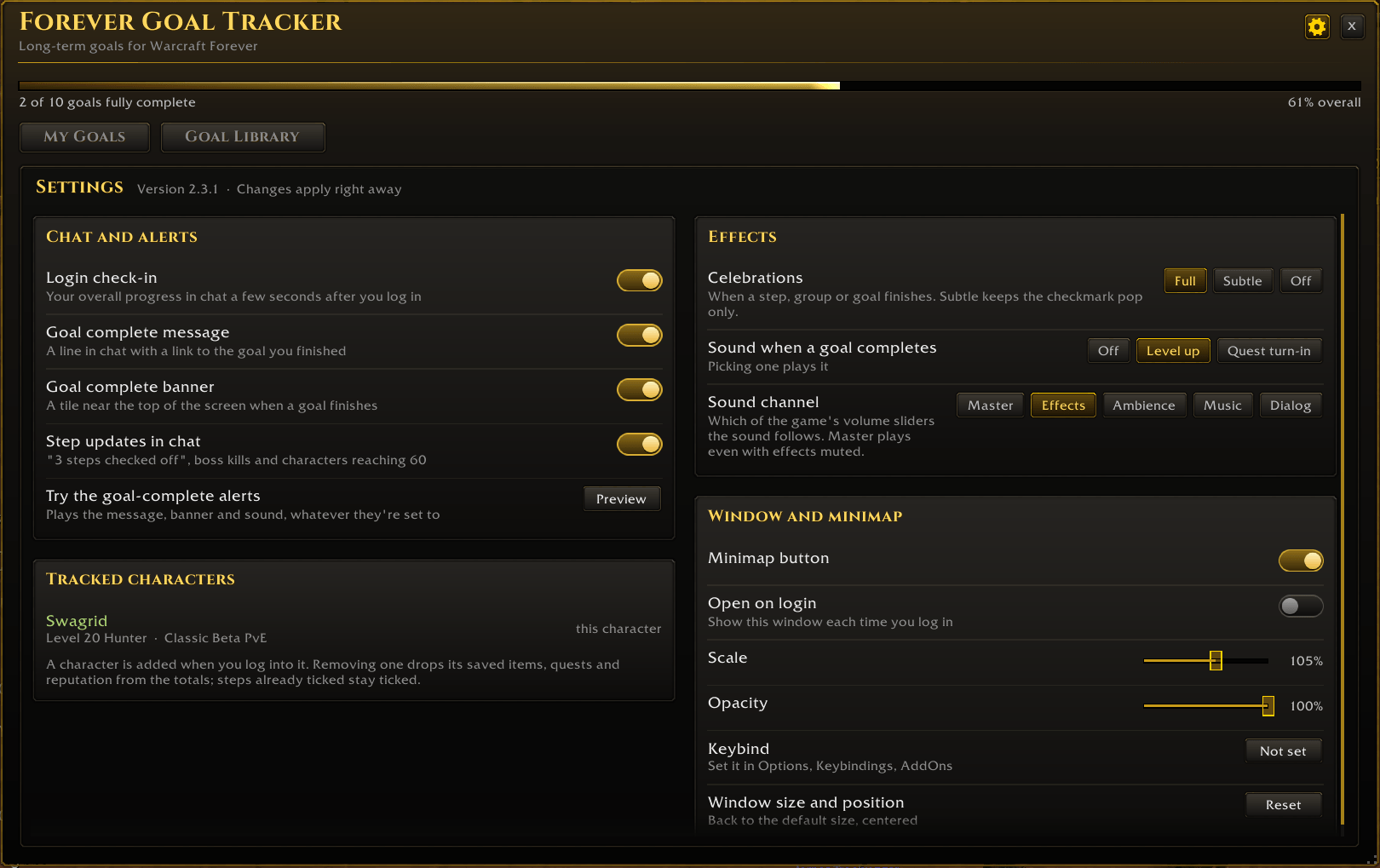
The gear opens Settings: turn off chat lines, the banner or celebrations, pick a goal-complete sound, hide the minimap button, and set the window's scale and opacity. Everything starts on.
Description
Forever Goal Tracker is a goal tracker for Warcraft Forever. Choose the long-term goals you want to chase from a built-in library, follow step-by-step guides for each one, and let the addon track your progress automatically across every character you play.
Features
- Goal Library with 65 goals. Legendary and epic weapons, rare and class mounts, reputations, raid clears, attunements and dungeon keys, item sets, professions, PvP ranks and milestones. Search by name or filter by type, and add only the goals you care about.
- Built for Warcraft Forever. Content that's new in Forever is marked NEW and Classic content Forever changed is marked UPDATED, both in Forever blue, with a "New & Updated" filter in the library. Guides not yet confirmed in Forever carry a small notice until Wowhead confirms the steps.
- Step-by-step guides. Every goal is broken into clear steps, from attunements and quest chains to material lists and boss kills, with tips for strategy and drop chances.
- Linked goals. When a step needs another goal, like the Naxxramas attunement or Honored with the Argent Dawn, that text is a link. Click it to add that goal to your tracker.
- Automatic tracking across your characters. Steps tick themselves when you meet them on any character:
- Character level and XP, per class and per race
- Items in your bags, gear and bank
- Completed quests and quests in your log
- Reputation standing
- Profession skill levels
- Gold on hand
- Mounts you own
- PvP rank and lifetime honorable kills
- Raid boss kills
- Pick the parts you want. Multi-part goals let you choose individual classes, professions, mount races or set classes. Want Blacksmithing but not Herbalism? Add just that.
- Favorites. Right-click a goal to star it and keep it at the top of your list.
- Celebrations and completion dates. Finishing a step, group or goal plays a small celebration, finished goals remember the day you completed them, and a chat message and banner announce goals you finish while the window is closed.
- Alliance and Horde goals. Faction goals are split by faction and only count that faction's characters.
- Clean, game-styled window. Dark etched panels, item icons from the game, progress bars for every goal and an overall bar. Resizable, movable, and it remembers where you left it. The minimap button's tooltip shows your progress and your favorites' next steps.
- Settings. The gear in the title bar opens a Settings page: turn off the login check-in, chat lines, the goal-complete banner or celebrations, pick a sound for finished goals and its volume channel, hide the minimap button, open the window on login, set its scale and opacity, and remove old characters from the tracked list. Everything starts on.
Goals included
- Legendary weapons: Atiesh, Thunderfury, Sulfuras
- Epic weapons: Corrupted Ashbringer, Rhok'delar, Lok'delar, Benediction / Anathema, Quel'Serrar
- Mounts: Winterspring Frostsaber, Deathcharger's Reins, Swift Razzashi Raptor, Swift Zulian Tiger, Black Qiraji Resonating Crystal, Dreadsteed, Charger, and epic racial mounts including the Skyborne Swift Galestrider
- Reputations: Timbermaw Hold, Thorium Brotherhood, Argent Dawn, Cenarion Circle, Zandalar Tribe, Hydraxian Waterlords, Brood of Nozdormu, and Ambassador (Exalted with all four capitals) for each faction
- Raids: Molten Core, Onyxia, Blackwing Lair, Zul'Gurub, Ruins of Ahn'Qiraj, Temple of Ahn'Qiraj, Naxxramas
- Attunements and keys: Molten Core, Onyxia (Alliance and Horde), Blackwing Lair and Naxxramas attunements; Upper Blackrock Spire, Scholomance, Blackrock Depths, Stratholme and Dire Maul keys
- Item sets: Dungeon Sets 1 and 2, Tier 1, Tier 2 and Tier 3 for every class, Embrace of the Viper
- Professions: primary professions and secondary skills to 300
- PvP (Alliance and Horde): Grand Marshal / High Warlord, Rank 11 war mounts, Alterac Valley mounts, and battleground reputations
- Milestones: level classes to 60, save 5,000 gold, honorable kills
How to use
- Type /goals or click the minimap button.
- Open the Goal Library tab and click + Add on the goals you want. Use Choose on multi-part goals to pick individual parts.
- Switch to My Goals to follow each guide. Steps tick themselves as you play, and you can click any step to tick it by hand.
Commands: /goals (or /fgt, /forevergoals) opens the window. /goals settings opens Settings. /goals reset resets its size and position. You can also bind a key under Options > Keybindings > AddOns.
Notes
- A character is tracked after you log into it once with the addon installed. Open your bank once per character so banked items count.
- Raid boss kills are recorded while the addon is running.
- Guides are written from Classic Era, where the steps are known to be accurate. Warcraft Forever may change items, costs or drop sources, so guides show a notice until they're confirmed for Forever.
Roadmap
What's coming to Forever Goal Tracker, from small touches to big updates. Nothing here has a fixed date, and the order can change as Warcraft Forever evolves and as players tell us what they want most.
Have an idea or found a bug? Leave a comment here or open an issue on GitHub.
Next up
Item tooltips and links. Hover an item in a guide to see its real game tooltip, shift-click it to link it in chat, and see "Needed for Thunderfury" on items in your bags, the Auction House and loot.
Quick wins
Small improvements that make everyday use smoother.
- Wowhead links: right-click a step, item or quest to copy its Wowhead link.
Bigger features
New tools that take more building.
- Pop-out tracker: keep one goal's steps on screen while you play, like the quest tracker.
- Step-complete toasts: a small "Step complete" note when a step ticks itself while the window is closed.
- Step order: steps that need an earlier step done first show a lock until you get there.
- Shopping list: the materials you still need, totaled across all your goals.
- Personal notes on each goal.
- Alt overview: see which of your characters is furthest along on reputation and leveling goals.
- Raid lockout hints on raid goals.
- Guild announcements: guildmates who use the addon see when you finish a goal, with an optional line in guild chat (off by default).
- Share your wins: a "Copy for Discord" button and an optional screenshot when you finish a goal.
- Feedback from inside the game: write a suggestion in the addon and get a link to send it.
Big updates
Larger updates with lots of new content.
- More Warcraft Forever content: Forever's own items, raids and sets as they show up on Wowhead, and updated steps for Classic goals as Forever confirms them.
- More goals: Qiraji battle tanks, Darkmoon Faire decks, Steamwheedle Cartel, Ravenholdt and Shen'dralar reputations, Bloodsail Admiral, the Stranglethorn Fishing Extravaganza, and more class sets.
- Custom goals: build your own goals with your own steps.
Maybe someday
- Discord companion app: a small desktop app that posts your finished goals to a Discord channel.
Recently shipped
- 2.4.0: a Settings page (gear in the title bar) to turn off chat lines, the banner or celebrations, pick a goal-complete sound and its volume channel, hide the minimap button, open on login, and set window scale and opacity; tracked characters you can remove; a keybind; and finished goals and parts marked Complete in green in the Goal Library.
- 2.3.1: more goal links across the library, and steps you can't check off turned into tips.
- 2.3.0: WoW Forever markers: a "not confirmed in WoW Forever yet" notice on Classic-based guides, NEW and UPDATED labels in Forever blue, and a "New & Updated" filter, starting with the Skyborne Swift Galestrider and the updated Embrace of the Viper. Plus goal links (click a linked goal in a step to add it), completion dates, undo after reset, Expand all / Collapse all, a cleaner goal card, a richer minimap tooltip and clearer step wording.
- 2.2.0: favorites and a right-click menu, a login check-in, goal-complete banners and celebrations, real Tier 3 recipes and token sources, item icons for Tier 1 to 3.
- 2.1.2: Goal Library search, attunements and dungeon keys, Dungeon Sets 1 and 2, AQ20, Ambassador, Dreadsteed and Charger, Tips under each goal.
See the changelog for everything.
Forever Goal Tracker Team
