Forever Frost Alert
- By
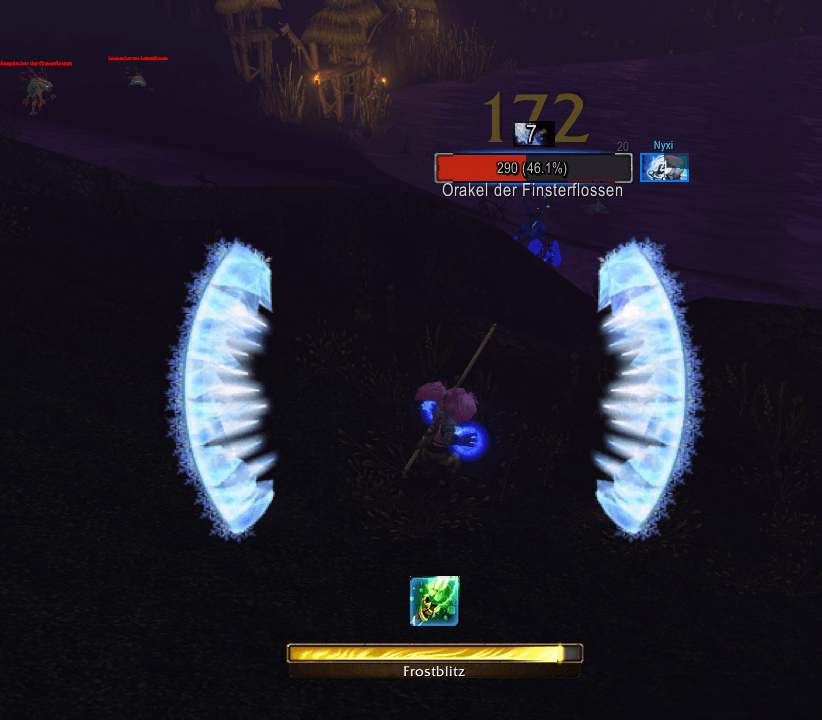
Displays glowing frost arcs while Fingers of Frost is active on your mage in WoW Forever. No aura framework required.
Screenshot 2026-11-10 211846.png
Unbenannt.png
Description
# Forever Frost Alert
**Track your Fingers of Frost charges at a glance.**
**AI disclosure: All project-specific source code was generated exclusively by AI, following the maintainer's instructions.** Documentation and the project icon were also AI-generated. The addon itself does not run an AI model. Blizzard's client code and artwork are separate from this project's generated code.
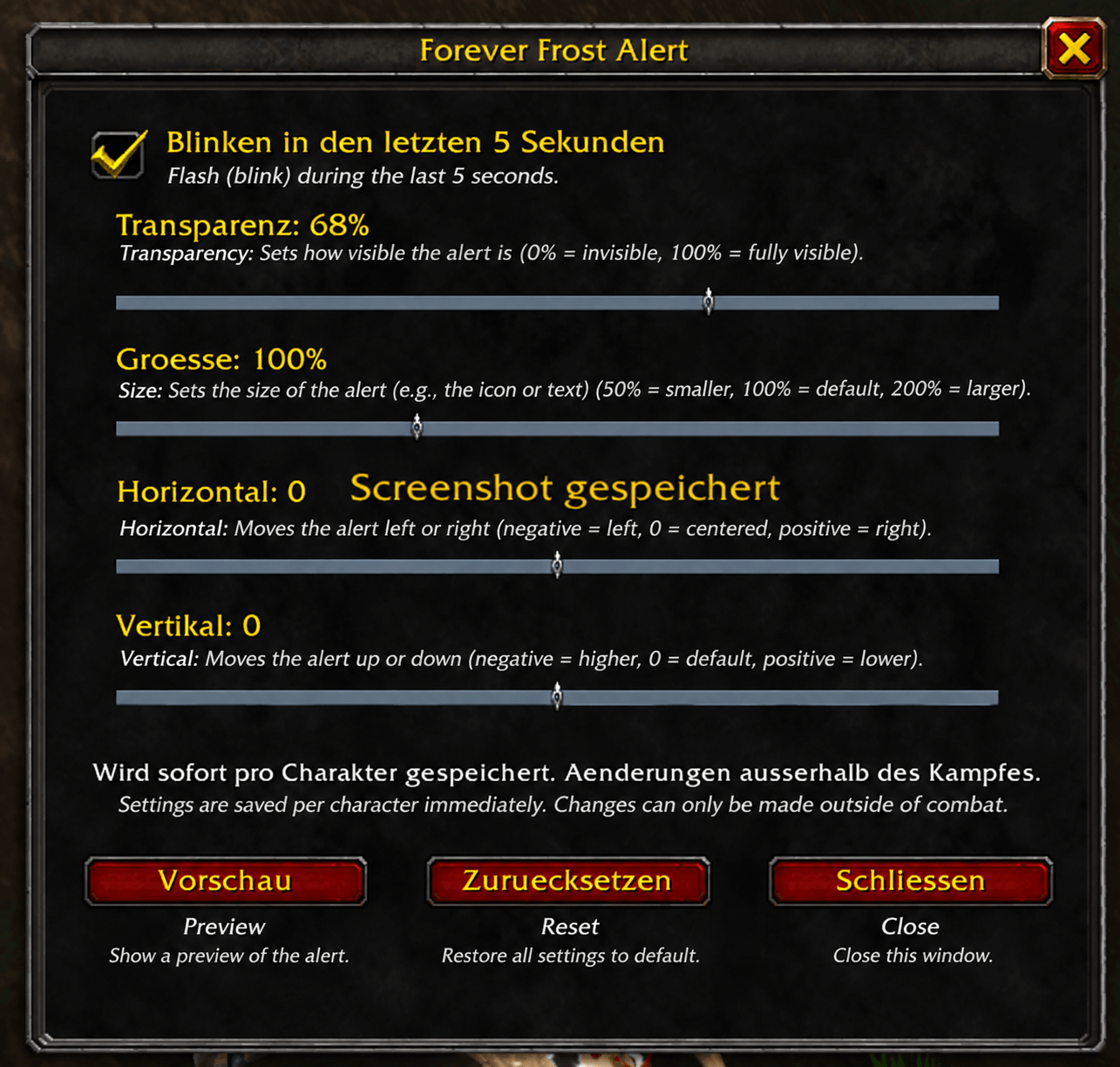
Forever Frost Alert gives your mage a clear, Retail-style visual cue for **Fingers of Frost** in **World of Warcraft: Forever**. Glowing frost wings show how many charges remain. Open **`/fiv`** to adjust transparency, size and position, and choose whether the wings blink before the buff expires.
## Charge display
| Fingers of Frost charges | Visible wings |
| --- | --- |
| No active buff | Neither wing |
| One charge | Left wing |
| Two charges | Left and right wings |
When you spend a charge, the right wing disappears first. The left wing stays until you spend the last charge or the buff expires.
## Expiry warning
With blinking enabled, the wings remain steady while more than five seconds remain. During the **last five seconds**, the visible wings begin blinking, accelerating from approximately **one to four flashes per second** as time runs out.
The warning follows the buff's actual remaining duration. If a new proc refreshes the buff to more than five seconds, the wings become steady again. Consuming the buff or letting it expire clears the alert.
**Prefer a steady display?** Open `/fiv` and uncheck **Blink during the last 5 seconds**. The wings will still show your remaining charges, without blinking. The preference is saved per character.
## Settings menu
Type **`/fiv`** or **`/fiv options`** outside combat to open the movable settings window:
- Enable or disable the expiry blink.
- Set **transparency from 0% to 100%**: 0% is fully visible, 100% is invisible.
- Adjust size and horizontal/vertical position with sliders.
- Preview your current settings or restore defaults.
Changes are saved immediately per character. The menu closes when combat starts. Existing layout settings are preserved on update; blinking remains enabled by default until you turn it off.
## Automatic language selection
The settings menu and chat messages automatically follow your **WoW client's language**:
- **German** on German clients (`deDE`).
- **English** on English clients (`enUS` / `enGB`).
- **English fallback** for other client languages.
No language setting is needed in the addon. The slash commands remain the same in every language.
## What it does
- Includes an in-game menu for blinking, transparency, size and position.
- Saves your settings per character.
- Includes a five-second preview that demonstrates two charges, then one, using your current display and blink settings. The preview ends when combat begins.
- Allows mouse clicks through the display.
- Works as a standalone addon, with no aura framework or other separately installed addon required.
- Automatically uses German or English for the menu and chat messages, based on the client language.
## Compatibility
**WoW Forever 1.60.1 only — interface 16001.**
This addon tracks the **Fingers of Frost proc and its remaining charges** on your mage. The wings indicate charges, with an optional expiry warning. There is no timer, numeric counter or rotation helper.
**Public beta:** the new settings window and native display changes still need live-client verification. Please report problems with your exact client build and the output of `/fiv status`.
## Getting started
Install the Forever file, enable **Forever Frost Alert** and log in on your mage. Type `/fiv` outside combat to open settings, then click **Preview**.
For manual installation, extract the **ForeverIcyVeins** folder into:
```text
World of Warcraft/_forever_/Interface/AddOns/
```
The folder keeps its original name for compatibility. Do not rename it. Restart WoW if a newly installed folder is not detected; use `/reload` when updating an existing installation.
## Commands
| Command | What it does |
| --- | --- |
| `/fiv` or `/fiv options` | Open settings |
| `/fiv help` | Show command help |
| `/fiv test` | Preview two charges, then one, using your current settings |
| `/fiv blink off` / `/fiv blink on` | Disable / enable the expiry blink |
| `/fiv scale 1.2` | Change size; range 0.5–2 |
| `/fiv alpha 0.8` | Change opacity; range 0–1 |
| `/fiv pos 0 -50` | Move relative to screen center; positive X moves right, positive Y moves up |
| `/fiv reset` | Restore defaults |
| `/fiv status` | Show the installed version and settings |
Change settings outside combat. The default layout is centered, at scale 1 and opacity 0.9.
If preview works but the proc does not appear, use `/fiv spell auto` to restore the default Fingers of Frost buff ID (400670), then `/reload`. The advanced `/fiv spell ID` command is available for troubleshooting a different client buff ID.
## Support and source
[Report a bug](https://github.com/1nd1v1d/Forever_Frost_Alert/issues) · [Source code](https://github.com/1nd1v1d/Forever_Frost_Alert) · [Changelog](https://github.com/1nd1v1d/Forever_Frost_Alert/blob/main/CHANGELOG.md)
MIT-licensed project source. The in-game artwork is referenced from the WoW client and is not bundled. The project icon is original AI-generated branding and is not a gameplay screenshot. This independent addon is not affiliated with or endorsed by Blizzard Entertainment.
Forever Frost Alert Team