Forever Friendlist
- By
Compact portrait Friends window replacement for WoW: Forever (1.60.1). Features WoW/faction icons, a "Recent Allies" tab (last location), WIM/WhisperMessenger support, hover notes, and local Main/Alt linking.
Description
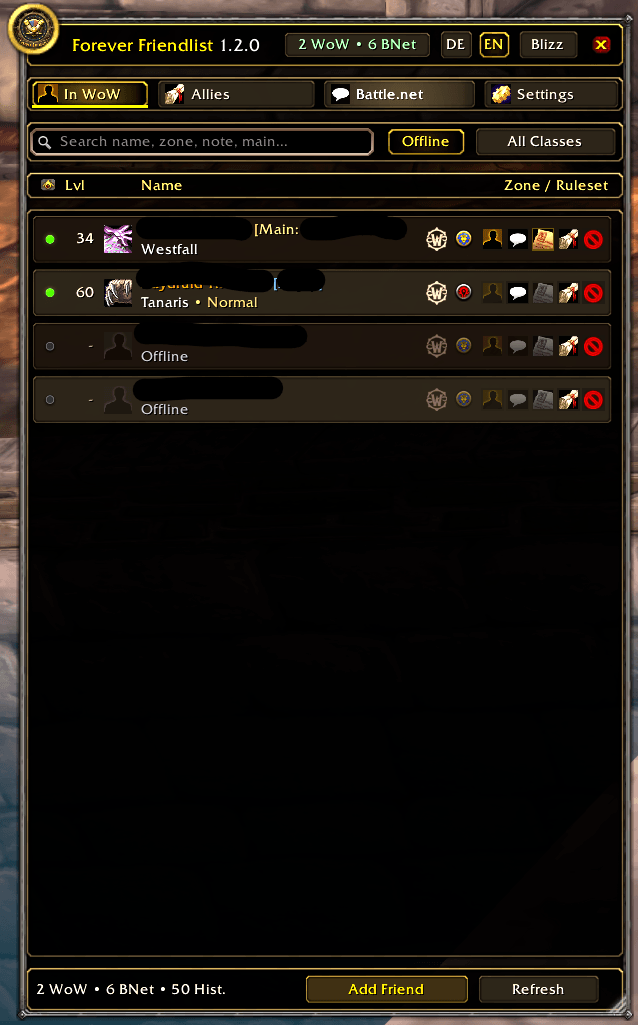
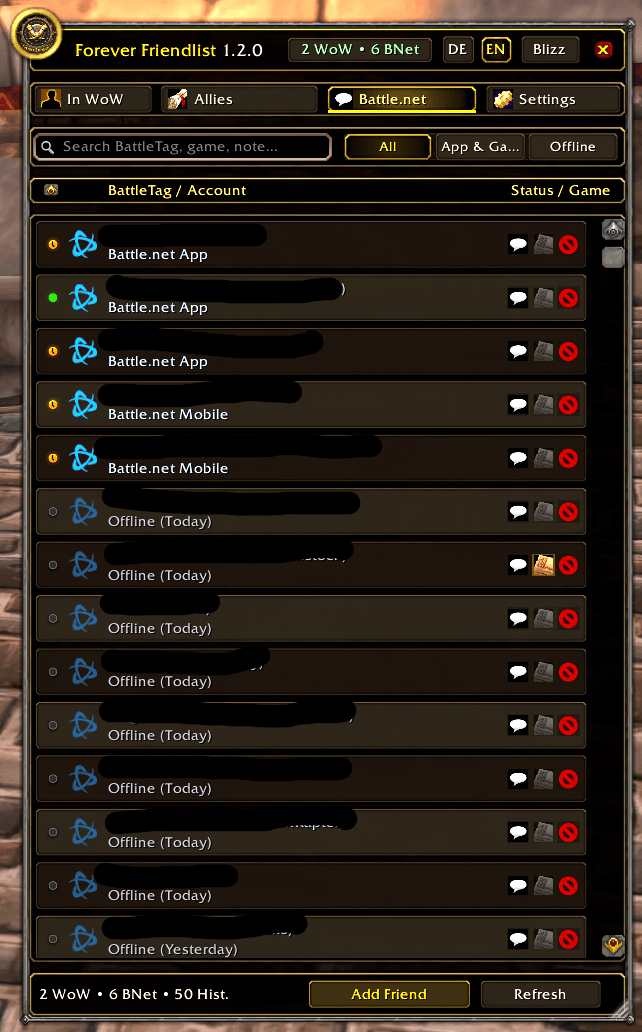
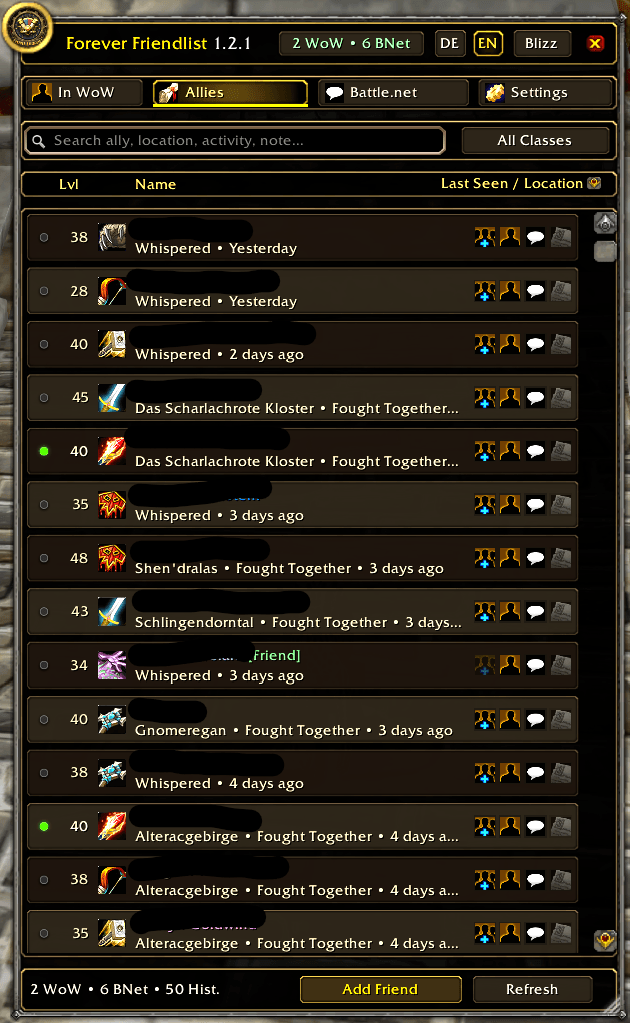
A standalone, portrait-format, WoW-first replacement for the default Friends window built specifically for World of Warcraft: Forever (Camelot engine / Interface 16001). Opening directly from your configured Social hotkey (default O) or the Social / Quick Join button without tainting protected Blizzard frames, Forever Friendlist keeps your active World of Warcraft friends front and center in a slim portrait window with horizontal top navigation (In WoW, Allies, Battle.net, Settings), official WoW edition logos, Alliance/Horde faction crests, realm rulesets, vertically centered quick-action icons with hover/popup notes, native bottom-chat whispers (compatible with WhisperMessenger and WIM), local Main/Alt linking, and a dedicated Recent Allies tab that shows where, how, and when you last encountered fellow players.
English
Forever Friendlist focuses on speed, clarity, and minimal screen footprint during gameplay. Classic character friends and Battle.net friends currently logged into World of Warcraft are merged and deduplicated into a clean portrait roster, while offline pure WoW character friends remain cleanly in the In WoW tab rather than mixing into Battle.net contacts. Blizzard's original Social window stays available at any time via the header [Blizz] button, Shift + Left-Click on the Micro Menu / Social button, or /ffl blizz (leaving /who and Raid tabs completely untouched).
Key Features
- Taint-Free Keybind & Social Button Replacement:
- Direct Hotkey & Button Integration: Redirects your configured Social / Friends keybind (default
O) outside combat and places a transparent overlay over the Social / Quick Join button without modifying protected Blizzard scripts. - Instant Blizzard Fallback: Access Blizzard's original Friends window at any time via
[Blizz]in the window header,Shift + Left-Clickon the Social or minimap button, or/ffl blizz.
- Direct Hotkey & Button Integration: Redirects your configured Social / Friends keybind (default
- Portrait WoW-First Roster (
In WoWTab):- Compact Portrait Shell with Horizontal Top Navigation: Slim resizable vertical frame (
490x660default) with a four-tab horizontal bar (In WoW,Allies,Battle.net,Settings) so it sits cleanly alongside chat or bags without covering the center of your screen. - Official WoW Edition Logos, Faction Crests & Rulesets: Displays Blizzard's official edition logo (WoW: Forever, Retail, Classic Era, TBC, Mists), official Alliance/Horde faction crest, and realm ruleset (
RP-PvP,PvP,Normal,RP,Hardcore,Self-Found) directly on active WoW rows and in tooltips. - Strict Pure-WoW Separation: Keeps offline pure WoW character friends inside the
In WoWtab below online players (toggleable via theOfflinefilter button) instead of mixing them into Battle.net friends. - Static Rows, Centered Action Icons & Hover/Popup Notes: Wobble-free two-line portrait rows with vertically centered, permanently visible
16x16action icons (Group Invite, Whisper, Link Main/Alt, Note, Remove Friend), sortable columns, and a full right-click context menu. Hover the Note icon to read the saved note in the tooltip (highlighted gold when a note exists), or click it to open the Edit Note popup.
- Compact Portrait Shell with Horizontal Top Navigation: Slim resizable vertical frame (
- Recent Allies Tab (
Allies) with Last-Seen Location:- Where & When You Last Met: Combines Blizzard's Recent Allies data with automatic local group tracking for every party and raid member (friends and non-friends alike) to display the exact last-seen zone/dungeon, activity, and relative timestamp directly on each row (e.g.,
Stratholme • Grouped together • 2h ago). - Instant Actions & Annotations: Filter by search text or class, add recent allies directly as friends, invite or whisper them, or save personal notes that persist across sessions.
- Where & When You Last Met: Combines Blizzard's Recent Allies data with automatic local group tracking for every party and raid member (friends and non-friends alike) to display the exact last-seen zone/dungeon, activity, and relative timestamp directly on each row (e.g.,
- Native Bottom-Chat Whispers, WhisperMessenger & WIM Support:
- Taint-Free Native Chat Box: Left-clicking a friend row or the Whisper icon opens Blizzard's native bottom chat input box directly without taint for both character and Battle.net whispers.
- Automatic WhisperMessenger & WIM Compatibility: Works alongside WhisperMessenger and WIM automatically when installed (plus a safe built-in modal fallback for right-click or standalone use).
- Local Main/Alt Linking & Automatic Group History:
- Main/Alt Tagging: Locally link alt characters to their Main so
[Main: Name]appears in the roster and linked alts show up in tooltips. - Group History Tooltips: Shows when and where you last grouped with any friend directly inside the friendlist tooltip (e.g.,
Last grouped: Yesterday, Stratholme). - Optional Suite Guild Info: Automatically displays guild affiliation in friend tooltips if
ForeverGuildUIorForeverGuildCensusis installed, without adding any global world tooltip hooks.
- Main/Alt Tagging: Locally link alt characters to their Main so
- Clean Battle.net Tab (
Battle.net):- Compact Non-WoW & Offline List: Lists genuine Battle.net friends in the Desktop/Mobile App, Diablo, Overwatch, Hearthstone, or other games with official Blizzard game logos, plus offline contacts with last-online times and centered quick actions.
- Pending Requests Header & Badge: Shows incoming Battle.net friend requests at the top of the tab with
AcceptandDeclinebuttons plus a live gold counter badge on the top navigation tab. - App-Only Filter: Optionally hide pure Battle.net App users directly in Settings.
- Dual-Theme Design & Controls:
- WoW (Forever) & Modern Flat: Switch live between classic Warcraft styling with centered circular corner medallion and Modern Flat dark styling, alongside instant
DE/ENlanguage buttons, draggable minimap medallion, native Addon Compartment entry, and Blizzard Settings page.
- WoW (Forever) & Modern Flat: Switch live between classic Warcraft styling with centered circular corner medallion and Modern Flat dark styling, alongside instant
Slash Commands
/ffl,/flist, or/friends— Toggle the Forever Friendlist window/ffl allies— Open directly to the Recent Allies tab/ffl bnet— Open directly to the Battle.net tab/ffl blizz— Open Blizzard's original Friends window/ffl rollback confirm— Restore saved data from the automatic pre-update backup
Installation
Extract the ForeverFriendlist folder directly into your WoW AddOns directory: World of Warcraft\_forever_\Interface\AddOns\ForeverFriendlist\
Deutsch
Forever Friendlist legt den Fokus auf Geschwindigkeit, Klarheit und kompakten Platzbedarf im laufenden Spiel. Klassische Charakter-Freunde und Battle.net-Freunde in World of Warcraft werden dedupliziert in einer schlanken Hochkant-Ansicht zusammengeführt, während offline reine WoW-Freunde sauber im Tab In WoW bleiben und sich nicht mit Battle.net-Kontakten vermischen. Blizzards originales Freundesfenster bleibt jederzeit über [Blizz] im Header, Shift + Linksklick auf den Social-Button oder /ffl blizz erreichbar (/who und Schlachtzug-Tab bleiben unberührt).
Hauptmerkmale
- Taint-freier Ersatz für Taste & Social-Button:
- Direkte Hotkey- & Button-Integration: Leitet deine konfigurierte Freundeslisten-Taste (Standard
O) außerhalb des Kampfes sauber um und legt ein transparentes Overlay über den Social- bzw. Quick-Join-Button, ohne geschützte Blizzard-Skripte zu verändern. - Sofort-Fallback zum Blizzard-UI: Öffne jederzeit das originale Blizzard-Freundesfenster per
[Blizz]in der Kopfleiste,Shift + Linksklickauf den Social- oder Minimap-Button oder über/ffl blizz.
- Direkte Hotkey- & Button-Integration: Leitet deine konfigurierte Freundeslisten-Taste (Standard
- Kompaktes Hochkant-Roster (Tab
In WoW):- Schlankes Hochkantformat mit horizontaler Top-Navigation: Skalierbares vertikales Fenster (Standard
490x660) mit vier oberen Tabs (In WoW,Verbündete,Battle.net,Optionen), das sich unaufdringlich neben Chat oder Taschen einfügt. - Offizielle WoW-Versionslogos, Fraktionswappen & Regelsätze: Zeigt Blizzards offizielles Versionslogo (WoW: Forever, Retail, Classic Era, TBC, Mists), offizielle Allianz-/Horde-Wappen sowie den Realm-Regelsatz (
RP-PvP,PvP,Normal,RP,Hardcore,Self-Found) direkt in aktiven Zeilen und Tooltips. - Saubere Trennung reiner WoW-Freunde: Offline reine WoW-Charakterfreunde bleiben im Tab
In WoWunterhalb der aktiven Spieler (über den Filter-ButtonOfflineumschaltbar) und wandern niemals fälschlich in den Battle.net-Tab. - Ruhige Zeilen, zentrierte Symbole & Hover-/Popup-Notizen: Vollständig statische, wackelfreie Zweizeilen-Einträge mit vertikal mittig ausgerichteten, dauerhaft sichtbaren
16x16-Aktionssymbolen (Gruppeneinladung, Flüstern, Main/Twink verknüpfen, Notiz, Freund entfernen), sortierbaren Spalten und Rechtsklick-Menü. Beim Überfahren des Notiz-Symbols zeigt der Tooltip die gespeicherte Notiz an (bei vorhandener Notiz golden hervorgehoben), ein Klick öffnet das Notiz-Popup.
- Schlankes Hochkantformat mit horizontaler Top-Navigation: Skalierbares vertikales Fenster (Standard
- Tab
Verbündete(Letzte Verbündete) mit letztem Fundort:- Wo & wann zuletzt getroffen: Kombiniert Blizzards Verbündeten-Daten mit lokalem Gruppen-Tracking für alle Gruppen- und Schlachtzugsmitglieder (Freunde wie Nicht-Freunde) und zeigt direkt in der Zeile Zone bzw. Instanz, Aktivität und Zeitpunkt an (z. B.
Stratholme • Gemeinsam in Gruppe • vor 2 Std.). - Direktaktionen & Notizen: Suche nach Name, Zone oder Aktivität, filtere nach Klasse, füge Verbündete direkt als Freund hinzu, lade sie ein, flüstere sie an oder hinterlege eigene Notizen.
- Wo & wann zuletzt getroffen: Kombiniert Blizzards Verbündeten-Daten mit lokalem Gruppen-Tracking für alle Gruppen- und Schlachtzugsmitglieder (Freunde wie Nicht-Freunde) und zeigt direkt in der Zeile Zone bzw. Instanz, Aktivität und Zeitpunkt an (z. B.
- Natives Chat-Flüstern, WhisperMessenger- & WIM-Kompatibilität:
- Taint-freie Blizzard-Chatzeile: Ein Linksklick auf eine Freundeszeile oder das Flüstern-Symbol öffnet direkt und taint-frei die originale Blizzard-Chat-Eingabezeile unten im Bildschirm für Charakter- und Battle.net-Flüsternachrichten.
- Automatische WhisperMessenger- & WIM-Unterstützung: Installierte Chat-AddOns wie WhisperMessenger oder WIM greifen automatisch mit (ergänzt um den sicheren integrierten Dialog als Fallback).
- Lokale Main/Twink-Verknüpfung & Automatische Gruppen-Historie:
- Main/Twink-Zuordnung: Verknüpfe Twinks lokal mit ihrem Main-Charakter, sodass
[Main: Name]direkt in der Liste und verknüpfte Twinks im Tooltip erscheinen. - Gruppen-Historie im Tooltip: Zeigt direkt im Freundes-Tooltip an, wann und in welcher Zone oder Instanz ihr zuletzt zusammen gespielt habt (z. B.
Zuletzt in Gruppe: Gestern, Stratholme). - Optionale Gilden-Anzeige aus der Suite: Zeigt im Freundes-Tooltip automatisch die Gildenzugehörigkeit an, sofern
ForeverGuildUIoderForeverGuildCensusinstalliert ist — komplett ohne globale Welt-Tooltip-Eingriffe.
- Main/Twink-Zuordnung: Verknüpfe Twinks lokal mit ihrem Main-Charakter, sodass
- Aufgeräumter Tab
Battle.net:- Kompakte Zeilen mit offiziellen Spielelogos: Listet echte Battle.net-Freunde in der Desktop-/Mobile-App, Diablo, Overwatch, Hearthstone oder anderen Spielen inklusive offizieller Blizzard-Spielelogos sowie Offline-Kontakte mit Zuletzt-online-Zeit und mittig ausgerichteten Schnellaktionen.
- Offene Anfragen & Badge: Zeigt ausstehende Battle.net-Freundesanfragen ganz oben im Tab mit
Annehmen- undAblehnen-Buttons sowie einem goldenen Zähler-Badge direkt am oberen Tab. - App-Filter: Reine Battle.net-App-Nutzer lassen sich in den Optionen auf Wunsch komplett ausblenden.
- Dual-Theme-Design & Bedienung:
- WoW (Forever) & Modern Flat: Wechsle live zwischen klassischem Warcraft-Look mit zentriertem rundem Eckwappen und Modern Flat, inklusive direktem
DE/EN-Schalter, verschiebbarem Minimap-Wappen, Addon-Fach-Eintrag und Blizzard-Einstellungsseite.
- WoW (Forever) & Modern Flat: Wechsle live zwischen klassischem Warcraft-Look mit zentriertem rundem Eckwappen und Modern Flat, inklusive direktem
Chat-Befehle
/ffl,/flistoder/friends— Hauptfenster von Forever Friendlist öffnen oder schließen/ffl allies— Direkt den Tab Verbündete (Letzte Verbündete) öffnen/ffl bnet— Direkt den Tab Battle.net öffnen/ffl blizz— Originales Blizzard-Freundesfenster öffnen/ffl rollback confirm— Gespeicherte Daten aus dem automatischen Backup wiederherstellen
Installation
Entpacke den Ordner ForeverFriendlist direkt in dein WoW-Addon-Verzeichnis: World of Warcraft\_forever_\Interface\AddOns\ForeverFriendlist\
Credits & Disclosure
Developed by Zeroa (vibe coded for the most part) for WoW: Forever.
Forever Friendlist Team