Forever Extended Character Stats
Adds expanded character stats panel to World of Warcraft: Forever.
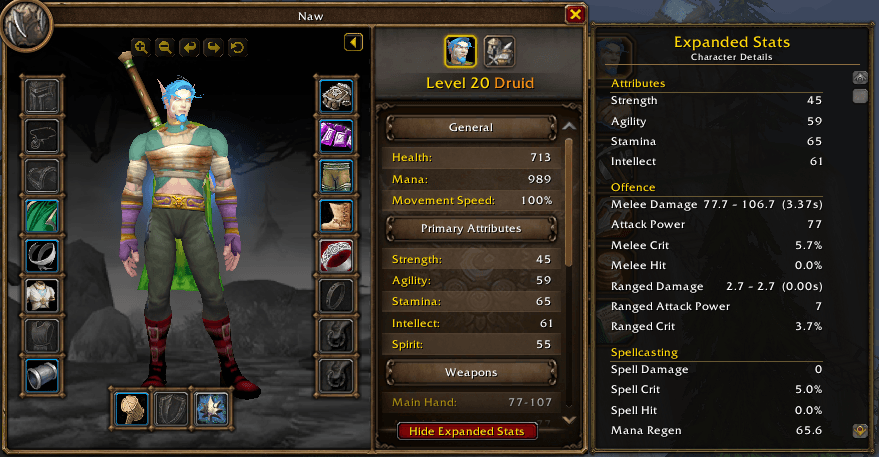
XCSexample.png
Description
Forever Expanded Stats
Forever Expanded Stats adds a native style expanded statistics panel directly to the World of Warcraft: Forever Character window.
It is designed to feel like an extension of Blizzard’s existing interface rather than a separate floating addon window.
Features
• Integrates directly with the Character window
• Adds an expandable stats panel
• Shows Strength
• Shows Agility
• Shows Stamina
• Shows Intellect
• Shows melee damage and attack speed
• Shows Attack Power
• Shows melee critical strike chance
• Shows melee hit where available
• Shows ranged damage and attack speed
• Shows ranged Attack Power
• Shows ranged critical strike chance
• Shows spell damage
• Shows spell critical strike chance
• Shows spell hit where available
• Shows mana regeneration
• Shows Armour
• Shows Dodge
• Shows Parry
• Shows Block
• Shows maximum Health
• Shows maximum resource
• Updates automatically while the Character window is open
• Remembers whether the expanded panel was open
• Lightweight with no external dependencies
Native Character Window Integration
Forever Expanded Stats is attached directly to Blizzard’s Character interface.
Open your Character window and use the Expanded Stats control at the bottom of the stats panel.
The additional statistics panel opens alongside the standard Character window, keeping everything in one place.
Use Hide Expanded Stats to collapse it again.
Automatic Updates
The addon refreshes the displayed statistics automatically while the Character window is open.
Changes from equipment, stats, Attack Power, Health and resources are reflected without needing to reopen the panel.
Protected Stats
World of Warcraft: Forever restricts access to some combat information in certain situations.
If a value is not exposed to addons, Forever Expanded Stats will display:
Protected
or:
—
instead of causing an error.
Slash Commands
/fes
Toggles the expanded statistics panel.
/fes show
Opens the expanded panel.
/fes hide
Closes the expanded panel.
/fes refresh
Manually refreshes the displayed statistics.
Installation
Install Forever Expanded Stats through the CurseForge app, or manually place the ForeverExpandedStats folder inside your World of Warcraft: Forever AddOns folder.
For the current Forever beta installation this is normally:
World of Warcraft/_classic_beta_/Interface/AddOns/
Then restart World of Warcraft or use:
/reload
Compatibility
Designed for:
World of Warcraft: Forever
Forever 1.60.1
Interface 16001
Forever Expanded Stats does not replace Blizzard’s Character window. It simply extends the existing interface with additional character information.
Forever Extended Character Stats Team