


Forever Enhance
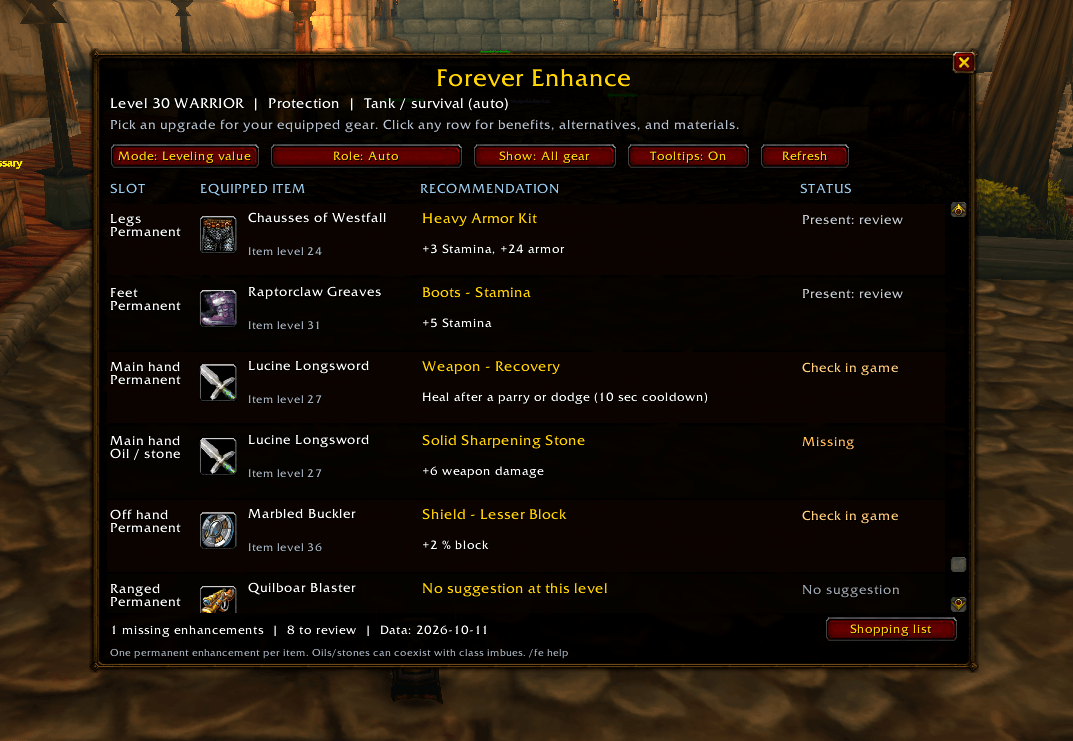
View your equipped gear, recommended enhancements, and current enhancement status in one place.
Description
Forever Enhance
Forever Enhance reviews your equipped gear and recommends compatible enhancements based on your character's level, role, talents, weapon type, and selected spending mode.
Open the recommendation panel from the minimap button or type /fe.
Features
- Permanent enchant recommendations
- Armor kits, weapon oils, sharpening stones, and weightstones
- Scopes and selected head, leg, shoulder, necklace, and off-hand enhancements
- Automatic talent-based role detection with manual role selection
- Separate permanent and temporary enhancement tracking
- Recommendations displayed directly in equipment tooltips
- Draggable minimap button for quick access
- Shopping list for recommended upgrades and crafting materials
- Blizzard-style interface designed to blend into the default World of Warcraft UI
Gear Recommendations
Forever Enhance checks your currently equipped gear and shows:
- Your equipped item and item level
- The recommended enhancement
- The benefit provided by that enhancement
- Whether your current enhancement is missing, already good, or has an upgrade available
Click any recommendation for additional information including the enhancement source, crafting materials, alternatives, and why it was selected.
Leveling Value vs. Max Performance
Leveling Value is designed for characters progressing through levels and avoids recommending expensive high-end enhancements too early.
Max Performance considers the strongest supported enhancements your character is currently eligible to use.
Role Selection
Forever Enhance can automatically select a recommendation profile based on your character and talents.
You can also manually choose a role from the Role dropdown when planning gear for a different purpose.
Shopping List
Use the Shopping List button to generate a copyable list of recommended upgrades and required crafting materials.
This makes it easier to gather everything you need before visiting the Auction House, an enchanter, or another crafter.
Equipment Tooltips
Forever Enhance can display enhancement recommendations directly on equipment tooltips.
Tooltip recommendations can be enabled or disabled from the main Forever Enhance window.
Commands
- /fe - Open or close Forever Enhance
- /fe help - Display available commands
- /fe shopping - Open the shopping list
- /fe refresh - Rescan your equipped gear
Important
Forever Enhance uses role-based recommendation weights and a leveling/spending policy. It is not a full gear or DPS simulator.
The current in-game item tooltip and WoW Forever server restrictions always take priority.
Forever Enhance Team
