
Forever Class Timers
- By
Screenshot 2026-09-24 183315.png
Screenshot 2026-09-24 182909.png
Screenshot 2026-09-26 205718.jpg
Description
Forever Class Timers
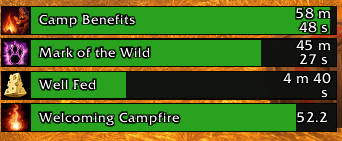
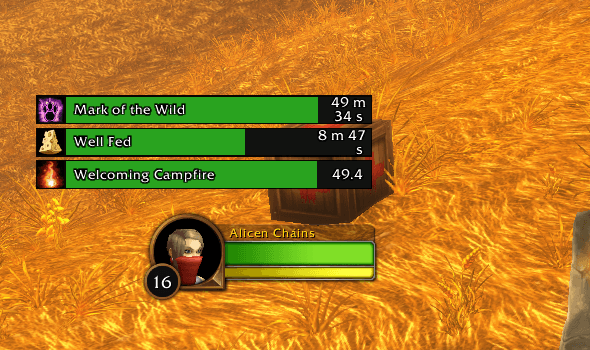
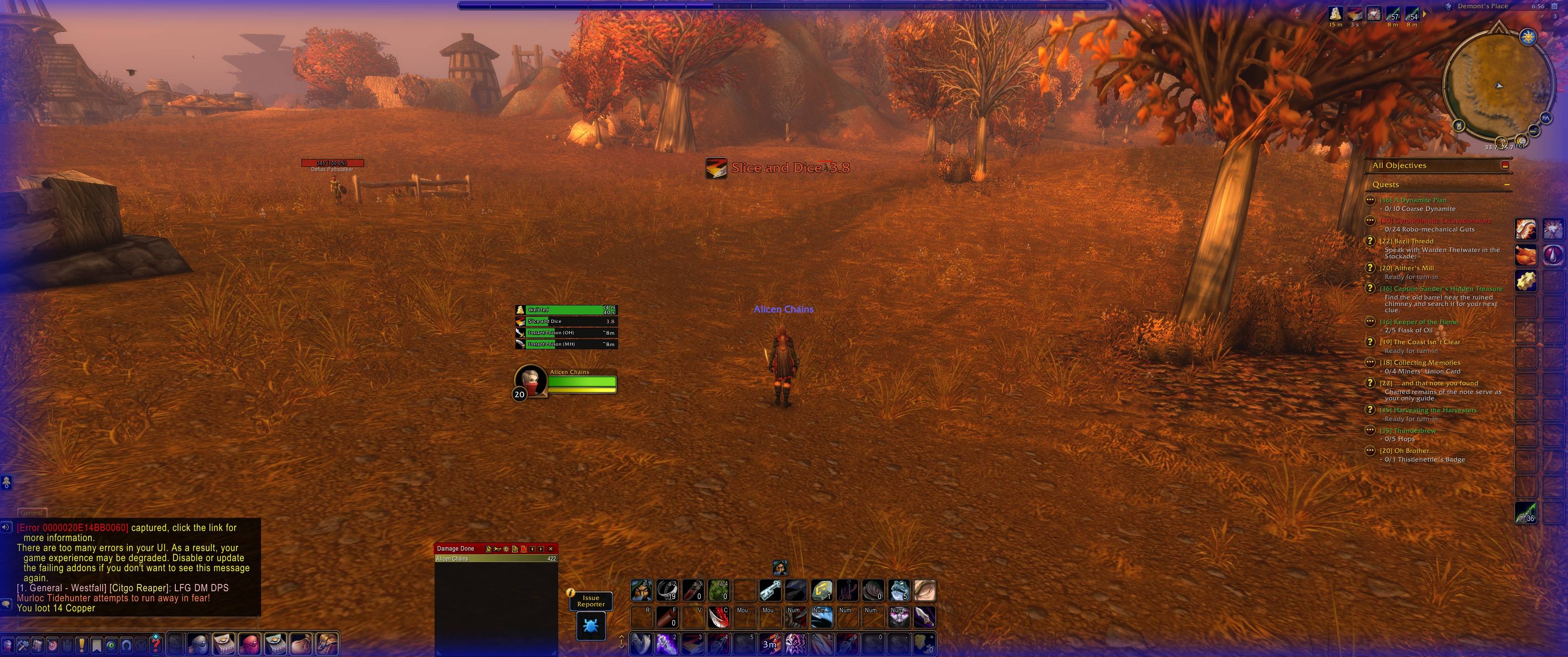
Forever Class Timers is a customizable buff and debuff tracker for WoW Forever, supporting all classes. Monitor your buffs, enemy debuffs, pet effects, and weapon coatings with countdown bars, flexible layouts, and visual reminders.
New features
- Multi-enemy debuff tracking: A separate timer list appears beside each visible enemy nameplate, allowing you to monitor your debuffs and DoTs across multiple enemies while switching targets.
- Only your debuffs: Filter the current-target list to your own effects, or choose to display other players’ debuffs.
- Pet effect tracking: Track buffs and harmful effects on your pet, with clear “Pet:” labels. Keep pet lists beside your other trackers or position them separately.
- Shaman totem buffs: Track supported totem-granted effects, including untimed buffs such as Stoneskin, which display “Active.”
- Independent group visibility: Use checkboxes to show or hide Player Buffs, Enemy Debuffs, Pet Buffs, and Pet Debuffs.
- Size sliders: Adjust bar width, overall scale, text size, spacing, and large-reminder size. Existing manual controls remain available.
- Hide the minimap button: Choose whether the FCT minimap button is displayed. Settings remain accessible with
/fct options. - Improved bug reports: Generate a copyable report containing configuration diagnostics for all four trackers.
- In-addon release notes: Review new features and fixes by version through the What’s New page.
Buffs, debuffs, and weapon coatings
Automatically track timed effects without manually adding every ability, including:
- Class buffs and racial buffs.
- Trinket effects, food buffs, and other timed player buffs.
- Debuffs and damage-over-time effects on enemies.
- Buffs and debuffs affecting your pet.
- Poisons, sharpening stones, weightstones, oils, and other temporary weapon coatings.
Hide effects you do not want to see and restore them later. Weapon coatings can appear with your player timers or in their own movable group.
Make the layout your own
- Move timer lists and save their positions between sessions.
- Choose whether lists grow upward or downward.
- Sort timers from shortest to longest or longest to shortest within their groups.
- Adjust spacing between bars.
- Resize unlocked lists by right-clicking and dragging the upper-right resize grip.
- Choose flat, rounded, or beveled bar styles.
- Customize bar colors, text colors, and warning colors.
- Assign individual colors and warning thresholds to specific abilities.
- Pin selected abilities ahead of ordinary effects.
- Filter out buffs based on their full duration.
- Hover over aura bars to view their in-game tooltips.
- Save, load, rename, and share settings through profile import/export.
Visual refresh reminders
Select multiple abilities for large, movable icon-and-countdown reminders when their remaining time falls below your chosen threshold. Reminders become visible at the threshold and disappear when the effect is refreshed or expires.
Optional flashing screen-edge warnings provide another visual cue. Choose a default edge color or assign different colors to individual abilities. You can also reserve edge warnings for one selected ability.
Positioning handles appear only while arranging your reminders. Preview tools let you test your layout and warning appearance.
Settings and helpful commands
Open FCT through its minimap button, the game’s AddOns options, or /fct options. Press Escape to close FCT menus.
/fct unlock— Unlock timer-list positioning./fct lock— Lock your layout./fct test— Show sample timer bars./fct updates— Read release notes./fct bugreport— Generate a copyable diagnostic report./fct copychat— Copy recent General chat text.
Important tracking details
Multi-enemy tracking supports up to 40 visible nameplates. Enable enemy nameplates in the game to use it. Each list hides when its nameplate becomes unavailable; enemies outside that visibility cannot be reliably tracked. These lists show your effects, while large reminders and screen-edge warnings remain tied to your current target.
Pet Buffs and Pet Debuffs describe effects on your pet. Effects applied to enemies by your pet appear in enemy tracking when the client identifies them as yours.
Weapon timers may use tooltip-based estimates when native enchant timers are unavailable. Those estimates update outside combat.
Sorting applies within display groups. Customized abilities, weapon coatings, and pet effects may occupy separate sorting blocks. Missing-effect notices operate outside combat.
Reporting problems
Use /fct bugreport and paste the generated report into the project’s comments. Include the affected ability, what happened, what you expected, and how to reproduce the problem.
If a Lua error appears, copy and paste the complete error—including Message, Stack, and Locals. If no error appeared, write “None.” Screenshots are welcome when they help explain the issue.
Forever Class Timers Team
