Forever Block & Parry
- By
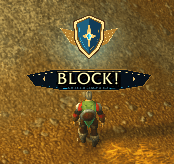
Screenshot 2026-10-07 115014.png
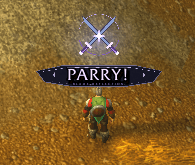
Screenshot 2026-10-07 115054.png
Description
Forever Block & Parry
Clearly see when you block or parry an incoming attack with animated alerts for WoW Forever.
-
Block: A gold shield with a glowing “BLOCK!” banner.
-
Parry: Silver-purple crossed blades with a “PARRY!” banner.
-
Turn block and parry alerts on or off separately.
-
Resize and move the alerts to fit your interface.
-
Optional screen-edge flash.
-
Completely silent—no sound effects.
-
Your settings stay saved between sessions.
Both alerts share the same size and position. When attacks happen quickly, the latest enabled alert replaces the previous one.
Commands
| Command | What it does |
|---|---|
/fblock block on |
Enable block alerts |
/fblock block off |
Disable block alerts |
/fblock parry on |
Enable parry alerts |
/fblock parry off |
Disable parry alerts |
/fblock test block |
Preview the block alert |
/fblock test parry |
Preview the parry alert |
/fblock scale 0.25 |
Change alert size; accepts 0.1–3 |
/fblock unlock |
Unlock the alert so you can drag it |
/fblock lock |
Lock the alert in place |
/fblock duration 1.5 |
Display alerts for 1.5 seconds |
/fblock flash off |
Disable the screen-edge flash |
/fblock flash on |
Enable the screen-edge flash |
/fblock on |
Enable the addon |
/fblock off |
Disable the addon |
/fblock reset |
Restore default settings |
/fblock status |
Show version and troubleshooting information |
Installation
Extract the download and place the ForeverBlock folder inside your WoW Forever client’s Interface/AddOns folder. Restart the game and enable the addon in your AddOns list.
Beta Notice
Built for WoW Forever interface version 16001. Live block and parry detection still needs in-game verification. Preview commands let you check the appearance but do not confirm combat detection. If alerts fail to appear during combat, include your /fblock status output when reporting the issue.
Forever Block & Parry Team