


Forever Action Combat
- By
Forever Action Combat
Play WoW Forever in a completely different way.
Forever Action Combat (FAC) replaces the traditional mouse-driven tab-target feeling with a more direct Action / Tab-Target hybrid control system, inspired by modern MMORPGs such as Throne and Liberty and New World.
FAC does not replace WoW's combat system. Your abilities, action bars and game mechanics remain intact.
Instead, it changes how you control your character, camera, targeting and interactions, making combat feel much more immediate and immersive.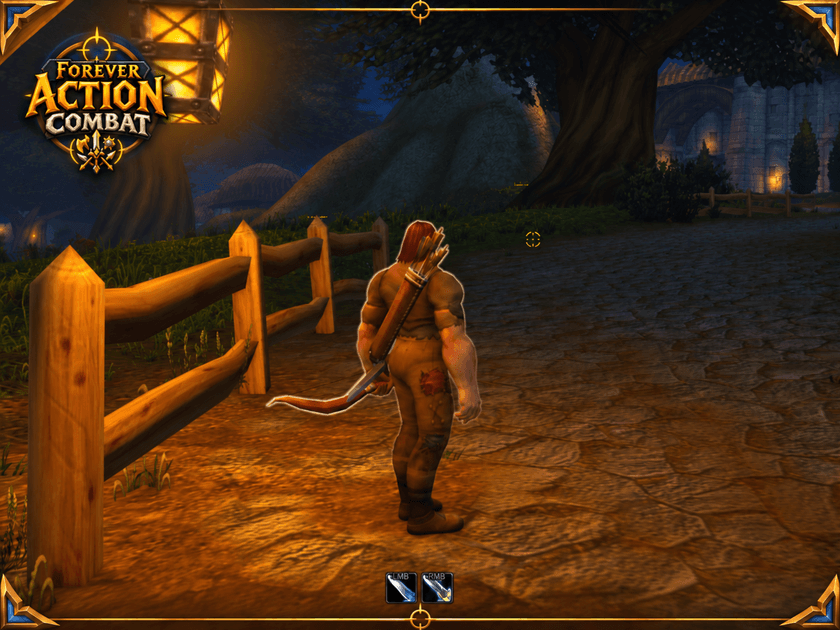
⚔️ Features
- 🎯 Aim-Based Targeting — point your camera toward enemies and use the center reticle to acquire targets naturally.
- 🖱️ Action Camera — permanent mouse-look with an over-the-shoulder camera designed for action gameplay.
- ⚔️ Left Click Attack — target and attack enemies directly with LMB.
- 🛡️ Right Click Defense — assign a defensive ability, spell, item or macro to RMB.
- 💬 Contextual Interaction — use F to interact with NPCs, objects, players and loot.
- 💰 Contextual Looting — lootable enemies display the appropriate interaction prompt.
- 🧭 Modern Movement — A/D automatically work as strafe while Action Mode is active.
- 🎯 TAB Targeting — traditional nearby enemy targeting is still available whenever you want it.
- 🖱️ Smart Cursor Handling — hold ALT to temporarily release the cursor; menus and interface windows automatically free the mouse when needed.
- ✨ Minimal Action HUD — optional LMB/RMB indicators, central reticle and contextual prompts without replacing your normal WoW action bars.
- 📦 Optional Smart Auto-Loot.
- 📷 Adjustable camera distance, mouse sensitivity, reticle size and HUD scale.
🎮 Default Controls
Mouse — Control camera
LMB — Target / Attack
RMB — Defensive Action
F — Interact / Loot / Player Options
TAB — Target nearby enemy
ALT — Temporarily release cursor
WASD — Movement with A/D strafe
FAC is enabled automatically after installation, so you can install it and start playing immediately.
⚙️ Configuration
Type:
/fac
or use the FAC minimap button.
You can customize the reticle, LMB/RMB HUD, camera distance, mouse sensitivity and auto-loot behavior.
Useful commands:
/fac on — Enable Action Mode/fac off — Disable Action Mode and restore normal controls/fac cursor — Toggle between Action Mode and free cursor/fac status — Show current FAC status
World of Warcraft combat.
A completely different way to control it.
Forever Action Combat
Forever Action Combat Team
