For The Empire Duel Ladder
- By
Run clean, real-time PvP tournaments in WoW with live brackets and spectator syncing.
Description
For The Empire Duel Ladder is a lightweight PvP tournament addon designed to run organized duels and bracket-style competitions directly inside World of Warcraft.
Built for guild events, community tournaments, and friendly competitions, this addon allows one player to act as the host while others can participate or spectate in real time.
========================================
⚔️ FOR THE EMPIRE DUEL LADDER ⚔️
========================================
Run clean, real-time PvP tournaments in World of Warcraft
with live brackets, host controls, and spectator syncing.
✔ Host-controlled tournament system
✔ Click-to-advance bracket matches
✔ Raid import support
✔ Live guild broadcast syncing
✔ Password-protected spectator mode
----------------------------------------
QUICK START
/fte ui → Open addon
Become Host → Add players or click "Add Raid"
Generate Bracket → Click winners to advance
Spectators:
/fte ui → enter password → Join
----------------------------------------
FULL GUIDE
GETTING STARTED
Type:
/fte ui
This opens the main tournament window.
----------------------------------------
HOST SETUP (REQUIRED)
1. Click "Become Host"
2. (Optional) Set a password
3. Add players or import raid
4. Click "Generate Bracket"
----------------------------------------
ADDING PLAYERS
Manual:
- Type player name
- Click "Add"
Raid:
- Be in a raid group
- Click "Add Raid"
----------------------------------------
RUNNING THE TOURNAMENT
1. Click "Generate Bracket"
2. Matches appear as:
Player1 vs Player2
3. Click the WINNER to advance
Once all matches are complete:
→ Next round is generated automatically
----------------------------------------
WINNING
When only one player remains:
→ The addon announces the winner
----------------------------------------
SPECTATOR MODE
1. Type:
/fte ui
2. Enter password (if required)
3. Click Join
Spectators receive live updates
----------------------------------------
BROADCAST (HOST ONLY)
Click "Broadcast" to sync with guild
----------------------------------------
COMMANDS
/fte ui - Open UI
/fte help - Show commands
----------------------------------------
IMPORTANT NOTES
- Only the host controls the bracket
- Spectators are read-only
- Works best in guild groups
- Even number of players recommended
----------------------------------------
TROUBLESHOOTING
UI not opening:
→ Make sure addon is enabled
→ Type /fte ui
No updates:
→ Host must press Broadcast
→ Check password is correct
Empty bracket:
→ Host must generate bracket first
----------------------------------------
Created by Roleybones
UPDATED 05/05/2026
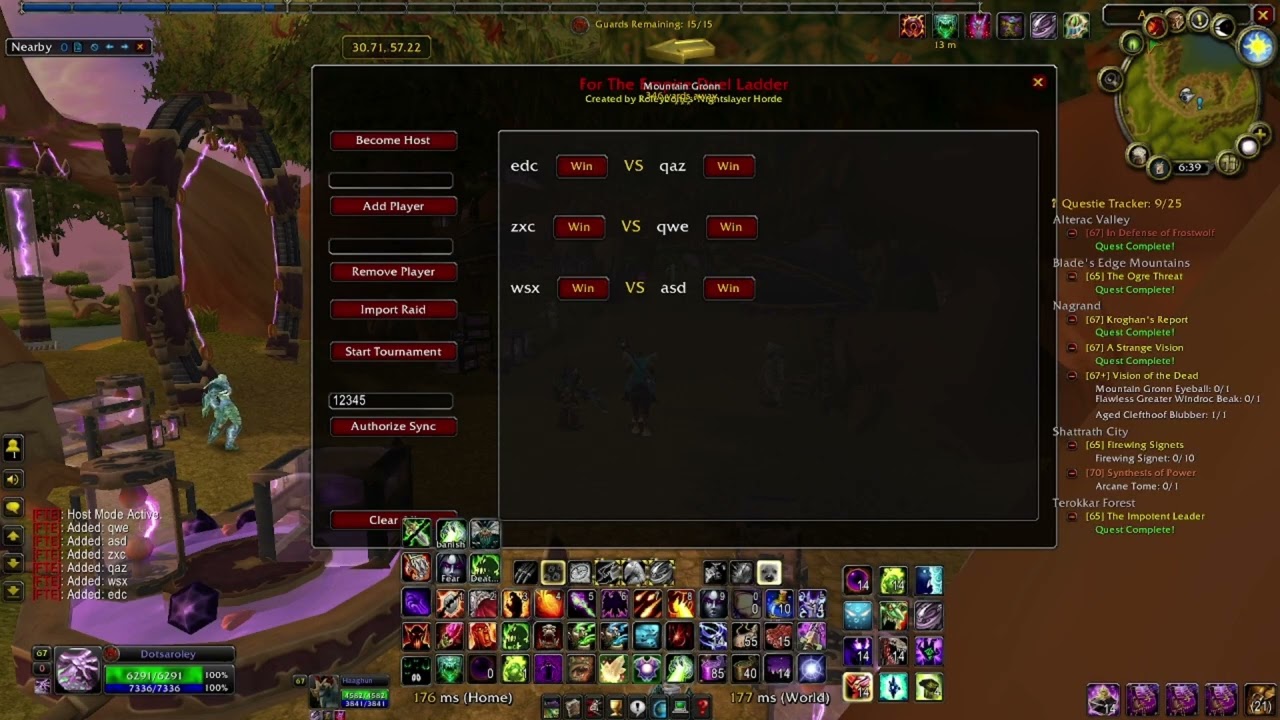
The For The Empire Duel Ladder is a specialized tournament management tool designed for the World of Warcraft TBC Classic environment. It allows a host to organize player lists, generate random bracket pairings, and synchronize match results across a guild or group so everyone can track the tournament progress in real-time.
The interface is designed to be lightweight and functional, fitting the aesthetic of the TBC era while providing modern management features like manual player entry and automated raid importing.
Getting Started
To begin, type /fte or /fte ui in your chat box to bring up the main control panel. Note that sometimes you may need to type the command twice for the window to appear properly.
If you are the person running the tournament, click the Become Host button. This enables the administrative functions on the left side of the frame, allowing you to manage the bracket and broadcast results to others.
Managing the Roster
You can populate your tournament list in three ways:
-
Manually typing a name into the top text box and clicking Add Player.
-
Using the Import Raid button to instantly grab everyone in your current group.
-
Removing specific names using the Remove Player box if someone needs to drop out.
Running the Tournament
Once your list is ready, click Start Tournament to shuffle the names and generate the opening round matches in the main display area. As duels finish, the host simply clicks the Win button next to the victor's name. The addon will automatically highlight the winner in green, the loser in red, and move the winner into the next round's pool once all matches in the current tier are decided.
Synchronization & Viewing
For other players to see the bracket updates, the host must ensure they are in a Guild or Group. Non-host players should enter the shared password (default is FTE123) into the password box and click Authorize Sync to allow their addon to receive live updates from the host's broadcast.
Resetting
If you need to wipe the slate clean for a brand new event, the Clear All button at the bottom left will purge all current players and match history, resetting the addon to its default state.
Roleybones-Nightslayer-Horde
For The Empire Duel Ladder Team