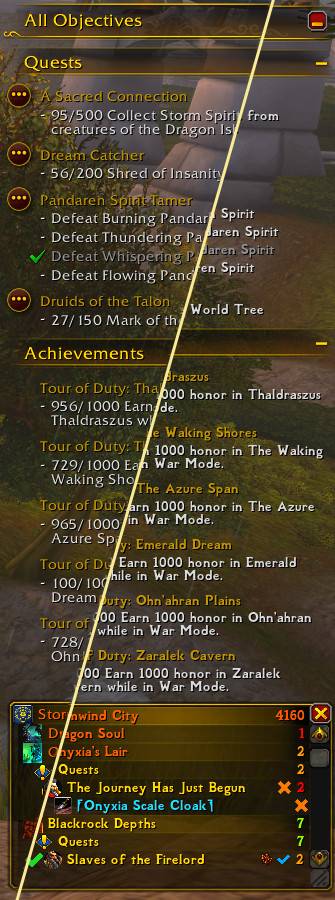
Comparison of the objective tracker & ATT's mini-list with the default font and a custom font
Description
Effortlessly transform the look of your entire interface by changing your font! Whether your goal is to enhance readability or give your UI a bit more style, Fontmancer automagically applies your chosen font to ALL text elements including chat windows, quest tracker, unit frames, floating combat text... you name it, even elements added by other addons!
- One-Click Change: Apply your selected font to all text in your UI
- Adjustable Font: Fine-tune its appearance such as size, colour, and more
- Addon Support: Any addon text is automatically supported
- Frame Exclusions: Optional list of name of frames you would not like to change
How to add your own font(s):
- Get the .ttf file of the font(s) you would like to use
- Download SharedMedia like you would download any other addon
- Navigate to your WoW installation folder, then follow the path
Interface\Addons\SharedMedia - Make sure to have Windows set to show file extensions
- In there you should find a file called
MyMedia.bat.txt. Rename it toMyMedia.bat - Run
MyMedia.batonce - Put your font file(s) into the newly created subfolder found at
Interface\Addons\SharedMedia_MyMedia\font - Run the
MyMedia.batscript one last time to register your added file(s) - That's it! If you start your game, you should now see your font in the dropdown menu of Fontmancer. It will persist through updates
Got a bug to report or a feature to request? Please follow the 'Issues' link above!
Inspired by gmFonts
The Fontmancer Team