Screenshot 2026-05-26 at 2.38.52â¯PM.png
Screenshot 2026-05-27 at 4.29.27â¯PM.png

image.png
Description
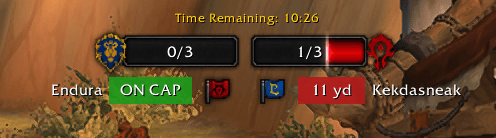
A CTF addon that tracks flag carriers and shows how far they are from capping or if they're "ON CAP" or "NOT ON CAP" message.
Made for Twin Peaks and Warsong Gulch.
What It Does
Banner — Colored banners appear next to the flag icons on the score bar showing each carrier's status:
- Distance to cap in yards
- NOT ON CAP / ON CAP / DROPPED status
- Carrier name with optional class coloring
Carrier HUD — An optional draggable frame showing both flag carriers with distance, cap status, and ETA.
Directional Arrows — When you're carrying the flag, two optional draggable arrows point toward your base and the enemy flag carrier. (North-up only — player facing is unavailable in battlegrounds.)
Chat Commands
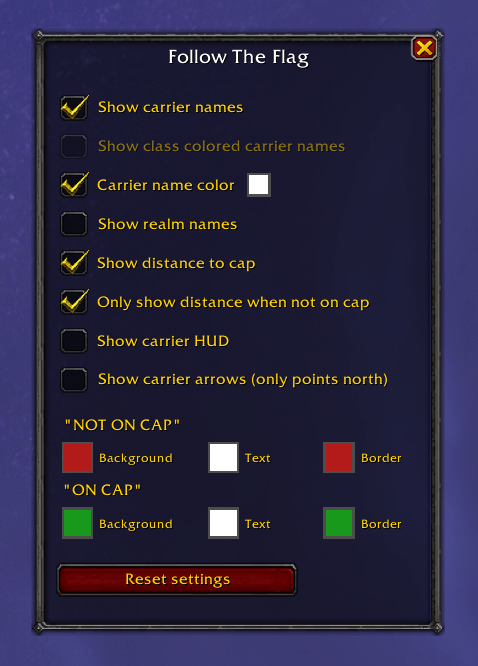
/ftf— Open the settings window/followtheflag— Same as above/ftf blizzard— Open settings in the Blizzard options panel
Settings
- Show carrier names — Display flag carrier names on the score bar
- Show class colored carrier names — Color names by class
- Carrier name color — Use a single custom color for all carrier names
- Show realm names — Include server names alongside character names
- Show distance to cap — Show distance in yards on the score bar banner
- Only show distance when not on cap — Hides the NOT ON CAP label, shows yards only
- Show carrier HUD — Toggle the draggable carrier info frame
- Show carrier arrows — Toggle the directional arrows when carrying the flag
- Banner colors — Customize background, text, and border colors for NOT ON CAP and ON CAP banners
All settings are also available in the Blizzard interface options under Follow The Flag.
Follow The Flag Team

Owner