Foe's Magnificent Micromenu
- By
The most customizable replacement Micromenu addon ever made.

FMM-ezgif.com-optimize.gif
FMM1.jpg
FMM2.jpg
FMM3.jpg
Description
Foe’s Magnificent Micromenu
Foe’s Magnificent Micromenu is a sleek, modern replacement for the default World of Warcraft micromenu, designed for players who care about both style and clarity. It keeps all the familiar game buttons you expect, but wraps them in a clean, configurable package that feels right at home in a custom UI.
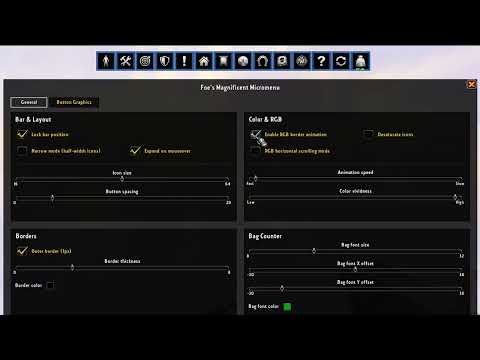
Type /fmm to open the GUI config menu!
(PLEASE NOTE: This addon is built for WoW 12.0 Midnight; not all features will work as intended in WoW retail.)
Core Features
- Customizable micromenu bar
- Lock or unlock the bar for easy repositioning
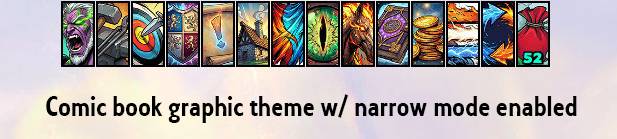
- Optional narrow mode with half-width icons for a more compact layout
- “Expand on mouseover” option to see full icon art when hovered
- Lock or unlock the bar for easy repositioning
- Button themes & graphics
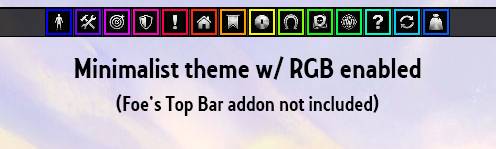
- Choose a global Button theme (including Comic book style and Minimalist).
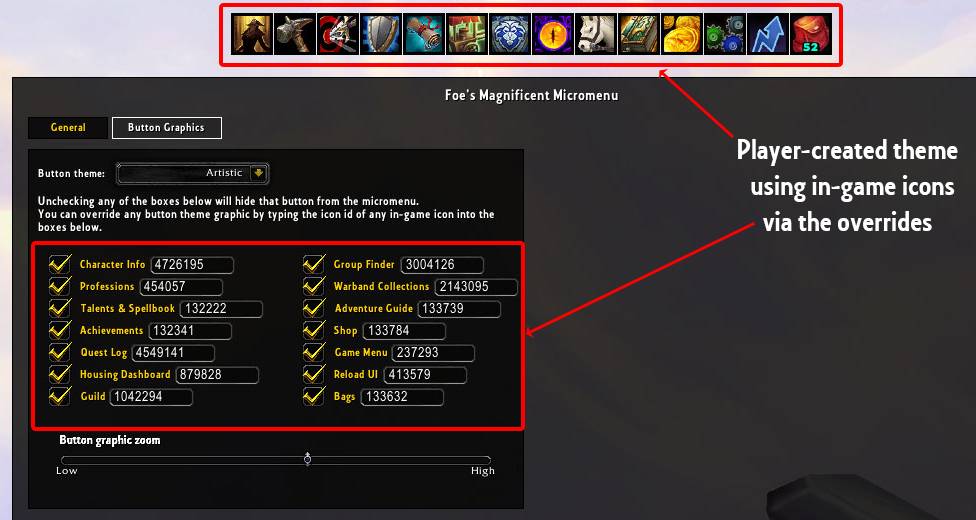
- Per-button override: type the icon ID of any in-game icon to replace an individual button’s graphic
- Optional desaturate icons toggle for a muted, grayscale look.
- Color & RGB effects
- Enable RGB border animation for a soft cycling color effect around the bar.
- RGB horizontal scrolling mode for a subtle “moving” color gradient.
- Adjustable Animation speed and Color vividness so the effect can be anything from barely noticeable to fully vibrant.
- Borders & framing
- Adjustable border thickness slider.
- Border color picker with alpha, matching your existing UI theme.
- Bonus functionality
- Optional Bag button with bag space counter.
- Optional ReloadUI button.
- Adjustable bag font size, plus X/Y offset to line it up perfectly with your layout.
- Clean, unified configuration UI
- Custom options window with two tabs: General and Button Graphics
- Clear tooltips and inline instructions
Why use Foe’s Magnificent Micromenu?
If you’re already running a custom UI or you just want your micromenu to look as good as the rest of your HUD, this addon gives you:
- A minimal, modern look instead of the bland default art.
- Fine control over colors, borders, animations, and icon graphics.
- A tidy configuration panel that’s easy to understand and quick to tweak.
Perfect for players who want their UI to feel deliberate, cohesive, and just a little bit extra.
Foe's Magnificent Micromenu Team