FocusToggle
- By
Lightweight addon that lets you toggle your focus and marker. Configurable. Toggles with one keybind. No shift / alt / ctrl needed.
screenshot.jpg
Description
Focus Toggle gives you a single keybind that both sets and clears your focus target. Press it over a mob to focus and mark it; press it again to clear both. Standard macros can't do this, because they have no way to branch on whether you already have a focus. Focus Toggle adds a small secure button that makes that decision for you, and it works in combat.
- One-key toggle: press over a mob (or with a target) to set it as focus and mark it. Press again to clear the focus and remove the mark.
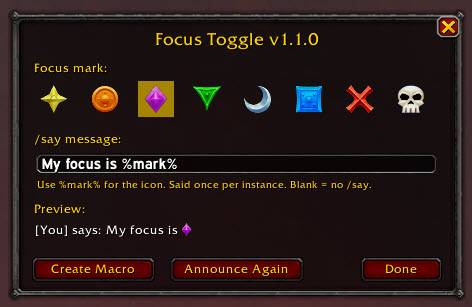
- Choose your mark: pick any of the 8 raid icons in the settings (
/ft). The default is Diamond. - Custom announcement: write your own
/saymessage, and use%mark%wherever the raid icon should appear. For example,My focus is %mark%. - Once per instance: the message is said the first time you set a focus in an instance, not on every press. It resets when you enter a different instance or join a new group, or you can reset it yourself with the Announce Again button or
/ft reset. - Automatic macro setup: click Create Macro in the settings, or type
/ft macro, then drag the FocusToggle macro onto your action bar. The macro updates itself whenever you change your settings. - Commands:
/ftopens settings,/ft statusshows your current setup, and/ft debugshows step-by-step details when troubleshooting.
The FocusToggle Team