
FocusMarker
- By
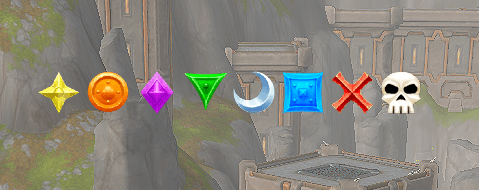
A lightweight addon to automatically mark your focus target with a user-selected raid icon. Perfect for Mythic+ groups that need precise, manual control over marking.
01-Icons.png
02-Settings-01.png
Description
FocusMarker
Midnight (Patch 12.1.5) Ready! — Version 2.0.20
Welcome to FocusMarker, a lightweight, reliable, and powerful target-marking suite built for coordinated group play. Created by Dentee-Frostmourne, FocusMarker provides a clean, movable bar of raid icons. Simply click the icon you want, press your macro keybind, and let FocusMarker manage your target marking instantly and seamlessly.
🔇 New in v2.0.20: Mute / Silent Mode
By popular community request, you can now silence group-wide announcements without losing any functionality:
- Dungeon & Party Silence: Toggle Mute mode to completely suppress Ready Check announcements and route icon changes locally to your own chat window only. Perfect for healers or players without an interrupt who want to mark their focus target without cluttering party chat.
- Easy Toggle: Quickly toggle on/off anytime using
/fm mute(or/fm silent), or check the "Mute Announcements (Silent)" box in the settings panel (/fm). - Raid Priority Maintained: FocusMarker remains completely silent in raid groups by default, printing confirmations locally to yourself only.
📢 Patch 12.0.7+ Native Overwrite Protection
- Target Safety: Takes full advantage of Blizzard's native macro extension to prevent accidental target marker overrides.
- Smart Skipping: Uses the native tilde (
~) prefix before target marker IDs (e.g.,/tm [@focus] ~8). The game will intelligently skip applying your marker if the unit is already marked by another group member. - Leader Priority: Never blindly override your tank or raid leader's priority marks during fast-paced pulls.
⚙️ How to Set Up (Important!)
Due to combat security restrictions in World of Warcraft, FocusMarker operates safely by managing a dedicated macro for you.
Step 1: Create the Macro
- Open the macro menu in-game (
/macro). - Click New.
- Name: You MUST name the macro exactly:
FocusMark(case-sensitive, no spaces). - Icon: Select the Red Question Mark (
?) or any icon you prefer. - Body: Leave the text box completely EMPTY.
- Save the macro and drag it to your action bar.
Step 2: Initialize
- Click any icon on the FocusMarker icon bar (e.g., Skull).
- The addon will automatically write the secure, combat-safe code into your
FocusMarkmacro.
undefined
Step 3: Usage
- Hover your mouse over your desired enemy target.
- Press your
FocusMarkkeybind. - Result: The enemy is instantly set as your focus and marked with your preferred raid target icon (unless already marked by a teammate).
✨ Key Features
- Native Edit Mode Integration: Open Blizzard's Edit Mode to unlock, reposition, and dock your icon bar just like default UI elements.
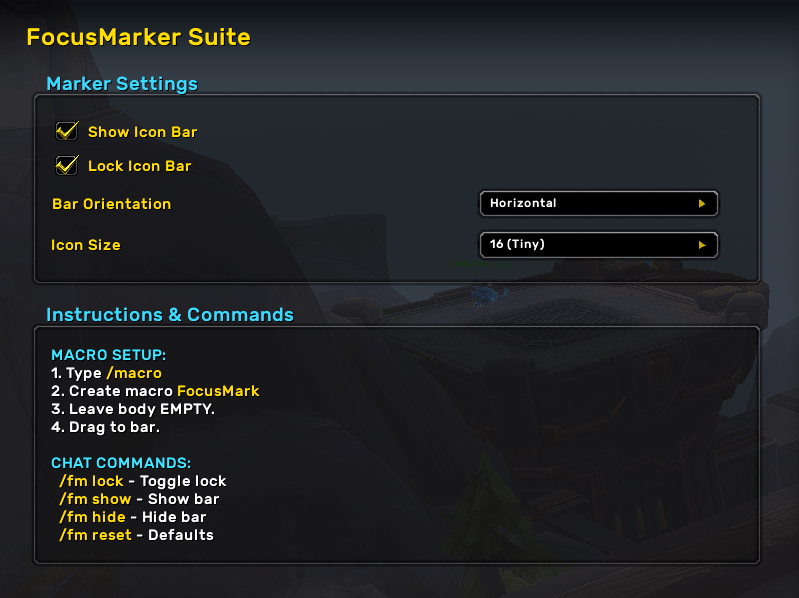
- Customizable Layout: Choose between horizontal or vertical orientation, and pick from 6 different icon sizes (16px to 64px) via
/fmor the floating Edit Mode panel. - Mute / Silent Mode: Completely suppress Ready Check broadcasts and keep 5-man party mark updates local to yourself.
- Hide / Show Anytime: Don't need the icon bar on screen? Hide it with
/fm hide. YourFocusMarkmacro continues to work seamlessly in the background. - Combat Safe: Zero Lua errors and zero action blocking during combat.
- Smart Chat Routing:
- Party: Broadcasts your assigned marker so your group stays coordinated.
- Muted / Raid / Solo: Prints cleanly to your local chat window only to eliminate spam.
- Ready Checks: Automatically reminds your group of your interrupt assignment (unless muted or in a raid).
⌨️ Slash Commands
| Command | Description |
|---|---|
/fm |
Opens the configuration panel (Icon Size, Orientation, Mute toggle). |
/fm mute (or /fm silent) |
Toggles Mute / Silent mode on or off. |
/fm lock |
Toggles bar lock on or off. |
/fm show |
Shows the icon bar. |
/fm hide |
Hides the icon bar. |
/fm reset |
Resets bar position, size, and settings to defaults. |
🐛 Feedback & Support
If you encounter any issues, have questions, or would like to suggest a feature:
- CurseForge: Leave a comment on the addon page!
- Discord:
dentee - In-Game: Dentee-Frostmourne
FocusMarker Team
