FishingKit - Classic
- By
All-in-one fishing companion: gear swapping, lure management with live timer, session stats, clam opening, and more. Features skill tracking, zone info, quick action buttons, and comprehensive catch statistics. Essential for serious anglers!
20-02-2026_21-44-19_rec-png.png
Description
FishingKit - Classic Era Edition
Description
FishingKit is a comprehensive fishing companion addon for World of Warcraft Classic (Classic Era, Hardcore, Season of Discovery). It provides everything you need for an enhanced fishing experience - from gear management and lure tracking to detailed statistics, gold tracking, auction house price scanning, and quality-of-life improvements.
Features
Main Fishing Panel
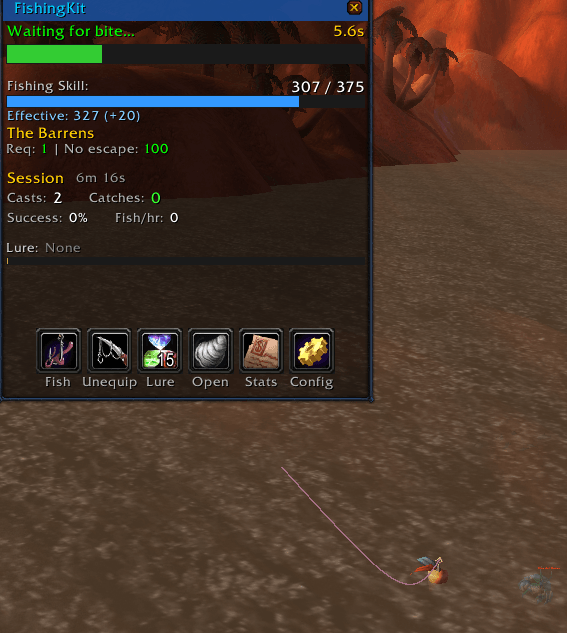
- Skill Display - Shows your current fishing skill with progress bar and fish-to-level counter
- Skill Above Fish Button - Current skill level always visible above the Fish button, even when collapsed
- Effective Skill - Calculates total skill including gear and lure bonuses with catches-to-level estimate
- Zone Information - Displays zone skill requirements, no-getaway threshold, and color-coded catch rate percentage
- Seasonal Notes - Subtle indicator when seasonal fish (Winter Squid, Summer Bass) are in or out of season in your zone
- Live Cast Bar - Visual progress bar while fishing with elapsed time, catch notifications, and bite confidence band
- Bite Confidence Band - Green highlight on the cast bar showing the most likely bite window based on your catch history
- Session Statistics - Track casts, catches, success rate, fish per hour, and gold per hour in real-time
- Lure Timer - Countdown timer showing remaining lure duration with color coding (green/orange/red)
- Goal Progress - Active fishing goals display on the idle status line
- Collapsible View - Collapse the panel to show only the cast bar and action buttons for a compact layout
- STV Contest Bar - Compact Tastyfish counter and timer appears above the panel during the Fishing Extravaganza
Quick Action Buttons
- Fish - One-click casting (secure action button) with skill level displayed above
- Gear - Instantly swap between fishing gear and normal equipment
- Lure - Automatically applies your best available lure to your fishing pole
- Open - Quickly open clams, crates, and containers caught while fishing
- Stats - Access comprehensive lifetime statistics with 5 tabbed views
- Route - Show pool route on world map with numbered waypoints
- Config - Addon settings and configuration
Double-Click to Cast
- Double-right-click anywhere in the world to recast Fishing instantly
- Uses a SecureActionButton with override binding for reliable, lag-free casting
- Loot a catch and immediately recast without moving your mouse to a button
- Safety timer auto-clears the binding if no click follows
- Binding cleared during combat
- Toggle on/off in General config tab
Persistent Footer Bar
- Always-visible footer at the bottom of the panel, even when collapsed
- Shows last fish caught (name and quantity, persists 5 minutes)
- Shows "2x Click to Cast" indicator when double-click casting is enabled
Equipment Management
- Save your fishing gear set (pole, hat, boots, gloves)
- Save your normal combat gear set
- One-click swap between gear sets
- Automatically saves normal gear before equipping fishing gear
- Persists across sessions - never lose track of your gear
Auto-Combat Gear Swap
- Detects entering combat while fishing pole is equipped
- Chat warning when combat is detected
- Queues automatic gear swap to normal equipment when combat ends
- Retry logic for reliable lockdown-safe swapping
- Toggle on/off in Equipment config tab
Smart Lure System
- Automatically detects the best lure in your bags
- One-click lure application with secure macro
- Live lure timer that reads the actual bonus from your fishing pole tooltip
- Color-coded countdown: Green (>60s), Orange (>30s), Red (<30s)
- Audio warning when lure is about to expire (30 seconds)
- Missing lure warning - periodic alert when fishing without an active lure
- Works correctly even for lures applied before logging in
Complete Zone Database
- All Classic Azeroth fishable zones with accurate skill requirements
- Every zone includes minimum skill to cast and no-getaway skill for 100% catch rate
- Starting Zones: Elwynn Forest, Dun Morogh, Durotar, Mulgore, Teldrassil, Tirisfal Glades
- Classic Zones: All Azeroth zones from Westfall to Winterspring
- Cities: Stormwind, Ironforge, Undercity, Orgrimmar, Thunder Bluff, Darnassus
- Instances & Raids: Blackfathom Deeps, The Deadmines, Wailing Caverns, Scarlet Monastery, Maraudon, The Temple of Atal'Hakkar, Scholomance, Stratholme, Zul'Gurub
Comprehensive Statistics
- Session Stats: Casts, catches, success rate, fish per hour, gold per hour, session duration
- Lifetime Stats: Total casts, catches, fish caught by type, skill ups
- Zone Statistics: Track your fishing success in each zone with top fish breakdown
- Zone Fish Browser: See all catchable fish in your current zone with skill requirements, catch counts, and values
- Rare Catches: History of rare and valuable catches with timestamps
- Loot History: Recent catch log with zone and quality info
- Efficiency Trend: Bar graph showing fish/hour over 5-minute intervals throughout the session
- Gold Summary: Vendor and AH value totals with per-hour rates
- Tabbed statistics panel with Overview, Fish Caught, Zone Fish, Zones, and History views
Gold Tracking
- Tracks vendor value of catches using real item sell prices from GetItemInfo
- Scans AH prices automatically when you visit the Auction House (up to 20 fish per visit)
- AH prices cached account-wide for cross-session and cross-character use
- Displays vendor gold/hr and AH gold/hr on the main panel stats row
- Stats panel Overview shows total vendor value, AH value, and per-hour rates
- Fish tooltips show cached AH prices
Tooltip Enrichment
- Hover over any fish item (bags, AH, loot, trade) to see FishingKit data
- Shows: total caught, catch zones, minimum skill (color-coded), seasonal availability
- Displays cached AH price per unit
- Shows your best personal catch zone for that fish
Bite Timing Analysis
- Cast bar shows a confidence band highlighting the most likely bite window
- Semi-transparent green band marks the 35th-65th percentile range
- Thin bright green line marks the median bite time
- Based on your actual catch timing data per zone (persists across sessions)
- Data improves with more catches; requires 5+ catches in a zone to display
STV Fishing Extravaganza
- Compact gold-bordered contest bar appears above the main panel during the event
- Only visible when in Stranglethorn Vale during Sunday 2-4 PM server time
- Shows Tastyfish count (X/40) with progress bar and minutes remaining
- "Turn in to win!" message at 40 Tastyfish
- Completely hidden outside contest hours or zones
Key Bindings
- All major actions available in the WoW Key Bindings menu
- Bindable: Toggle Panel, Swap Fishing/Normal Gear, Lure Info, Toggle Stats, Toggle Settings
- Access via Game Menu > Key Bindings > FishingKit
Pool Map Markers
- Discovered fishing pools are marked on both the minimap and world map
- Colored circle pins (cyan/teal) show pool locations with hover tooltips
- Tooltips display pool name, times seen, last seen, and coordinates
- Pool locations persist across logout/reload (stored account-wide)
- Pools detected on mouseover (tooltip alert) and recorded at close range
- Fishing a pool refines its pin to the most accurate position
- Minimap pins use normalized coordinate fallback (Classic Era restricts UnitPosition in open world)
- World map pins use the standard MapCanvasDataProviderMixin system
Pool Route Navigation
- Build an optimized route through discovered pools with
/fk route - Nearest-neighbor TSP algorithm starts from closest pool to player
- Numbered waypoints shown on world map with colored connecting lines
- Current waypoint highlighted in green, others in cyan
- Skip waypoints with
/fk route skipor right-click - Recalculate from nearest pool with
/fk route recalculate - New pool discoveries automatically inserted into active route
- Import pool data from GatherMate2 with
/fk import gathermate - Route auto-rebuilds when changing zones
Container Opening
- Detects clams, crates, and other openable containers in your bags
- Shows total count of items to open
- Spam-click to quickly open all containers
- Supports: Big-mouth Clam, Thick-Shelled Clam, Waterlogged Crate, and more
Fishing Goals
- Set session catch targets via
/fk goal <fish name> <count> - Track progress on the idle status line with color-coded display
- Completion celebration with visual and audio feedback
- Multiple goals supported, first incomplete goal shown
- Fish matched by name against catch history and database
Catch & Release
- Mark junk fish for automatic deletion:
/fk release <fish name> - Only deletes gray and white quality items for safety
- Higher quality items rejected with error message
- Keeps your bags clean during extended fishing sessions
Alerts & Notifications
- Screen flash on successful catch
- Panel briefly turns green when you catch something
- Sound alerts for catches and rare items
- Lure expiration audio warning at 30 seconds remaining
- Pool discovery sound when mousing over a fishing pool
- Enhanced fishing sound - boosts SFX volume while fishing for easier splash detection, restores when done
- Missing lure warning - periodic alert when fishing without an active lure
- Milestone celebrations at 100, 250, 500, 1000, 2500, 5000, 10000 total catches
- All alerts can be toggled in settings
Minimap Button
- Quick access to show/hide the fishing panel
- Right-click for settings
- Draggable around the minimap
Slash Commands
| Command | Description |
|---|---|
/fk or /fishingkit |
Toggle the main panel |
/fk show |
Show the panel |
/fk hide |
Hide the panel |
/fk equip |
Equip fishing gear |
/fk unequip |
Equip normal gear |
/fk savegear fishing |
Save current gear as fishing set |
/fk savegear normal |
Save current gear as normal set |
/fk sound on/off |
Toggle sound alerts |
/fk sound test |
Play test sound |
/fk stats |
Open statistics panel |
/fk config |
Open configuration |
/fk reset stats |
Reset all statistics |
/fk reset position |
Reset UI position |
/fk lock / /fk unlock |
Lock/unlock UI position |
/fk scale [0.5-2.0] |
Set UI scale |
/fk pools |
List discovered pools in current zone |
/fk pools clear |
Clear all saved pool data |
/fk pools clearzone |
Clear pool data for current zone only |
/fk route |
Start/stop pool navigation route |
/fk route skip |
Skip to next waypoint |
/fk route recalculate |
Recalculate route from nearest pool |
/fk import gathermate |
Import pool data from GatherMate2 |
/fk goal <fish> <count> |
Set a fishing goal for the session |
/fk goal |
List active goals |
/fk goal clear |
Clear all goals |
/fk release <fish> |
Add fish to auto-delete list |
/fk release |
List release items |
/fk release clear |
Clear release list |
/fk debug |
Toggle debug mode |
Configuration
The config panel (/fk config) includes 5 tabs:
General
- Enable/disable addon, show/hide UI, lock position, UI scale, minimap button
Alerts
- Sound alerts on/off, pool detection sound, test sound button
- Visual alerts, screen flash on rare catch, milestone celebrations
- Enhanced fishing sound (boost splash volume), missing lure warning
Equipment
- Auto-save normal gear, auto-combat gear swap toggle
- Save Fishing Gear / Save Normal Gear buttons
- Current equipment status display
Pools
- Pool detection on/off, pool discovery sound
- Minimap/world map pin display toggle
- Navigation: enable routes, show route on world map, start/stop/skip/recalculate/import buttons
- Pool data count and clear buttons
Statistics
- Track stats on/off, track loot history on/off
- All-time statistics summary
- Reset session / Reset all stats buttons
Installation
- Download and extract to your
Interface/AddOnsfolder - Ensure the folder is named
FishingKit-Classic - Restart WoW or type
/reload
Getting Started
- Equip your normal combat gear and type
/fk savegear normal - Equip your fishing gear and type
/fk savegear fishing - Open the panel with
/fkand start fishing! - Use the Gear button to swap between sets
- Use the Lure button to apply lures with one click
- Mouse over fishing pools to discover and mark their locations on your maps
- Visit the Auction House to scan fish prices for gold/hour tracking
- Set key bindings via Game Menu > Key Bindings > FishingKit
- Set fishing goals with
/fk goal <fish name> <count> - Start a pool route with
/fk routeand open the world map to see it
Compatibility
- Game Versions: Classic Era, Hardcore, Season of Discovery
- Interface: 11508, 20505, 30405, 50503
- Addon Version: 1.0.8-classic
Classic Era Notes
- No Navigation Arrow: Classic Era restricts
UnitPosition()andGetPlayerFacing()in the open world, so no TomTom-style arrow is available. Use the world map route lines and/fk route skipto navigate between pools. - No Find Fish Tracking: The Weather-Beaten Journal / Find Fish ability is not available in Classic Era.
- Pool Recording: Pool positions are recorded at the player's location (no facing offset) since
GetPlayerFacing()is restricted. Positions are still accurate enough for route building. - Minimap Pins: Use a normalized coordinate fallback when world position APIs are unavailable.
Known Limitations
- Fish Bite Detection: The WoW API does not expose when a fish bites the bobber. Listen for the in-game splash sound to know when to click. The addon boosts SFX volume while fishing to help, and will flash green and play a sound when you successfully catch something.
- AH Price Scanning: Prices are scanned when you visit the AH (up to 20 fish per visit). Prices may become stale over time. Visit the AH periodically for updated values.
- Lure Application: Lure application requires the secure Lure button on the panel due to WoW combat lockdown restrictions. The keybind shows lure info but cannot apply directly.
- Player Position: Some Classic clients restrict position APIs in the open world. Route building will fall back to alphabetical ordering if your position cannot be determined.
Credits
Created for the Classic fishing community. Happy fishing!
Feedback & Issues: Please report any bugs or feature requests!
The FishingKit - Classic Team