


FilterChat
- By
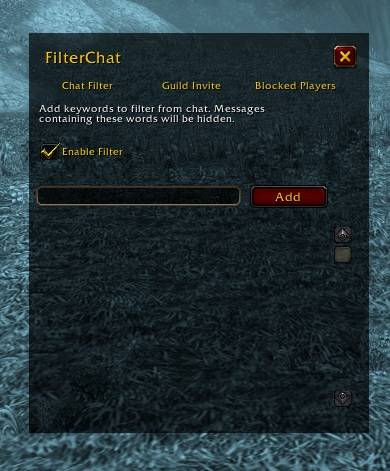
Untitled.jpg
Description
FilterChat
Take back control of your chat window. FilterChat silently removes spam, keyword-triggered noise, unwanted guild invites, and messages from specific players — before you ever see them.
Features
🔇 Keyword Chat Filter
Hide any chat message that contains a word or phrase you don't want to see. Works across Say, Yell, Whisper, Party, Raid, Instance, Guild, Officer, and custom channels.
🚫 Block Players (NEW!)
Had enough of one person spamming the same emote or message over and over? Add their name to the Blocked Players list and FilterChat will hide everything from them — regular chat, whispers, and emotes (both /emote custom text and canned emotes like /wave or /dance). No more scrolling past the same spammer's wall of text.
- Matches by character name regardless of capitalization, spacing, or realm suffix (e.g.
Begbeanderson,Begbe Anderson, andBegbeanderson-YourRealmare all treated as the same player). - Toggle the feature on/off independently from the rest of the addon.
🛡️ Guild Invite Blocker
Automatically declines guild invites from guilds whose name matches an entry on your block list — perfect for filtering out spam/bot guild invites. Includes smart name matching that catches lookalike characters (accented letters, Cyrillic, Greek, and basic leetspeak substitutions like 0 for o) so spammers can't dodge your filter with fake-looking names. The invite popup and its sound are suppressed so you never even notice the spam invite happened.
Options
Type /fc or /filterchat to open the settings panel, which has three tabs:
- Chat Filter — manage your list of blocked keywords and enable/disable the filter.
- Guild Invite — manage your list of blocked guild names and enable/disable auto-decline.
- Blocked Players — manage the list of players whose chat and emotes should be hidden, and enable/disable the filter.
Each tab has a text box and an Add button to add new entries, and a scrollable list with Remove buttons to delete entries you no longer need.
Slash Commands
| Command | Description |
|---|---|
/fc or /filterchat |
Open/close the FilterChat options panel. |
/fcdebug |
Show current status (filters enabled, blocked guild/player lists, intercept method). |
/fcdebug on / /fcdebug off |
Enable/disable debug output printed to chat. |
/fcdebug test <guild name> |
Check whether a guild name would be blocked. |
/fcdebug testplayer <player name> |
Check whether a player would be blocked. |
/fcdebug delay <seconds> |
Set how long sound effects stay muted after blocking a guild invite (0–5s). |
Changelog
1.2.0
- Added Blocked Players feature: hide all chat messages and emotes from specific players.
- Added
/fcdebug testplayercommand.
1.1.0
- Guild invite blocking with lookalike-character matching and automatic sound muting.
1.0.0
- Initial release: keyword-based chat message filtering.
FilterChat Team
