


FellowshipSync: The Ultimate Social Hall of Fame
- By
FellowshipSync Logo.jpg
scr1.png
scr2.png
scr3.png
scr4.png
Description
FellowshipSync
The Hall of Fame, history book and game night for your guild, your friends and your alts.
FellowshipSync quietly records your adventures: every kill, death, jump, boss, epic, level, first and friendship. It shares them automatically with your guild and your Battle.net friends, across factions and realms, and turns everything into leaderboards, a deathlog, a guild bestiary, weekly challenges, a written history for every character, a world map of deaths, and a memorial wall for fallen heroes. There’s a raffle wheel and Deathroll for guild events too.
Type /fsync or click the minimap button to open it.
Works on: WoW: Forever · Classic Era · TBC Anniversary · Mists of Pandaria Classic · Retail. One download, and each game automatically loads its own version.
Highlights
- Fully automatic syncing: with your guild, with Battle.net friends across factions and realms, and for all your alts.
- Hall of Fame: 27 scoreboards you can choose and rearrange by drag and drop.
- All-Time or This Week: every board switches between lifetime totals and this week’s numbers.
- Deathlog with famous last words, and a Deathmap with skulls and hot zones on the world map.
- Guild Bestiary and Dungeon & Raid Log: every enemy and boss your guild has defeated, and every wipe.
- Guild Firsts, Speedrun board, Legacy Race and a weekly newspaper you can post to guild chat or Discord.
- Fellowship: friendship bonds, weekly guild bounties, a Book of Deeds, pretend-gold wagers, rivalries, Deathroll and a raffle wheel.
- Records: about 40 personal statistics, from time in combat to your favourite emote.
- Make it yours: 45 colour themes, 10 borders, 7 backgrounds, 11 fonts with outlines, glow, pulse, drop shadow and one-click style presets.
- Toasts and chat announcements, tailored down to each kind of event.
- A setup guide the first time you log in, and profiles for your whole account or each character.
Getting Started
The first time you log in, the setup guide offers a choice:
- Quick Start: sensible defaults. Share with your guild and friends, everything visible, toasts for big moments, no chat announcements.
- Let me choose: five short steps covering who sees your stats, what they may see, which notifications you want, and how the addon looks, including a style preset.
You can change everything later in Options, or rerun the guide with /fsync setup.
The Tabs
Hall of Fame
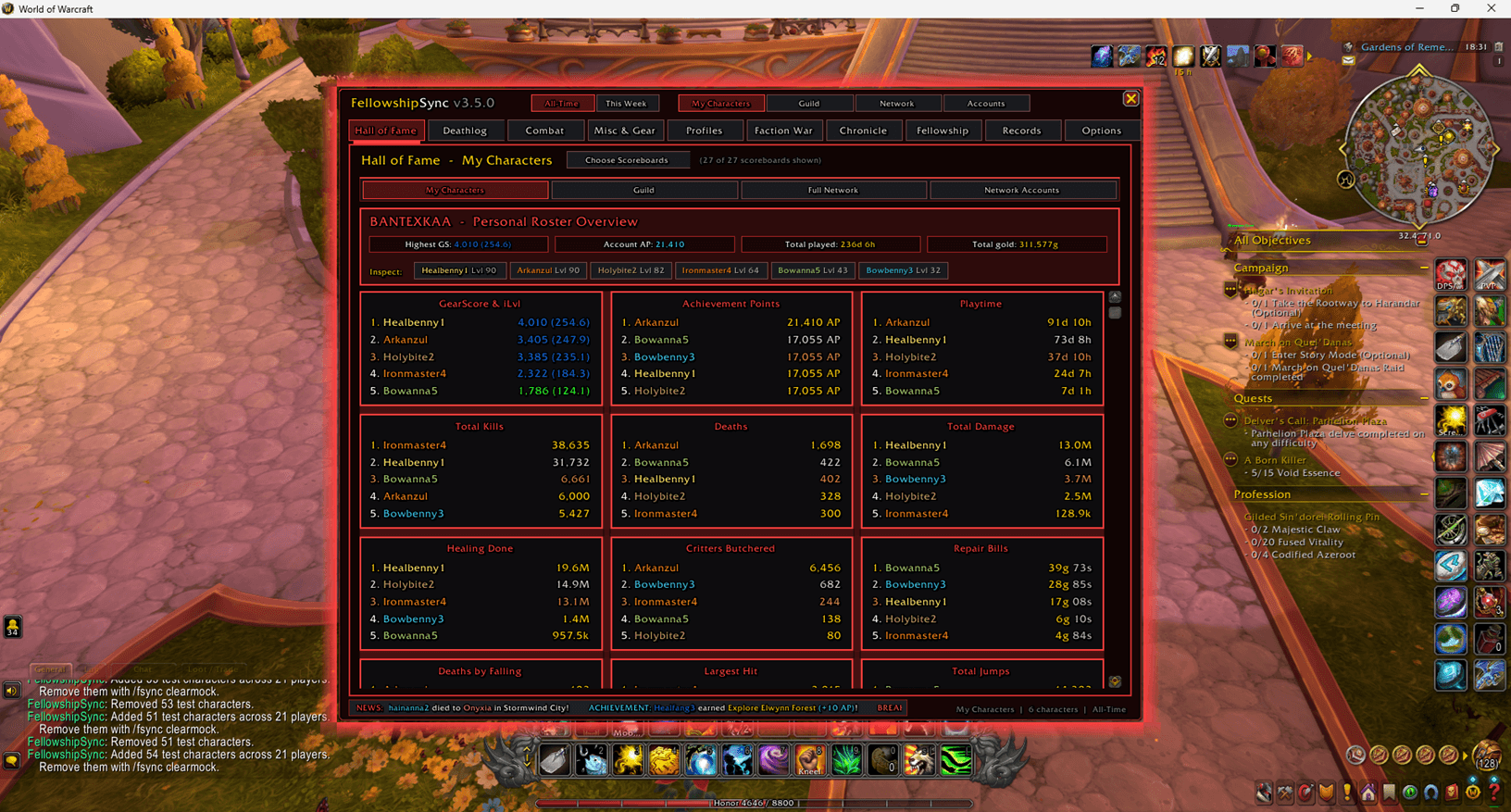
Up to 27 scoreboards, each showing the top five:
- GearScore & item level, playtime, kills, deaths, damage and healing
- Legacy Points (Forever) or Achievement Points (Retail, Mists)
- Critters, repair bills, falling, largest hit, jumps, epics, gold looted
- Quests, fish, chat, AFK time, flight time and distance travelled
- Corpse runs, time in combat, hearthstone uses, exploration, potions, Night Owls and emotes
Pick your scoreboards per view, and drag a scoreboard’s title onto another to swap them. Each view keeps its own layout, or Sync Layout to All 4 Tabs copies one everywhere. In My Characters, a roster banner sums up your account and has quick buttons to inspect any character.
Character Inspector
Click any name, anywhere, for a full profile:
- level, race, class, guild, zone, hearthstone, gold, rested XP and time played
- all 16 equipment slots with item levels and real item tooltips
- main and secondary professions with progress bars
- Legacy Challenges, achievements or milestones
- your Nemesis and Top Victim
- a stat ledger with more than 30 lines
It also has buttons for the character’s Book of Deeds and Make Rival.
Deathlog
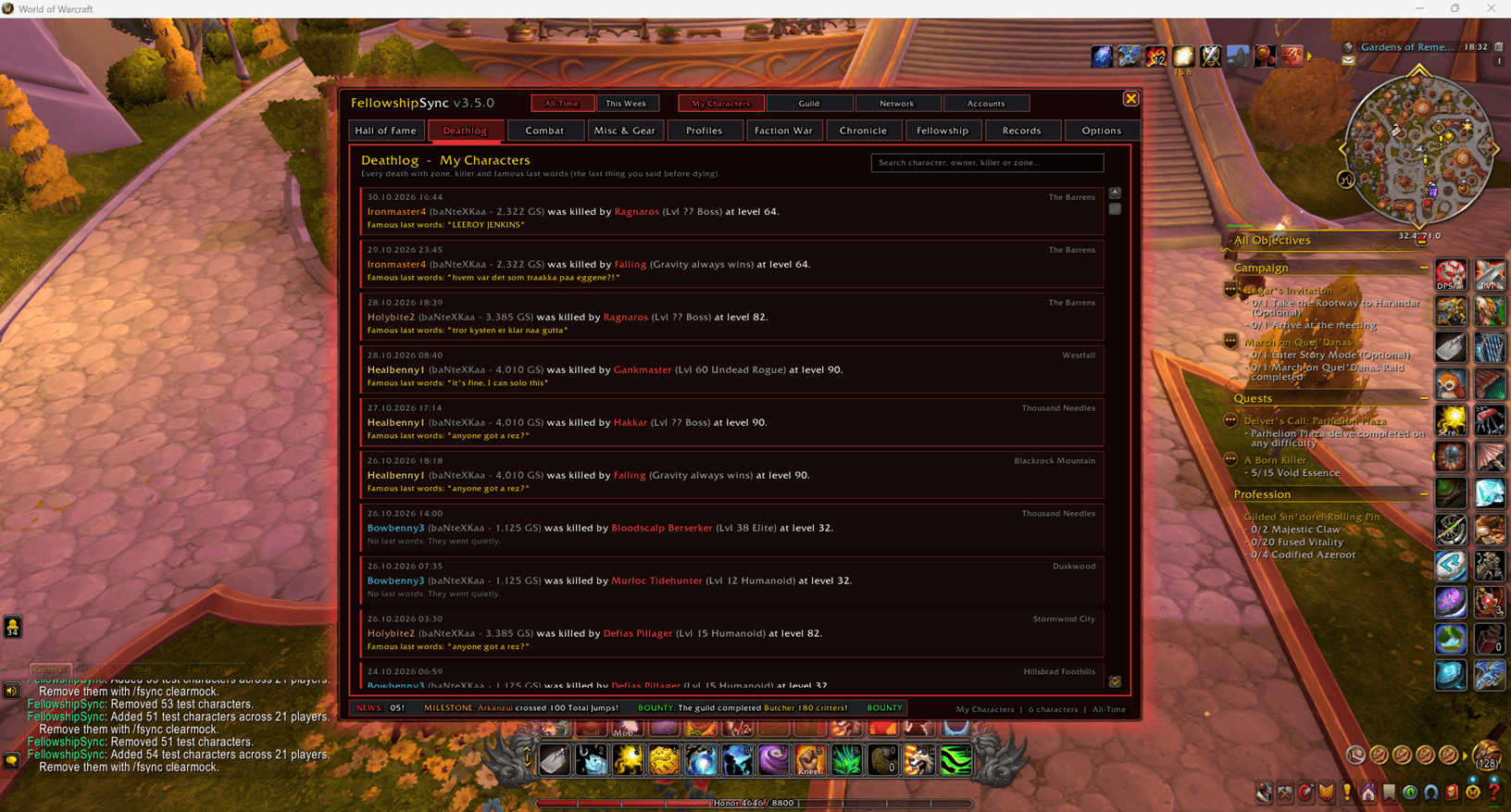
Every death with date, zone, killer, level and famous last words: the last thing you said in /say, party, raid or guild before dying. Whispers are never recorded. Searchable.
Combat
- Leaderboards: Deaths, Kills, Duels (won/lost, win rate), Damage, Healing and Largest Hit.
- Bestiary: every enemy type discovered, total kills, how many players have slain it, and the top slayer.
- Dungeons & Raids: kills, wipes, fastest kill and first killer for every boss, plus the Wall of Shame for the most wipes.
Misc & Gear
- GearScore and item level, with each character’s best item
- Legacy Points / Achievements / Milestones, depending on the game
- Silly Boards: Critters Butchered, Repair Bills, Chatterbox, Gravity Victims, AFK Champion, Frequent Flyer
- Loot Rolls: Need and Greed rolls, how many of each you won, total wins, /roll used, natural 100s and natural 1s
- Professions: main professions, secondary skills, mastery, nodes gathered and items crafted
- Travel: on foot (with estimated steps), mounted, flying, swimming and total, in metric or imperial
- Jumps, Fishing, Quests, Gold and Epics
Profiles
One card per player with an online indicator, points or best GearScore, and every synced character with level, class, GearScore, professions and zone. Searchable.
Faction War
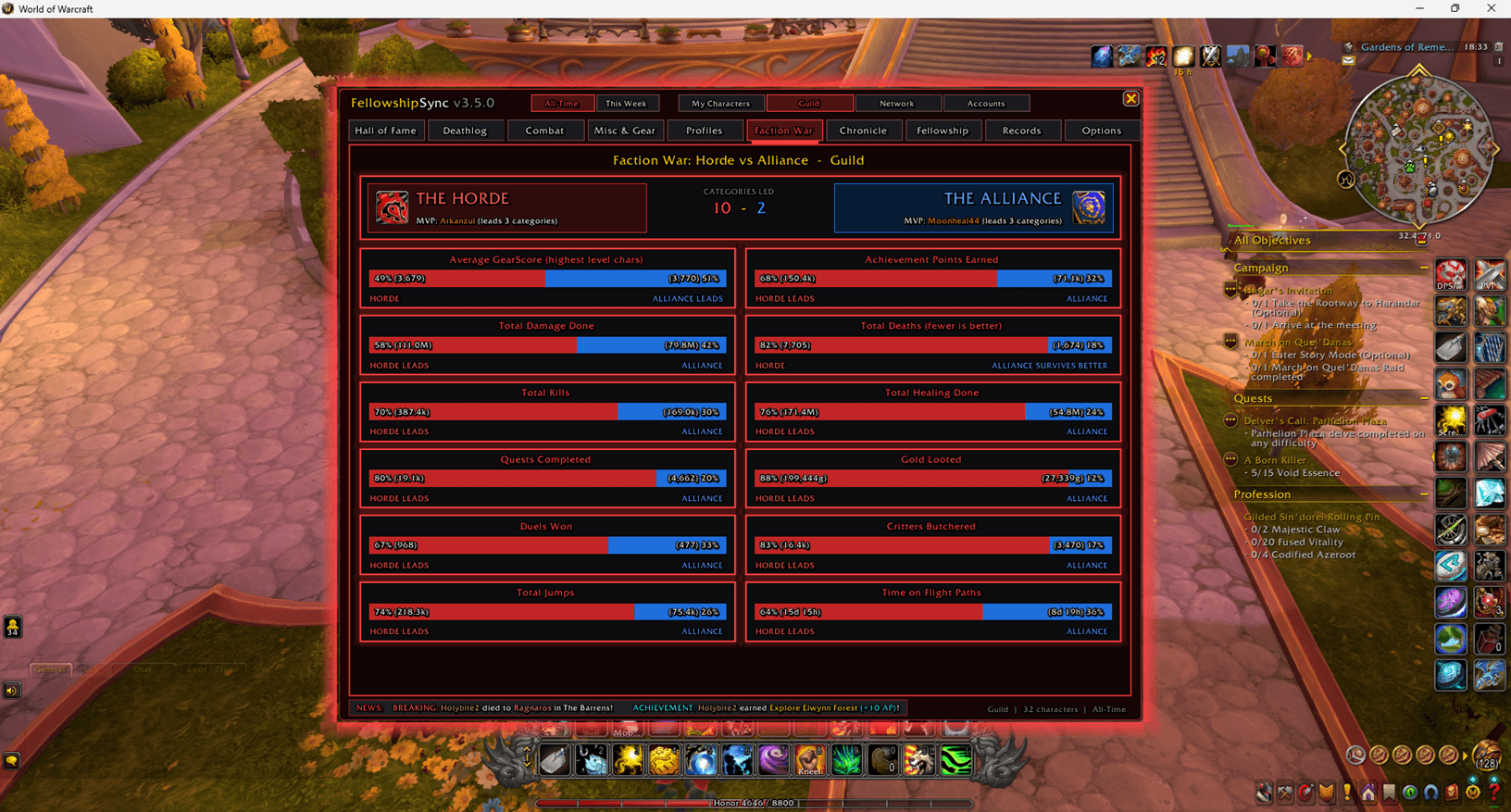
Horde versus Alliance across 12 categories, with a “categories led” score. The MVP is the player who leads the most categories, not just the best-geared one, so levellers and non-raiders can win too. Outside Retail, Faction War always uses your whole network, because guilds there belong to one faction.
Chronicle
- Guild Firsts: first to max level, first of every class, first to defeat each boss, first to master each profession, first to complete each Legacy Challenge, and the Bestiary Pioneers. All permanent and dated.
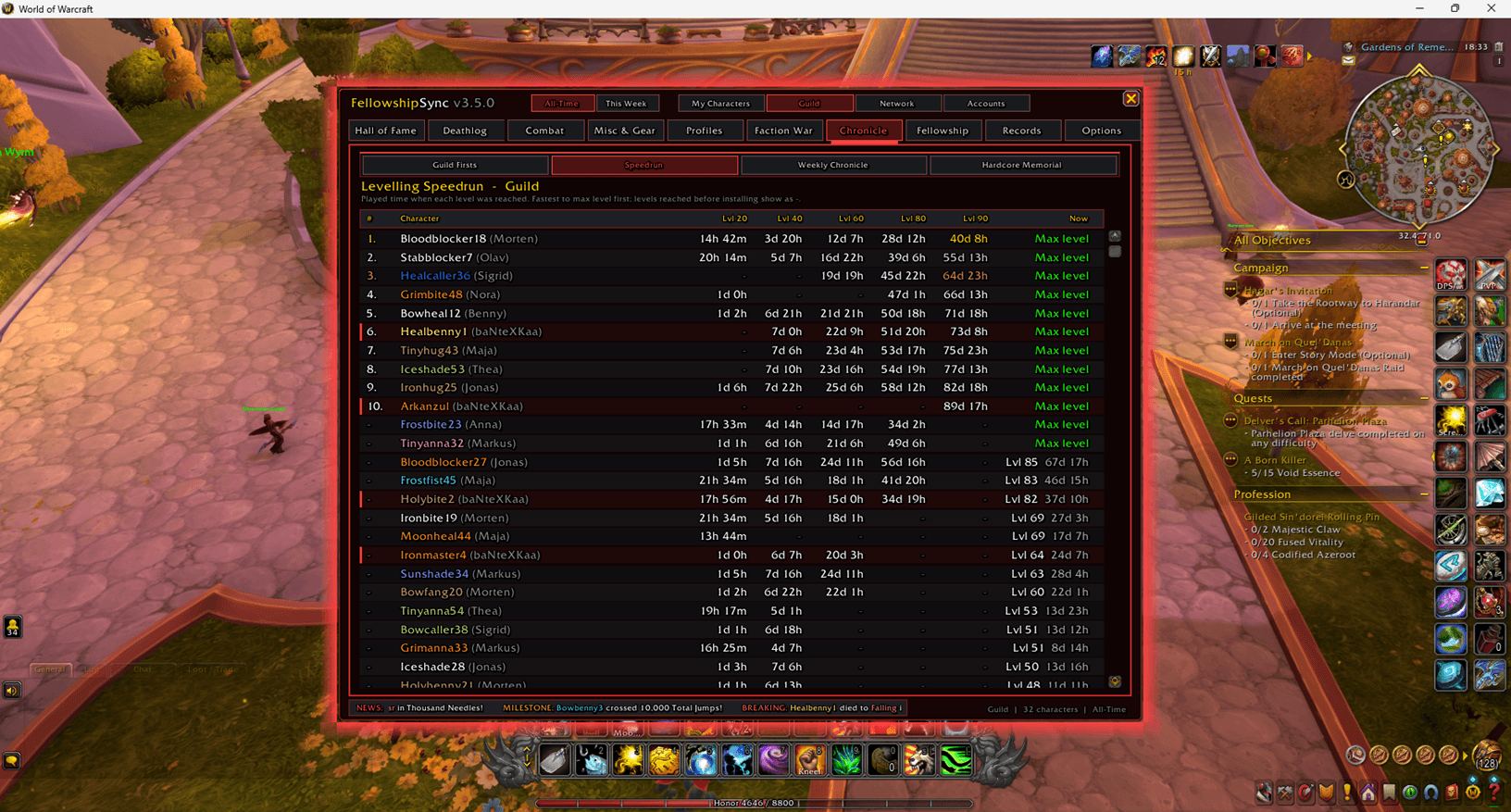
- Speedrun: played time at each level split. The fastest to max level ranks first.
- Legacy Race (Forever): every class at levels 25, 45 and 60, and every crafting profession at 150, 225 and 300.
- Weekly Chronicle: about 20 awards, such as Slayer of the Week, Wipe Lord, Globetrotter, Corpse Runner, Night Owl and Last Words of the Week.
- Choose Awards: pick which lines to include.
- Post to Guild Chat: posts every chosen line, nicely paced.
- Copy for Discord: gives you the text formatted for Discord.
- Hardcore Memorial: a gravestone for every fallen Hardcore hero, with level, zone, killer, time lived and last words.
Fellowship
- Bonds: time grouped with each player, bosses and deaths together, and who resurrected you. Bond levels go from Acquaintance to Fellowship, and there’s a list of your guild’s strongest pairs.
- Guild Bounties: three new challenges for the whole guild every week, such as “Slay 4,500 enemies” or “Stay under 75 deaths”. Targets scale with guild size, with progress bars, top contributors and a Bounty Wall.
- Book of Deeds: a written biography of every character, plus “On this day” anniversaries.
- Deathmap: every recorded death on the world map, as skulls, hot zones or both.
- Choose the skull size and maximum number of skulls, and the hot-zone detail.
- Limit it to the last 7, 30 or 90 days, show Hardcore final deaths only, and highlight your own deaths.
- Includes a Danger Zones ranking.
- Memory Lane: automatic screenshots of your big moments, with a log.
- Wagers: bet pretend Fellowship Marks on weekly questions. Anyone can add wagers based on a stat. Officers and the guild leader can create free-text wagers (“Who pulls first?”) and declare the winner. Winners split the pot, and there’s a Marks leaderboard.
- Rivalries: name a rival and get a head-to-head scorecard across 14 stats. You’re told when someone names you.
- Games:
- Deathroll: the addon follows both players’ /rolls and declares the loser. Stakes are on the honour system.
- Raffle wheel: set a keyword and a fee, and everyone who types the word in your chosen channel joins. Mark who has paid, then spin. The winner is drawn fairly, and the wheel reveals them.
Records
- My Records: personal bests (longest life, longest session, most kills in a session, most levels in a day, best gold day, fastest boss kill), daily streaks, and a 24-hour play-time clock that tells you whether you’re a Night Owl, Early Bird or Evening Raider. Also your favourite zone, companion, enemy, nemesis and emote, plus lifetime totals.
- Zones: where you spend your time, and the most popular zones around you.
- Loot: items looted by quality, from grey to legendary, and your biggest single loot.
- Gold Flow: earned, spent, from quests, vendor sales and vendor purchases.
- Survival: time in combat, fights, corpse runs, spirit healer visits, resurrections, potions, food and bandages, and close calls on Classic games.
- PvP: honorable kills, players slain, battlegrounds played and won, win rate.
- Social: chat, whispers, emotes, trades, mail, and how many players you’ve grouped with.
- Habits: sessions, average and longest session, days played, best streak, Night Owl and Early Bird hours, UI reloads.
Make It Yours
Everything is under Options → Cosmetics & UI, and changes show instantly.
- Style presets: one click for Classic, Clean, Neon, Royal or Minimal, then fine-tune anything.
- 45 colour themes: from Default Gold, Horde Red and Alliance Blue to Arcane Violet, Frost Wyrm, Sunwell Radiance, Naxxramas Frost, Midnight Eclipse, Candy Pop and High Contrast. My Class Colour follows the class of whichever character you’re playing.
- Pop: blend your theme’s accent colour into borders, buttons and tabs, from subtle to vivid.
- 10 border styles: Classic Tooltip, Sharp 1px, Bold 2px, Thick 4px, Royal Double Line, Royal Gold, Achievement Wood, Toast Frame, Neon Glow, or no border.
- 7 backgrounds: solid colour, tooltip, dark dialog, dialog, marble, rock or parchment, with adjustable opacity.
- Card styles: Soft, Flat or Bold (accent-coloured edges).
- Glow & shadow:
- glow strength and size, with an optional slow pulse
- glow around toasts and scoreboard cards
- a drop shadow behind the window
- 11 fonts with outline options (none, outline, thick, pixel), applied across the whole window, plus list text size and window scale.
SharedMedia support: if you have SharedMedia, ElvUI or a similar addon, its fonts, borders and backgrounds appear in these lists automatically.
If a font isn’t available in your game version, FellowshipSync falls back to the standard font instead of hiding any text.
How Syncing Works
FellowshipSync shares everything automatically, cheaply and safely, wherever your friends are.
Fully automatic
- When stats are sent: 20 seconds after login, then every 10 minutes while you play.
- At login, you ask everyone online for their latest data, and replies arrive within a minute.
- Combat and instances: sending pauses during combat and inside dungeons and raids (a game rule) and catches up when you leave.
- Instant sync: use
/fsync syncor the button in Options.
Three ways data travels
- Guild: over the guild’s hidden addon channel, including connected realms.
- Battle.net friends: directly to friends in any faction and on any realm. Friends without the addon only ever receive one small “hello”.
- Bridging: a guild member who receives a friend’s stats passes them into the guild once. That’s how the other faction appears in Faction War. Each update is passed on once and never loops.
All your characters
Your alts’ last known stats are shared at login, at most hourly after that, and on request. They keep their real “last played” date, so they never make you look online.
Smart and light
- The Bestiary sends only changes; full lists go out only on request.
- No duplicates: the same update arriving by several routes is applied once.
- Message pacing: Battle.net messages are split into small pieces and paced.
- Offline players stay in your lists with their last known stats. Hover a name to see when and how they last synced.
- Version check: you get a notice once if someone runs a newer version, even one whose data your version can’t read yet.
Privacy & Security
You decide what others see. Each of these can be turned off separately:
- Combat stats and the deathlog
- Distances and travel
- Gold
- Fun stats
- Playtime and levelling times
- Locations and death positions
- Professions
- Gear
- Last words
- Bonds, rival and wagers
- Your alts
Battle.net password: only friends who enter the same password receive anything from you. The addons prove the password to each other without ever sending it (SHA-256 challenge-response). While a password is set, your stats are never passed on to anyone else’s guild.
Network Key: players only see each other when their keys match, so a group can run its own private network.
Network data is checked: everything received is checked for type and size, and nothing from another player can change your own characters.
Toasts & Announcements
Your own toasts (up to 13 kinds):
- level-ups (every level or max level only)
- Legacy Challenges or achievements, GearScore records, profession milestones, round numbers
- first boss kills, new fastest kills, Hardcore final death
- bounties, wager results, “On this day”, Deathroll results, and update available
Guild & friends toasts (8 kinds):
- Boss kills: guild firsts only, or every first kill.
- Level-ups: max level only, or every 10 levels.
- Legacy, Hardcore deaths, every death, records, maxed professions, and someone naming you as their rival.
Only news from the last 15 minutes triggers a guild toast, so a guildmate’s login never floods you.
You control:
- how long toasts stay up, their size and position (drag them anywhere)
- 12 sounds, chosen separately for your toasts and for guild toasts
- an optional glow around toasts, in your theme’s colour
- waiting until combat ends, and holding guild toasts while you’re in a dungeon or raid
Busy raid nights fold into one “+N more updates” toast.
Chat announcements (7 kinds, off by default): post your own milestones to guild chat, party/raid chat, or both. That covers max level with your levelling time, every 10 levels, boss kills, records, Legacy/achievements, maxed professions, and Hardcore deaths with last words. A preview shows exactly what would be posted.
Profiles
All settings are shared across your whole account by default, so you set things up once. Any character can get its own profile, which starts as a copy of your settings. You can also create, copy, switch, delete and reset profiles. Your statistics are always kept per character.
Every Game, Done Right
| Forever | Classic Era | TBC Anniversary | MoP Classic | Retail | |
|---|---|---|---|---|---|
| Points | Legacy Points | Milestones | Milestones | Achievement Points | Achievement Points |
| Legacy Race | ✅ | – | – | – | – |
| Combat log tracking | – | ✅ | ✅ | ✅ | – |
| History from Blizzard statistics | ✅ | – | – | ✅ | ✅ |
| Hardcore detection | – | ✅ | ✅ | – | – |
| Faction War | Network | Network | Network | Network | All views |
| Max level | 60 | 60 | 70 | 90 | 90 |
On Classic Era, TBC and MoP, the combat log gives exact killing blows, real damage and effective healing, fall damage, close calls, and real killer names in the Deathlog.
On Retail and Forever, the game no longer lets addons read the combat log, so FellowshipSync uses Blizzard’s statistics plus target and nameplate tracking.
Professions follow each game: Classic ranks to 300/375/600, Retail per expansion, and Retail Archaeology on its own scale. Weekly numbers reset on your region’s server reset, such as Wednesday in Europe. Data from different games never mixes, and on Forever, characters are identified by first name and surname.
Slash Commands
| Command | What it does |
|---|---|
/fsync |
Open or close the window |
/fsync setup |
Run the setup guide again |
/fsync sync |
Send your stats now |
/fsync test |
Fill every tab with sample players to explore |
/fsync clearmock |
Remove the sample players |
/fsync wipe |
Clear cached players (your own characters stay) |
/fsync game |
Show which game was detected |
/fsync stats |
Show which Blizzard statistics were found |
/fsync legacy |
Show your Legacy or Achievement Points |
/fsync minimap |
Show or hide the minimap button |
Good to Know
- Guild Firsts and level times are only recorded from the moment you install, so nobody gets credit they can’t prove. On Forever, Legacy Challenge completion dates come from the game.
- This Week starts counting from your first login after installing.
- Kills on Retail and Forever count when an enemy dies on your target or nameplate and you or your group tagged it.
- Inside dungeons and raids the game may hide some names and all positions from addons.
- Steps are estimated from distance on foot.
- Wagers use pretend money. Deathroll and raffle stakes are between players, on the honour system.
Installation
- Extract into the AddOns folder of your game:
_forever_,_classic_era_,_anniversary_,_classic_(MoP) or_retail_, thenInterface/AddOns/. - Log in. The setup guide appears after a few seconds, or type /fsync.
- Optionally, type /fsync test to explore every tab with sample players, and /fsync clearmock when you’re done.
The libraries it needs (Ace3, LibDeflate, LibDataBroker, LibDBIcon and HereBeDragons) come included.
Feedback
Found a bug or have an idea? Leave a comment or open an issue. Please include any Lua error text (BugSack makes this easy), your game version, and what you were doing.
FellowshipSync by baNteXKaa
Coded with Claude AI
FellowshipSync: The Ultimate Social Hall of Fame Team
