Fear Ward Tracker
- By
Keep track of Fear Ward in your raid – who has it on whom, and which priest is on cooldown.
Screenshot 2026-08-31 220005.png
Description
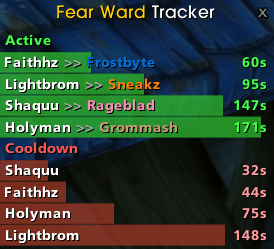
Fear Ward Tracker shows you a compact, movable window with real-time info:
- 🟢 Active – which priest cast Fear Ward on which target, including remaining duration
- 🔴 Cooldown – which priest is currently on cooldown and how much time is left
Names are shown in class color, the window resizes automatically and hides itself when nothing is active.
Features
- Range-independent tracking. Active Fear Wards are detected by scanning the buffs on your raid/party members – no matter how far away the priest is. With the real caster and the real remaining time straight from the game.
- Per-priest cooldown display. Reliably derived and keeps counting down correctly, even if the ward is consumed early by a fear.
- Instant updates. When a fear consumes the ward or it expires, the line disappears immediately.
- Class colors for priests and targets.
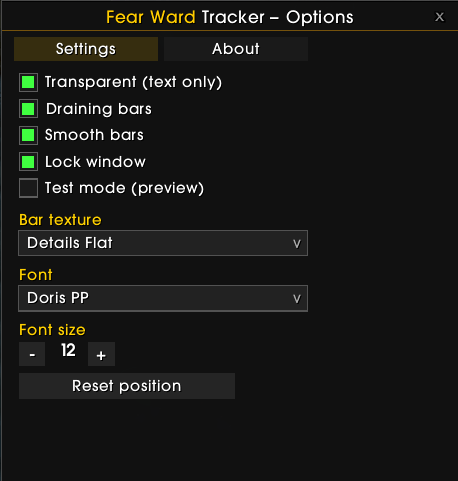
- Clean, skin-independent design – dark movable window with a minimap button.
- Test mode to try everything out without a priest in your group.
- Values (cooldown / buff duration) are easy to adjust at the top of the file.
Usage
Via the minimap button or slash commands:
| Command | Effect |
|---|---|
/fw test |
Toggle test mode (simulates random priests) |
/fw unlock |
Make the window movable (with preview) |
/fw lock |
Lock the window in place |
/fw reset |
Reset position |
/fw hide |
Hide |
/fw show |
Show again |
Minimap: Left-click toggles the window, right-click + drag moves the button.
How does the tracking work?
Fear Ward Tracker uses a hybrid approach:
- Aura scan (primary): Continuously checks the buffs on all party/raid members. This detects active wards independent of distance – including the real caster and real remaining time.
- Combat log (supplement): Catches the exact cast moment of nearby priests, including casts that are consumed too quickly for the aura scan to see the buff.
Because buff duration and cooldown are identical, the cooldown end is derived from the buff's expiration time and stays correct even if the buff is consumed early.
Good to know
- Tracking covers party/raid members as targets – exactly what a raid tool needs.
- WoW does not expose other players' cooldowns directly; the cooldown is derived (from the buff appearing / the observed cast).
- Preset for a 3-minute cooldown and buff duration. Different values? Just adjust
COOLDOWNandBUFF_DURATIONat the top ofFearWard.lua.
Installation
- Copy the FearWard folder into
Interface\AddOns\. - Log in (enable "Load out of date AddOns" if needed).
/fw unlock→ position the window →/fw lock. Done.
Fear Ward Tracker Team