Fastscreen
- By

Take high-resolution World of Warcraft screenshots without keeping screenshot macros on your action bars.
WoWScrnShot_101226_004709.jpg
Description
Take high-resolution World of Warcraft screenshots without keeping screenshot macros on your action bars.
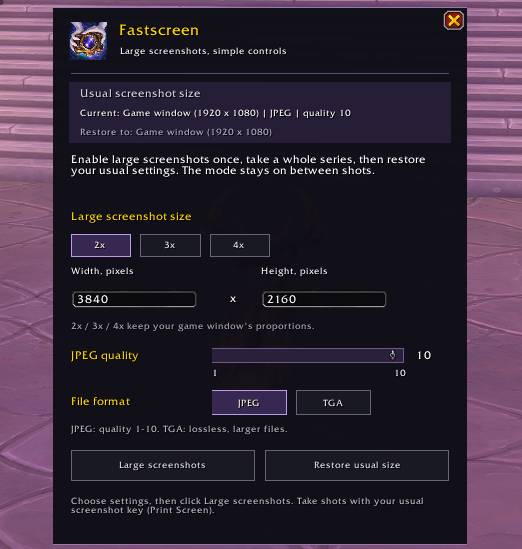
Fastscreen adds a movable camera button to your minimap and a simple menu for screenshot size, quality, and format. Enable large screenshots once, capture an entire series, then restore your previous settings when you are finished.
Features
- Minimap controls: left-click to open the menu, right-click to take a screenshot, or drag the camera button to reposition it.
- Resolution presets: choose 2x, 3x, or 4x your game window dimensions.
- Custom dimensions: enter your preferred screenshot width and height.
- JPEG quality controls: select a quality level from 1 to 10.
- File formats: choose JPEG or lossless TGA.
- Persistent screenshot mode: large dimensions remain enabled between shots, without automatically switching back after every screenshot.
- Restore previous settings: return to the screenshot size, quality, and format you used before enabling the mode.
- Saved preferences: your selected settings and minimap button position are remembered.
For example, the 4x preset requests a 7680 × 4320 screenshot from a 1920 × 1080 game window.
How to Use
- Left-click the camera button beside the minimap.
- Choose your screenshot dimensions, quality, and format.
- Click Large screenshots.
- Close the menu and take screenshots with your usual screenshot key, normally Print Screen, or right-click the minimap camera.
- Click Restore usual size when finished.
Closing the menu keeps large screenshot mode enabled. A normal logout or UI reload restores your previous screenshot settings.
Commands
/fastscreenor/fscreen- open or close the menu./fastscreen on- apply your saved large screenshot settings./fastscreen off- restore your previous screenshot settings./fastscreen shot- take a screenshot using the current settings./fastscreen help- display command help.
Notes
Fastscreen changes screenshot settings only. It does not change your gameplay window resolution, render scale, or graphics presets.
Large screenshots require more resources and may briefly pause the game while being created. Supported dimensions depend on your game client and hardware. Screenshots are saved by World of Warcraft to its usual Screenshots folder.
Designed for World of Warcraft Retail.
Fastscreen Team