Farming Paths
- By
Plan farming routes on any zone map. Drop waypoints, then follow a 3D on-screen arrow that moves to the next one as you arrive. Tabs, saved and shareable paths, minimap icons, and customizable colors. Made with AI assistance.
FarmingPaths_Image.png
FarmingPaths_Arrow.png
FarmingPaths_Settings.png
Description
🗺️ Farming Paths
Plan your route on the map. Follow the arrow. Farm on autopilot.
Farming Paths is a route planner and guide for World of Warcraft: Midnight (Retail). Pick a zone, crop the map to the area you farm, drop waypoints along your route, and a 3D arrow on your screen walks you from one to the next. When you arrive, it moves on by itself.
Herbs, ore, rares, mob loops, treasure runs: if you do it in a circle, this addon is for it.
✨ Features
🗺️ Map Planner
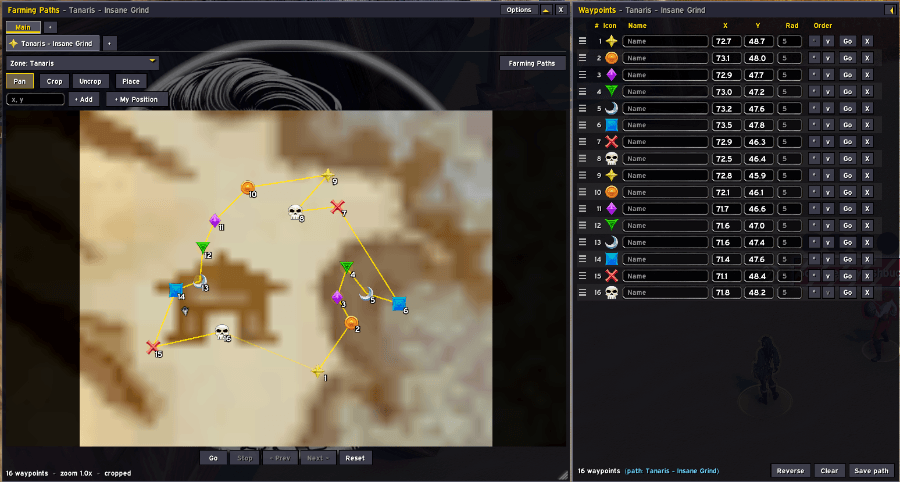
- Every zone with a map, grouped by continent, with a search box built into the zone menu. Type a name or a map ID, or jump straight to your current zone.
- Crop the map to just the area you farm, then zoom with the mouse wheel and drag to pan
- Add waypoints by Ctrl+clicking the map, using Place mode, typing coordinates (
45.2, 63.8), or clicking + My Position to drop one where you're standing - Drag waypoints on the map to move them. Lines connect the path so you can see the whole loop.
🧭 3D Direction Arrow
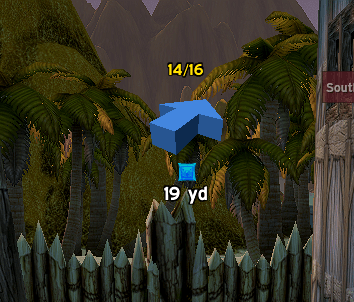
- A chunky 3D arrow on your screen points to the next waypoint, turning as you turn
- It fades from blue when you're far away to red as you close in, and you choose both distances
- Shows the waypoint's icon, name, number and distance
- Drag it anywhere on screen, and adjust its size, thickness and tilt
🔁 Auto-Advance
- Get within the arrival radius and the next waypoint is picked automatically, with an optional sound
- Set one radius for everything, or give each waypoint its own
- Loop the path or stop at the end
- Won't skip a waypoint just because you flew over it: by default it only counts once you've landed
- Go, Stop, Prev and Next buttons right under the map
📍 Minimap & World Map
- Your waypoint icons show on the minimap and the world map
- While navigating, only the current and next waypoint are shown, so your minimap stays clean
- The current target sticks to the minimap's edge so you always know which way to go
- Works with round, square and rotating minimaps
📋 Waypoint List
- A side panel lists every waypoint. Rename them, type exact X/Y positions, set arrival radii, and change icons.
- Drag the grip to reorder, or use the arrows
- Collapse it to a thin strip with one click
🎨 Icons
- Waypoints use the raid star by default
- Give any waypoint its own icon from the same icon set as the bank tabs, plus all 8 raid markers, or enter any icon ID
🗂️ Tabs, Groups & Saved Paths
- Keep several routes open in tabs and switch between them instantly
- Sort tabs into groups, like one group per expansion or per profession
- Give any tab or group its own color
- Save routes as Farming Paths and load them again later
- Import / export paths as a text string to share them with friends
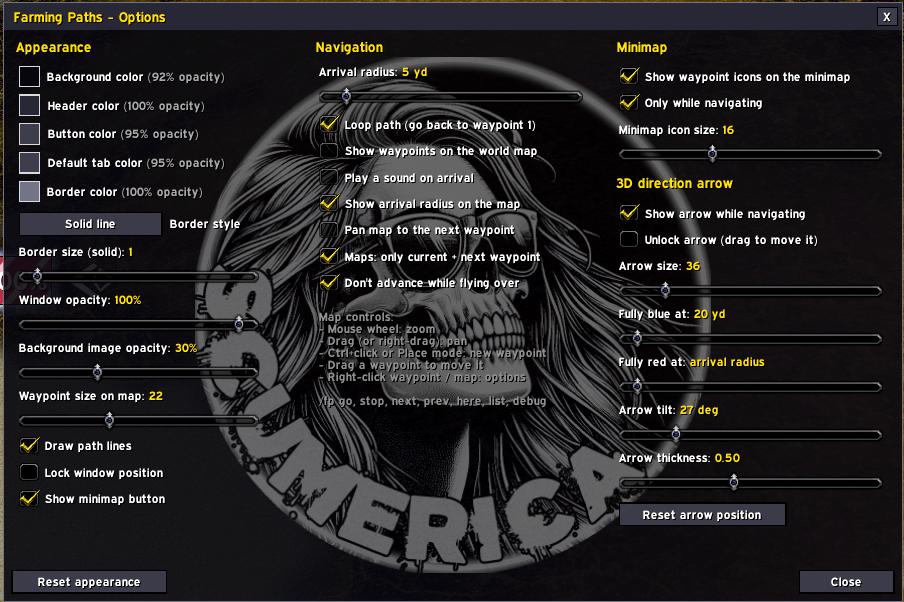
🎨 Fully Customizable Look
- Colors for the background, header, buttons, tabs and border, each with its own opacity slider
- Border styles: none, solid line, tooltip or dialog
- Window opacity, waypoint size, path lines, and a window lock
- Resize the window as small or large as you like, or minimize it to a slim title bar
- Settings are available in the addon's own Options window and in Esc > Options > AddOns
🖱️ How to Use
- Open Farming Paths with /fp, the minimap button, or the Addon Compartment
- Click Zone and pick your farming zone (or type to search)
- Optional: click Crop and drag a box around the area you farm
- Ctrl+click the map to drop waypoints in the order you want to visit them
- Press Go and follow the arrow
- Click Save path to keep the route for next time
⌨️ Slash Commands
/fp: show or hide the window/fp show//fp hide: show or hide the window/fp options: open the options/fp go: start navigating the current tab (from the nearest waypoint)/fp stop: stop navigating/fp next//fp prev: skip forward or back one waypoint/fp here: add a waypoint at your current position/fp list: collapse or expand the waypoint list/fp minimap: show or hide the minimap button/fp reset: move the window back to the middle of the screen/fp debug//fp arrow: troubleshooting info
📝 Notes
- Your routes, tabs and settings are shared across all your characters
- WoW doesn't tell addons the height of a spot you click on the map, so arrival is measured across the ground. The "don't advance while flying" option (on by default) stops you skipping a waypoint by passing over it.
- Export strings start with
!FP1!and can be pasted into Import in the Farming Paths menu
🤖 Made with AI Assistance (I know, I know)
Farming Paths was created with the help of AI assistance (Anthropic's Claude). Unfortunately I do not know how to code very well but hopefully this will be helpful to someone else for their farming goals! I have tested this as I use it and so far it hasn't had any major flaws. Bug reports and feature suggestions are very welcome. Please leave a comment or you can find me in-game Scumerica#1443
The Farming Paths Team