


FarmCounter - The Ultimate Farming Tracker
- By
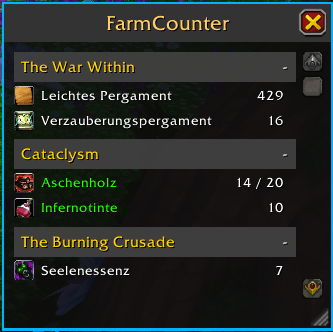
Overview with goal set
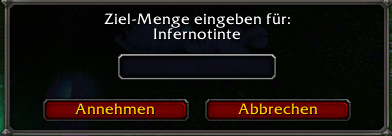
Window to set the goal
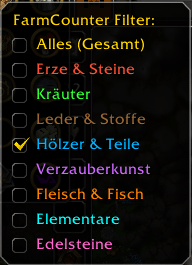
Filter Menu with different categories
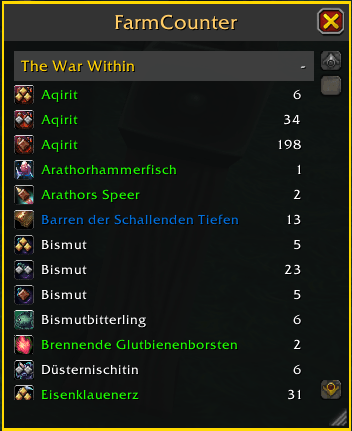
New in v7.2.2: Visual Quality Tiers & Smart Sorting
Description
FarmCounter
FarmCounter is a lightweight, all-in-one farming tracker designed to keep your inventory organized and your farming sessions efficient. Whether you are gathering herbs, mining ores, hunting Elementals, or collecting materials for the Housing System, FarmCounter gives you a clear, real-time overview of your loot.


✨ Key Features
- All-in-One Tracking: Automatically detects and counts items based on category (Ores, Herbs, Leather, Wood, Enchanting, Cooking, Gems, Elementals).
- Goals & Background Alerts: Set custom targets! Alerts (Sound & Chat) trigger even if the window is closed, allowing you to keep your screen clean while farming.
- Dynamic Visual Feedback: The window border changes color based on your active filter, so you always know what you are tracking at a glance.
- Housing Ready: Fully supports the new Housing Materials (Wood, Parts & Materials), including specific items like Ashwood.
- Smart Memory: Window position, size, and active filters are saved separately for each character.
- Multi-Language: Automatically detects your WoW client language.
🎮 How to Use
Minimap Button
- Left Click: Open/Close the window.
- Right Click: Open the Filter Menu (Select Ores, Herbs, etc. directly).
- Right Click + Drag: Move the button (sticks perfectly to the minimap border).
Farming Goals & Alerts
- Set a Goal: Left-Click any item in the list to enter a target amount (e.g., "100").
- Visual Progress: The counter updates to show
Current / Goal(e.g., "42 / 100"). - Goal Reached: Once you hit your target:
- The text turns GREEN.
- 🔊 A Raid Warning Sound (Horn) plays.
- 💬 A notification appears on screen and in chat.
- Background Mode: You can close the FarmCounter window while farming—the addon will still play the sound and notify you when you reach your goal!
- Remove Goal: Simply Right-Click the item to clear the goal.
Slash Commands
/fc- Toggle the main window./fc debug- Shows ItemID and ClassID of the item under your mouse cursor (useful for reporting missing items).
🔍 Filters & Visuals
Select your desired filter instantly via the new Right-Click Menu on the Minimap button. The border color and icon update automatically:
- 🟡 All (Summary): Shows everything (Gold Border).
- 🔴 Ores & Stone: Tracks Mining resources (Red Border / Pickaxe Icon).
- 🟢 Herbs: Tracks Herbalism resources (Green Border / Flower Icon).
- 🟤 Leather & Cloth: Tracks Skinning and Tailoring drops (Brown Border / Leather Icon).
- 🔵 Housing: Tracks Wood, Parts, and Construction Materials (Blue Border / Planks Icon).
- 🟣 Enchanting: Tracks Dust, Shards, and Crystals (Purple Border / Dust Icon).
- 🟠 Cooking: Tracks Meat and Fish (Orange Border / Chicken Leg Icon).
- 💎 Gems: Tracks raw gems found while mining (Pink Border / Diamond Icon).
- 🟦 Elementals: Tracks elemental reagents like Primal/Awakened elements (Cyan Border / Fire Icon).
🌍 Supported Languages
FarmCounter automatically detects your WoW client language:
- 🇺🇸 English
- 🇩🇪 German (Deutsch)
- 🇫🇷 French (Français)
- 🇪🇸 Spanish (Español)
- 🇮🇹 Italian (Italiano)
- 🇷🇺 Russian (Русский)
- 🇧🇷 Portuguese (Português)
- 🇰🇷 Korean (한국어)
- 🇨🇳 Chinese Simplified (简体中文)
- 🇹🇼 Chinese Traditional (繁體中文)
Found a translation error? Please let us know in the comments so we can improve the localization!
Simple. Efficient. Essential. Download FarmCounter today and optimize your farming!
FarmCounter - The Ultimate Farming Tracker Team
