FarmBox
- By
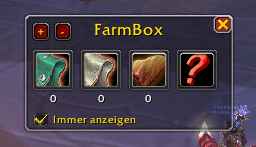
Track your farmed items with this simple, lightweight addon. Drag & drop items, auto-count inventory, SHIFT+Click support. Perfect for farmers!
farmbox1.png
farmbox3.png
farmbox2.png
Description
# FarmBox - Item Farming Tracker
**A simple and efficient farming tracker addon for World of Warcraft that helps you keep track of the items you're farming.**
## 🎯 Features
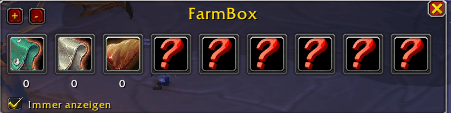
✅ **Track Multiple Items** - Add up to as many items as you want with dynamic slot management
✅ **Auto-Count** - Automatically counts items in your bags and bank
✅ **Drag & Drop** - Simply drag items from your bags into slots
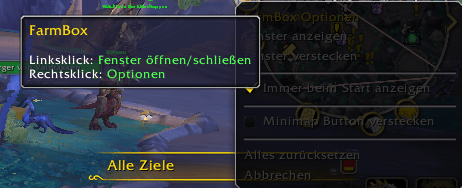
✅ **Minimap Button** - Easy access via minimap button with right-click options menu
✅ **Persistent Position** - Window position and all settings are saved
✅ **Auto-Show Option** - Optionally show FarmBox automatically on login
✅ **Tooltips** - Hover over slots to see full item information
✅ **Lightweight** - Minimal performance impact
## 📦 Installation
1. Download the addon
2. Extract to `World of Warcraft/_retail_/Interface/AddOns/`
3. Restart WoW or type `/reload`
4. Enable at character select screen
## 🎮 How to Use
### Opening/Closing the Window
- `/fb show` - Show the FarmBox window
- `/fb hide` - Hide the FarmBox window
- `/fb toggle` - Toggle window visibility
- **Left-click minimap button** - Toggle window
- Click the **X** button to close
### Adding Items
**Method 1: Drag & Drop**
- Open your bags
- Drag any item into an empty FarmBox slot
### Removing Items
- **Right-click** any slot to remove the item
### Managing Slots
- Click **+** button to add a new slot
- Click **-** button to remove the last slot
### Minimap Button
- **Left-click:** Open/close FarmBox window
- **Right-click:** Open options menu
- **Drag:** Move button around minimap
- `/fb minimap` - Show/hide minimap button
### Auto-Show Feature
- Check **"Always show"** in the FarmBox window
- Or use the minimap right-click menu
- FarmBox will automatically appear after login/reload
## 💬 Commands
- `/farmbox` or `/fb` - Show all commands
- `/fb show` - Show window
- `/fb hide` - Hide window
- `/fb toggle` - Toggle window
- `/fb minimap` - Toggle minimap button
- `/fb reset` - Reset all settings and data
## ⚙️ Technical Details
- **WoW Version:** 12.0.0.1+ (The War Within)
- **Dependencies:** None (all libraries included)
- **Saved Variables:** FarmBoxDB
- **Libraries Used:** LibStub, LibDataBroker-1.1, LibDBIcon-1.0, CallbackHandler-1.0
## 🔄 Auto-Counting
FarmBox automatically updates item counts when you:
- Loot items
- Buy from vendors
- Sell to vendors
- Move items between bags
- Deposit/withdraw from bank
The count includes items in both bags AND bank!
## 🎨 Features in Detail
### Dynamic Slots
Start with 5 slots, add as many as you need! Each slot can track a different item, and the window automatically resizes to fit.
### Persistent Data
Everything is saved:
- All tracked items and their counts
- Window position
- Number of slots
- Auto-show preference
- Minimap button position and visibility
### Minimap Integration
Full minimap button support with:
- Draggable around minimap edge
- Right-click options menu
- Can be hidden if you prefer
- Position saved between sessions
## 🐛 Known Issues
None currently! Please report any bugs you find.
📝 Changelog
Version 1.0.5
- Fixed some errors
- Removed Shift + Click
Version 1.0.4- Fixed EasyMenu error for WoW 12.0+ (now uses MenuUtil)
- Improved minimap button positioning (sits outside minimap circle)
- Added support for modern WoW menu system
- Fallback support for older WoW versions
### Version 1.0.3
- Fixed CallbackHandler compatibility with other addons
- Improved minimap button positioning
- Added world map hide functionality
### Version 1.0.2
- Fixed minimap button appearing in center
- Added persistent button position
- Improved drag & drop handling
### Version 1.0.1
- Initial release
- Basic farming tracker functionality
- Minimap button support
## 💡 Tips
- The **+/-** buttons let you adjust to your farming needs
- **Right-click the minimap button** for quick access to all options
- **Auto-show** is great for dedicated farming characters
- Window position is saved, so drag it wherever you like!
## 🤝 Support
If you encounter any issues:
1. Try `/reload` to reload the UI
2. Use `/fb reset` to reset all settings
3. Make sure you're on WoW 12.0+
4. Report bugs in the comments!
## 📜 License
All rights reserved. Free to use, do not redistribute modified versions.
## 🙏 Credits
Created with ❤️ for the WoW farming community!
Libraries used:
- LibStub
- LibDataBroker-1.1
- LibDBIcon-1.0
- CallbackHandler-1.0
FarmBox Team