Farm Counter & Value
- By
Counts your farmed profession loot and shows its auction house value via TSM.
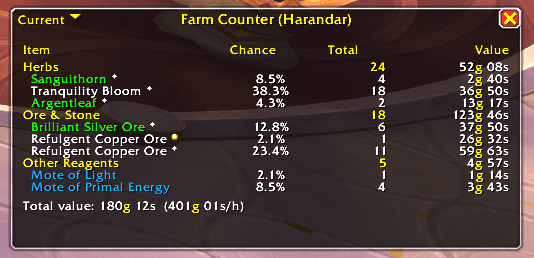
main.png
Description
Farm Counter & Value
How much gold did that farm session actually make? Farm Counter & Value counts everything you gather with your professions and shows what it is worth on the auction house right now - per item, per category and for the whole session, including gold per hour.
Fishing, herbalism, mining, skinning, prospecting, disenchanting - just start farming. The window appears with your first loot.
Features
- Counts all profession loot automatically
- Fish, herbs, ore & stone, leather & hides, cloth
- Gems and pearls from prospecting
- Enchanting materials from disenchanting (dust, essences, shards)
- Elemental materials, pigments, parts & salvage and other reagents
- Optionally everything from fishing casts, including junk and treasures
- Only real loot is counted - no bag moves, auction house purchases, mail or crafted items.
- Auction house values via TradeSkillMaster
- Value per item, total per category and total for the session
- Gold per hour for the current session
- Prices are looked up live when the window is drawn, so values always reflect the current market
- Choose your price source: Market Value, Minimum Buyout, Region Market Average, ... or any TSM custom price
- Sessions
- Start and stop farming sessions; they survive a
/reload - The last 5 sessions are kept and can be opened from a small dropdown, like the segment selector of a damage meter
- A global history of everything you have ever farmed
- Start and stop farming sessions; they survive a
- Reagent quality is shown next to the item name
- Sound alert for rare and epic loot (the sound for rare/blue items can be turned off separately)
- Optional auto hide after a few minutes without loot - the window comes back with the next counted loot
- Options page under Game Menu > Options > AddOns > Farm Counter & Value
- Small, movable window with drop chance, count and value columns
Requirements
- World of Warcraft Retail (Midnight)
- TradeSkillMaster is optional. Without it everything is still counted; values are shown as
--. For up-to-date prices, keep your AuctionDB data current with the TSM Desktop Application.
Commands
All commands start with /fcv (long form: /farmcountervalue).
| Command | Description |
|---|---|
/fcv |
Shows all commands |
/fcv show / hide |
Shows or hides the window |
/fcv start / stop |
Starts or ends a farming session |
/fcv reset |
Starts a new session (the old one stays in the dropdown) |
/fcv session / history |
Switches between session and global history |
/fcv view [1-5] |
Lists or opens previous sessions |
/fcv price [source] |
Shows or sets the TSM price source, e.g. DBMinBuyout |
/fcv cat [key] [on|off] |
Lists or toggles counted categories |
/fcv sound [on|off] |
Sound alerts on/off |
/fcv sound blue [on|off] |
Sound for rare (blue) items on/off |
/fcv options |
Opens the options |
Good to know
- Sessions without
/fcv startautomatically begin anew when you loot in a different zone (can be turned off in the options). - During boss encounters in instances, WoW does not let addons read loot messages, so loot there is not counted.
Feedback
Found a bug or have an idea? Please open an issue on GitHub or leave a comment here.
Farm Counter & Value Team