Fantasy Dice Forever
- By
FantasyDice
Rolling dice should feel like an event, not a line of chat text.
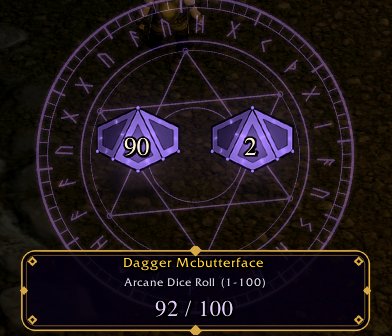
FantasyDice watches for dice rolls and plays a short animation: a rune-engraved die materializes in a magic circle, tumbles, bounces, settles, and lands on the result with a glow, a shockwave of sparks and a sound. No button to press, no setup. Install it and roll.
What it shows
/rollresults: any range (/roll,/roll 20,/roll 5-50, deathrolls...).- Group-loot rolls: Need, Greed and Disenchant, with the item's icon and name, and a different colour scheme for each (fiery crimson for Need, warm gold for Greed, arcane blue for Disenchant). By default only the winning roll of each item is shown (with a WINNER tag); you can switch this to show every roll.
- Other players' rolls: party, raid and nearby players, whenever the game sends you their results. Pick all visible, party and raid only, or only my rolls.
- A clear result plate: player name, roll type, range and the number, such as
87 / 100orNEED - 87. - Rolling the maximum or minimum gets an extra flourish.
The dice
Hand-built fantasy dice instead of plastic ones: a coin (1-2), D6, D10, D12 and D20, with dark metal edges, engraved runes and glowing symbols. /roll 100 is shown as a percentile pair of D10s, and a single digit under 10 uses one die. Each die has its own material colour (gold, bronze, crystal, emerald, arcane). The shape is decoration; the number on the die and on the plate is always exactly the number the game reported.
Make it yours
- 14 dice themes: Arcane, Ember, Frost, Sapphire, Emerald, Fel, Golden, Bronze, Blood, Obsidian, Void, Bone, Rose Quartz, or Automatic (colour by die shape).
- Dice shape: force a coin, D6, D10, D12, D20 or the percentile pair, or let the addon choose by roll range.
- Fonts and sizes: four number fonts, adjustable result-plate text size, die-number size, interface scale, and the size of other players' rolls.
- Timing sliders for tumble length and how long the result stays, three effect levels (minimal / reduced / full), sound on/off, and a movable display.
- Test buttons for every kind of roll, so you can preview your choices.
Special rolls
- Roll the maximum (100 on
/roll 100, 20 on/roll 20...) and the stage erupts: golden flash, rotating light rays, shockwaves, confetti, a CRITICAL SUCCESS banner and a brass fanfare with a cheering crowd. - Roll the minimum (1) and it turns sad: the die slumps and loses its colour, a storm cloud gathers and rains on it, a CRITICAL FAIL banner appears and a sad trombone plays.
- Only for ranges of 6 or more. Can be switched off.
Built to be safe and quiet
- Read-only: it never rolls for you, changes a roll, or touches the loot window.
- Rolls arriving together are queued and play one after another (the queue speeds up if it gets long). Duplicate messages never play twice.
- Zero cost while idle; the animation code only runs while a die is on screen.
- Works with the game's language: roll and loot patterns come from the client's own text.
Settings (/fdice)
Tabs for General, Appearance, Timing and Position & Test, with everything above plus loot rolls on/off, other players on/off, and test buttons that plays a clearly marked simulated roll (blue plate + "SIMULATED" banner) so a test can never be mistaken for a real roll.
Commands
| Command | What it does |
|---|---|
/fdice |
Open settings |
/fdice test [sides] [max | min] [need | greed | de] |
Play a simulated roll, e.g. /fdice test 100 max |
/fdice unlock / lock |
Move the dice display |
/fdice on / off |
Enable or disable animations |
/fdice status |
Detection counters (useful for bug reports) |
/fdice lootdebug / lootlog |
Record and view raw loot lines (for loot-roll problems) |
/fdice reset |
Reset position |
Honest notes
- These are pre-rendered 2D dice, not real-time 3D. WoW addons cannot load custom 3D models. The tumbling dice are sprite animations rendered from real polyhedron models; bounce, shadow and particles are added live.
- Client restrictions can hide rolls. Modern WoW clients can make some chat messages unreadable to addons (especially in instances). When that happens FantasyDice skips them safely, and
/fdice statusshows a "secret payloads skipped" counter so you can tell. No addon can show rolls the client hides from it. - Other players' rolls are only visible if the game sends them to you.
Installation
Unzip so the folder is Interface\AddOns\FantasyDice\FantasyDice.toc. For WoW Forever that is World of Warcraft\_classic_beta_\Interface\AddOns\. Enable the addon at character select (tick "Load out of date AddOns" if it is greyed out) and type /fdice test.
Feedback and bugs
Please report problems with the Lua error text (if any) and the output of /fdice status. Screenshots and short clips of the animations are very welcome.
Fantasy Dice Forever Team