Face to Face
- By
Talking to an NPC becomes a conversation of two: the NPC is drawn facing you, the interface fades away, and the dialogue stands in a window you can drag.
Talking to an NPC becomes a conversation of two. Made for WoW: Forever.
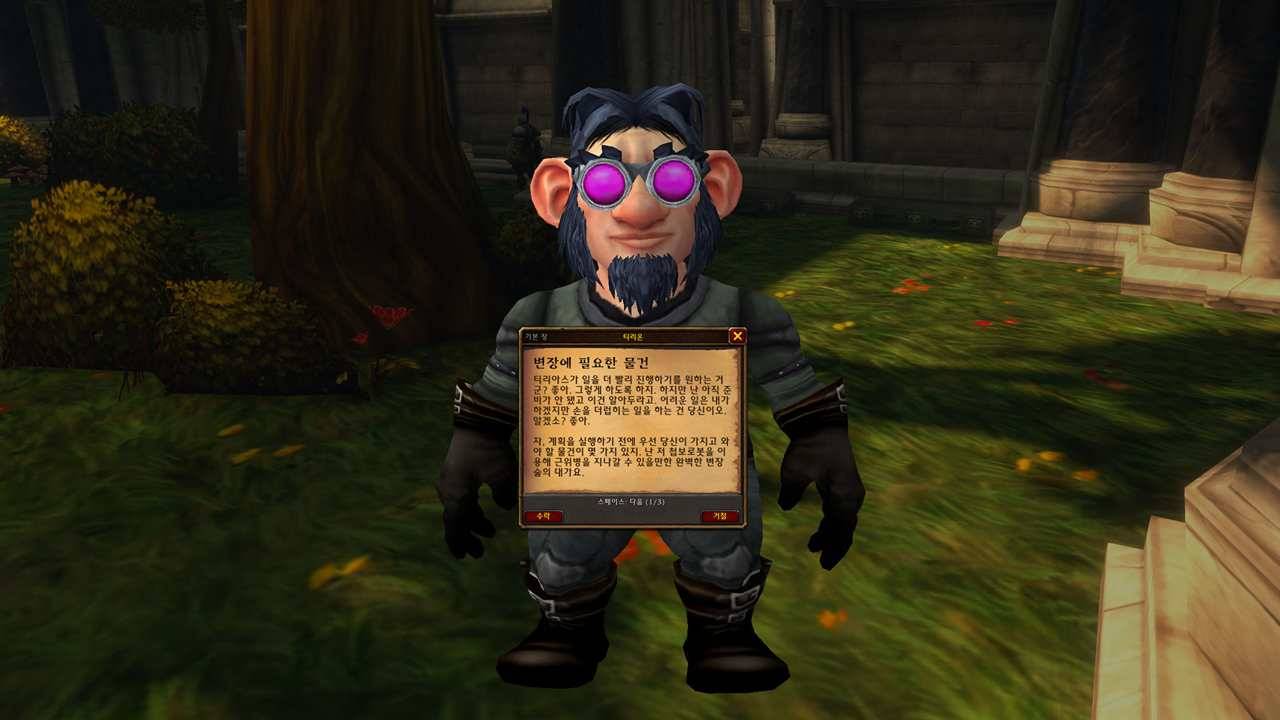
- The NPC is drawn in the middle of the screen, facing you, whichever side you talk to it from.
- The rest of the interface fades away while you talk and comes back when you are done.
- What the NPC says stands in a window that looks like the game's own: parchment, the quest fonts, red buttons. A long speech comes page by page.
- Answers and quests are numbered. Press the number, or click.
Good to know
- The mouse drags the window to where you want it, and it stays there.
/facetoface homeputs it back. - Short NPCs such as gnomes, goblins and dwarves are stood a little higher, so that the window does not cover their faces.
- Space reads on, and on the last page it accepts, continues or completes. Esc ends the talk. The number keys choose an answer or a reward. A click or the mouse wheel turns the pages too.
- The game's own gossip and quest windows stay open underneath, unseen, and do the work. The addon steps aside and shows them in a fight, for quests that are accepted by themselves, that flag you for PvP or that cost money to hand in, and when you press "Game window" in the title bar.
- Merchants, flight maps and other windows open as usual.
- If the addon runs into an error, it switches itself off with one line in the chat and gives the interface back.
Two ways to look
- Front view (the default): the NPC's own model is drawn facing you. The camera is not touched.
- Through your own eyes (
/facetoface front off): the camera goes to first person, turns to the NPC and takes a closer look. It is put back when the talk ends. This way uses the game's action camera settings for the length of a talk.
Commands
/facetoface (also /ftf; on Korean clients /대화)
/facetoface on,/facetoface off: switches the conversations on and off/facetoface front on,/facetoface front off: chooses between the front view and your own eyes/facetoface home: puts a dragged window back where it stood at first/facetoface camera on(oroff),/facetoface zoom on(oroff),/facetoface eyes 5: for the view through your own eyes only: whether the camera moves, whether it takes a closer look, and how many degrees higher it looks for your race (-20 to 20)/facetoface info: writes the addon's state to the chat
Record
The addon keeps a small record of what it did in its saved file (FaceToFace.lua in your account's SavedVariables folder): for the last four logins, which screens it showed and how often, the camera settings, the names of the NPCs you talked to with the size of their models, and errors. No character names of yours and no chat.
Languages
English and Korean.
Face to Face Team